
GameVault
Your self-hosted, DRM-free Steam alternative
- ghcr.io/hsinghhira/gamevault:latest
- port 6149
- Media
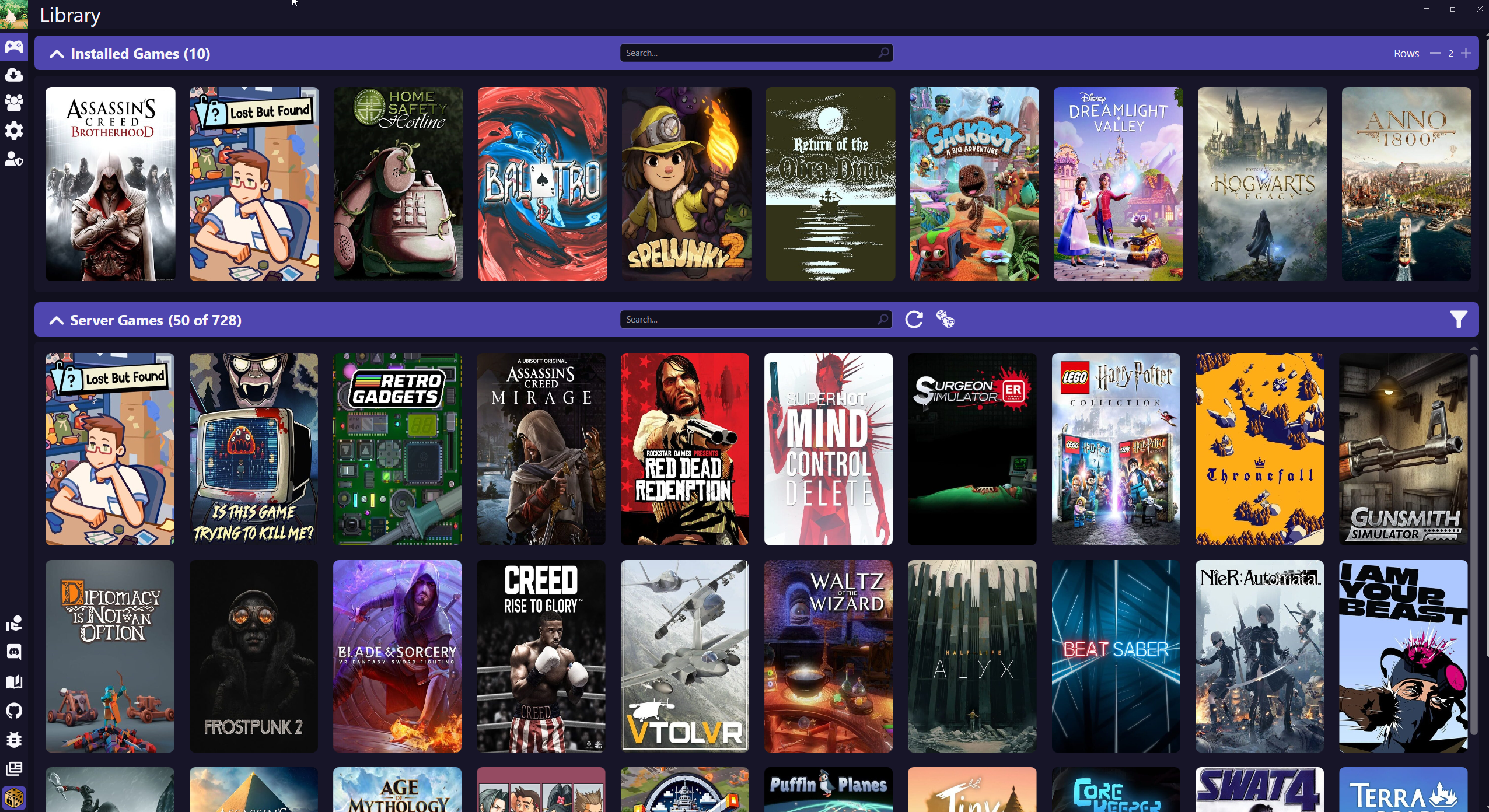
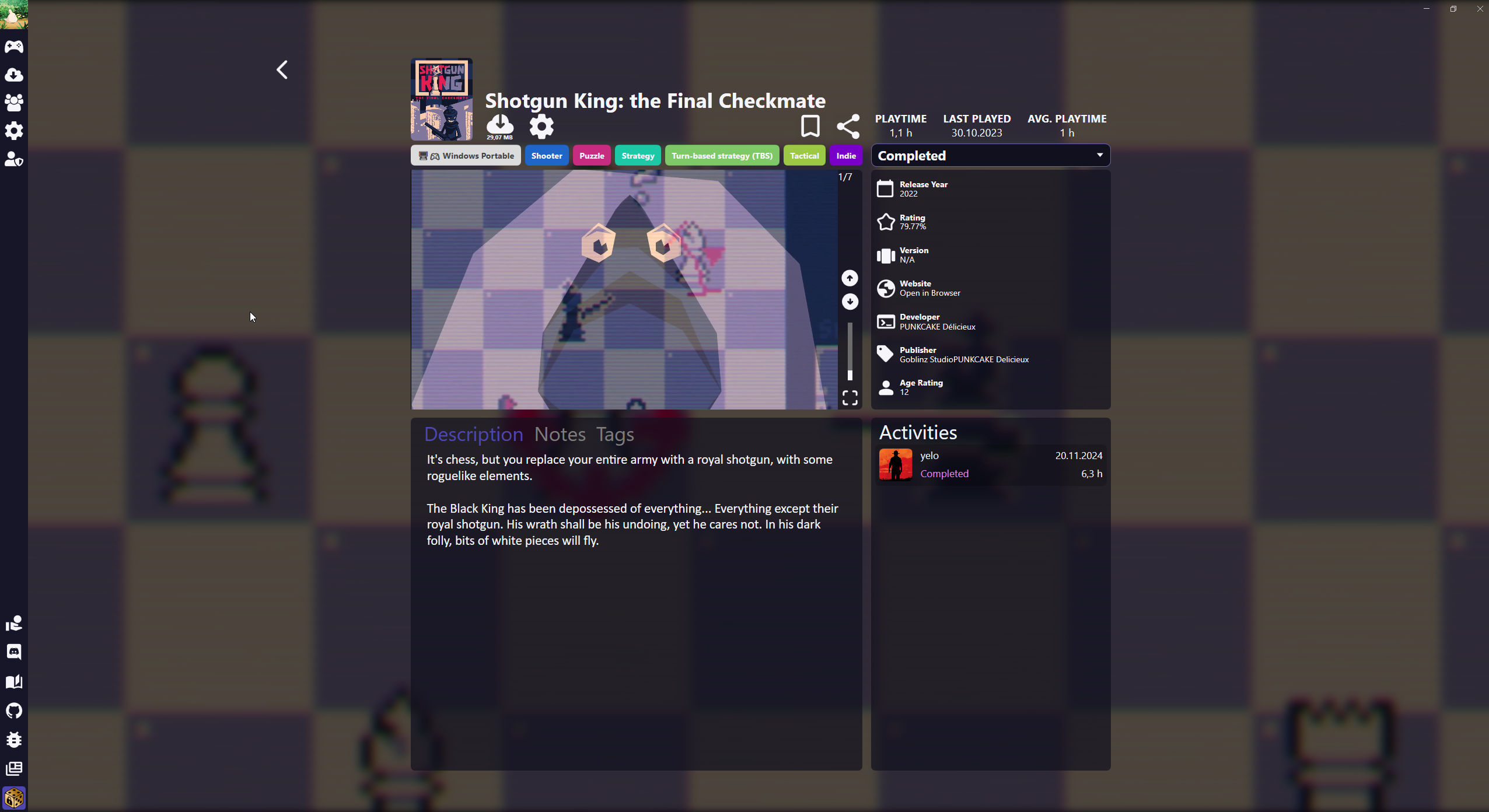
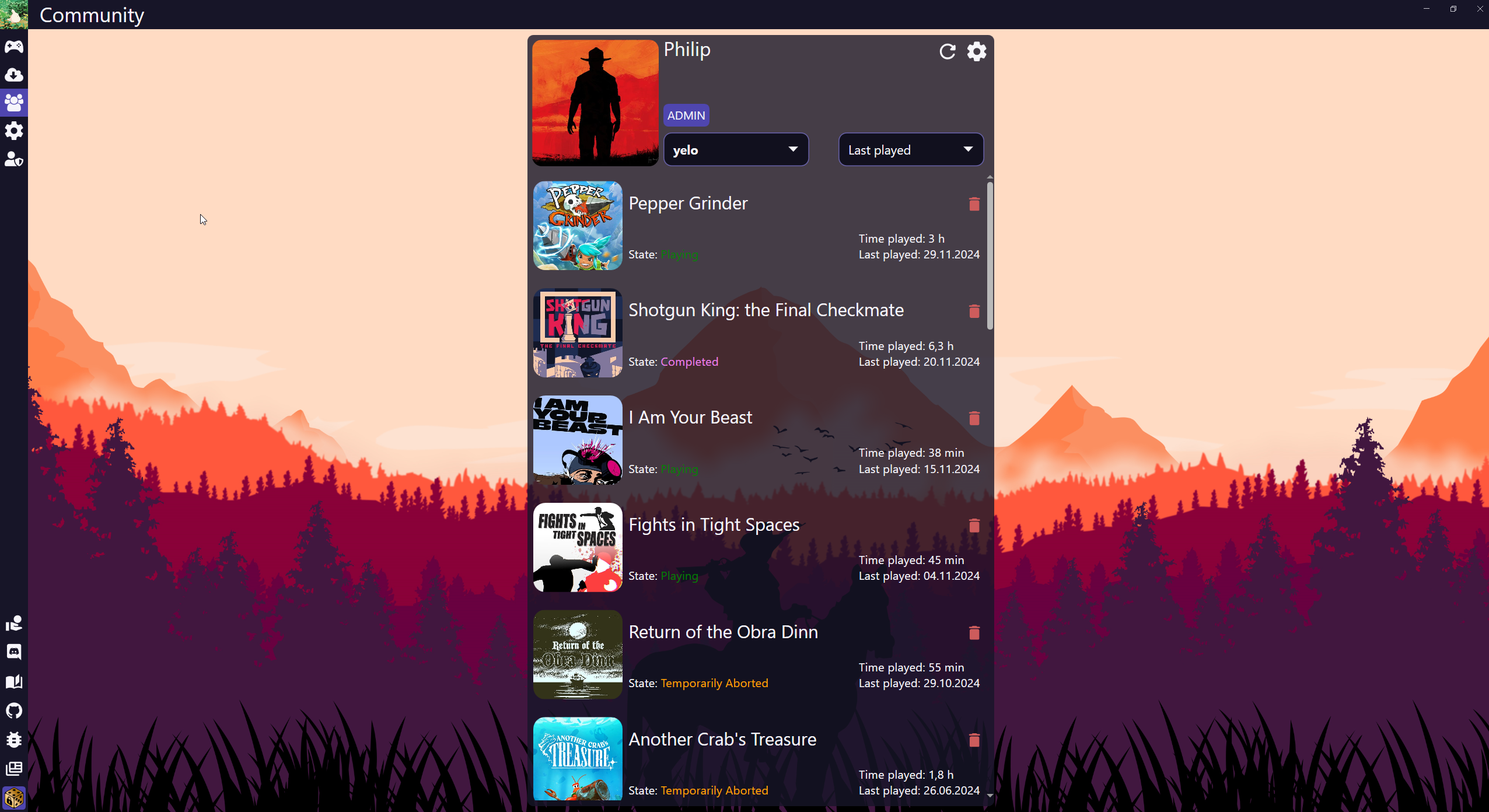
Web UI
/http://localhost:6149/ GameVault is a self-hosted gaming platform that lets you and your friends enjoy DRM-free games stored on your own server in an organized, Steam-like library. This is GameVault in a single container, with PostgreSQL inside, one port and one data folder plus your games folder. The database password is made for you on first start.
Features
- Scans your games folder and finds titles, versions and file types on its own
- Cover art, screenshots and details from IGDB
- Many users with roles, online status and play time
- Save file syncing, so players can pick up where they left off on any device
- Web UI in the browser; the GameVault app for Windows downloads and installs games
How to use
- Open GameVault from your dashboard.
- Register the first account. It becomes the admin.
- Copy DRM-free games (
.zip,.7zor.rar) into the files folder. GameVault finds them on its own. - Browse your library, add cover art and invite friends.
- Players can also use the GameVault app for Windows with the address
http://your-zimaos-ip:6149.
Before you install
There is nothing you must set. The /files volume is your game library; point it at a games folder you already have if you like. The first start takes about five minutes. Open http://your-zimaos-ip:6149 and register: the first account becomes the admin. Turn off sign-up afterwards with SERVER_REGISTRATION_DISABLED. PUBLIC_URL is only needed for OAuth2 sign-in; change localhost to your ZimaOS IP when you use it. Sign-up rules, IGDB keys, OAuth2 and the other settings are in the Variables tab; add them in the app settings.
The settings in the first table are already in the app settings. To use any other one, open the app settings, add the variable with your value, save, and the app restarts with it. A setting you leave out uses its default.
In the app settings
| Variable | Default value | Description |
|---|---|---|
TZ | $TZ | Your time zone. It is filled in from your ZimaOS time zone. Leave it unless you need another. |
PUID | $PUID | The user that owns your game files. It is filled in by ZimaOS. Leave it unless your games folder belongs to another user. |
PGID | $PGID | The group that owns your game files. It is filled in by ZimaOS. |
PUBLIC_ | http://localhost:6149 | The address you open GameVault at, like http://192.168.1.20:6149. Change localhost to your ZimaOS IP. It is only used for sign-in with OAuth2 (like authentik or Pocket ID). |
Sign-up and accounts
| Variable | Default value | Description |
|---|---|---|
SERVER_ | false | Set to true so nobody new can register. Do this after you have made your own account. |
SERVER_ | false | Set to true so new accounts work at once, without an admin turning them on first. |
SERVER_ | — | Makes this existing user an admin on every start. It does not create the account. |
SERVER_ | — | Sets the password of SERVER_ADMIN_USERNAME on every start. Use it to get back in if you forgot it, then take it out again. |
USERS_ | false | Set to true to ask for an email when people register. |
AUTH_ | true | Set to false to turn off username and password sign-in, so everyone signs in with OAuth2. |
Sign in with OAuth2
| Variable | Default value | Description |
|---|---|---|
AUTH_ | false | Set to true to sign in with your own provider (authentik, Pocket ID, Keycloak). The callback URL to add there is PUBLIC_URL followed by /api/auth/oauth2/login. |
AUTH_ | — | The authorization endpoint of your provider. |
AUTH_ | — | The token endpoint of your provider. |
AUTH_ | — | The userinfo endpoint of your provider. |
AUTH_ | — | The client ID from your provider. |
AUTH_ | — | The client secret from your provider. |
AUTH_ | openid,email,profile | The scopes asked for, comma separated. |
AUTH_ | — | Leave it out to use PUBLIC_URL followed by /api/auth/oauth2/login. |
Game details (IGDB)
| Variable | Default value | Description |
|---|---|---|
METADATA_ | — | Your Twitch/IGDB client ID, for cover art and game details. Make one for free at dev.twitch.tv. |
METADATA_ | — | Your Twitch/IGDB client secret. |
METADATA_ | true | Set to false to stop looking games up on IGDB. |
Games
| Variable | Default value | Description |
|---|---|---|
GAMES_ | .zip,.7z,.rar | The file types GameVault counts as games, comma separated. |
GAMES_ | 60 | How often GameVault checks the files folder for new games, in minutes. |
GAMES_ | false | Set to true if new games are not found on their own, for example when the games folder is a network share. |
GAMES_ | true | Set to false to only look at the top of the files folder, not inside subfolders. |
GAMES_ | — | Folders to skip, as a regular expression, like ^(tmp|incomplete)$. |
GAMES_ | 100 gb | The largest game an admin can upload from the browser. 0 turns uploads off. |
Save files
| Variable | Default value | Description |
|---|---|---|
SAVEFILES_ | true | Set to false to turn off save file syncing. |
SAVEFILES_ | 1 gb | The largest save file people can upload. |
SAVEFILES_ | 10 | How many saves are kept per game and user. The oldest go first. |
Parental controls
| Variable | Default value | Description |
|---|---|---|
PARENTAL_ | false | Set to true to hide games that are rated above a user's age. People then give their birth date when they register. |
PARENTAL_ | 18 | The age at which a user sees every game. |
Features
| Variable | Default value | Description |
|---|---|---|
MEDIA_ | 10 mb | The largest image (cover, avatar) people can upload. |
SERVER_ | — | The top download speed per download, in KB/s. Leave it out for no limit. |
SERVER_ | false | Set to true so everyone always shows as offline. |
Logs
| Variable | Default value | Description |
|---|---|---|
SERVER_ | info | How much GameVault writes to the log: debug, info, warn, error or off. |
name: gamevault
services:
gamevault:
image: ghcr.io/hsinghhira/gamevault:latest
container_name: gamevault
restart: unless-stopped
stop_grace_period: 90s
privileged: true
environment:
- TZ=$TZ
- PUID=$PUID
- PGID=$PGID
- PUBLIC_URL=http://localhost:6149
ports:
- target: 8080
published: "6149"
protocol: tcp
volumes:
- type: bind
source: /DATA/AppData/$AppID/data
target: /data
bind:
create_host_path: true
- type: bind
source: /DATA/AppData/$AppID/files
target: /files
bind:
create_host_path: true
healthcheck:
test: ["CMD", "curl", "-fsS", "-o", "/dev/null", "http://127.0.0.1:8080/api/status"]
interval: 30s
timeout: 10s
retries: 5
start_period: 300s
deploy:
resources:
limits:
cpus: "2.00"
memory: 2048M
reservations:
cpus: "0.25"
memory: 384M
labels:
icon: https://cdn.jsdelivr.net/gh/HSinghHira/IceStore@main/Apps/gamevault/icon.png
x-casaos:
id: com.icestore.gamevault
envs:
- container: TZ
description:
en_US: >-
Your time zone. It is filled in from your ZimaOS time zone.
Leave it unless you need another.
- container: PUID
description:
en_US: >-
The user that owns your game files. It is filled in by ZimaOS.
Leave it unless your games folder belongs to another user.
- container: PGID
description:
en_US: >-
The group that owns your game files. It is filled in by ZimaOS.
- container: PUBLIC_URL
description:
en_US: >-
The address you open GameVault at, like http://192.168.1.20:6149.
Change localhost to your ZimaOS IP. It is only used for
sign-in with OAuth2 (like authentik or Pocket ID).
ports:
- container: "8080"
description:
en_US: GameVault web UI, API and game downloads, published on host as 6149
volumes:
- container: /data
description:
en_US: >-
The database (library, users, progress), cover art in
gamevault/media, save files, config.yaml, logs and secret keys.
- container: /files
description:
en_US: >-
Your game library: DRM-free games as .zip, .7z or .rar files or
folders. You can point this at a games folder you already have.
x-casaos:
id: com.icestore.gamevault
architectures:
- amd64
- arm64
main: gamevault
author: HSinghHira
category: Media
developer: Phalcode
icon: https://cdn.jsdelivr.net/gh/HSinghHira/IceStore@main/Apps/gamevault/icon.png
thumbnail: https://cdn.jsdelivr.net/gh/HSinghHira/IceStore@main/Apps/gamevault/screenshot-1.png
screenshot_link:
- https://cdn.jsdelivr.net/gh/HSinghHira/IceStore@main/Apps/gamevault/screenshot-1.png
- https://cdn.jsdelivr.net/gh/HSinghHira/IceStore@main/Apps/gamevault/screenshot-2.png
- https://cdn.jsdelivr.net/gh/HSinghHira/IceStore@main/Apps/gamevault/screenshot-3.png
title:
en_US: GameVault
tagline:
en_US: Your self-hosted, DRM-free Steam alternative
description:
en_US: >-
GameVault is a self-hosted gaming platform that lets you and your
friends enjoy DRM-free games stored on your own server in an organized,
Steam-like library. This is GameVault in a single container, with
PostgreSQL inside, one port and one data folder plus your games folder.
The database password is made for you on first start.
**Features**
- Scans your games folder and finds titles, versions and file types on
its own
- Cover art, screenshots and details from IGDB
- Many users with roles, online status and play time
- Save file syncing, so players can pick up where they left off on any
device
- Web UI in the browser; the GameVault app for Windows downloads and
installs games
**How to use?**
1. Open GameVault from the Zima OS dashboard.
2. Register the first account. It becomes the admin.
3. Copy DRM-free games (.zip, .7z or .rar) into the files folder.
GameVault finds them on its own.
4. Browse your library, add cover art and invite friends.
5. Players can also use the GameVault app for Windows with the address
http://your-zimaos-ip:6149.
tips:
before_install:
en_US: >-
1. Look at the storage settings before you install. The /files folder
is where your games go. You can change it to a games folder you
already have.
2. More settings, like turning off sign-up or adding IGDB keys, are
listed on the GameVault page at
https://icestore.hsinghhira.me/app/gamevault/ (Variables tab). You
can add them now or later in the app settings.
3. Start the installation.
4. Wait about five minutes. The first start sets up the database.
5. Open http://your-zimaos-ip:6149.
6. Register your first account. It becomes the admin.
7. Put your DRM-free games into the files folder. GameVault finds
them within an hour, or right away from the admin panel.
index: /
port_map: "6149"
scheme: http
is_uncontrolled: false
version: "17.0.1"
update_at: "2026-10-25"
release_notes:
en_US: |-
- Single-container GameVault with one port (6149), one data folder and your games folder
- The database password and token seed are made on first start, so there is nothing to set
- gamevault-backend 17.0.1 (17.0 adds multiple versions per game; existing games are moved over on their own)
- PostgreSQL 16 inside
repo: "https://github.com/Phalcode/gamevault-backend"
support: "https://github.com/Phalcode/gamevault-backend/issues"
docs: "https://gamevau.lt/docs/server-docs/setup/docker-compose/" ZimaOS
 CasaOS
 Homeio