
Homedex
The missing inventory for your homelab
- ghcr.io/harshshah0203/homedex:0.2.5
- port 6150
- Networking
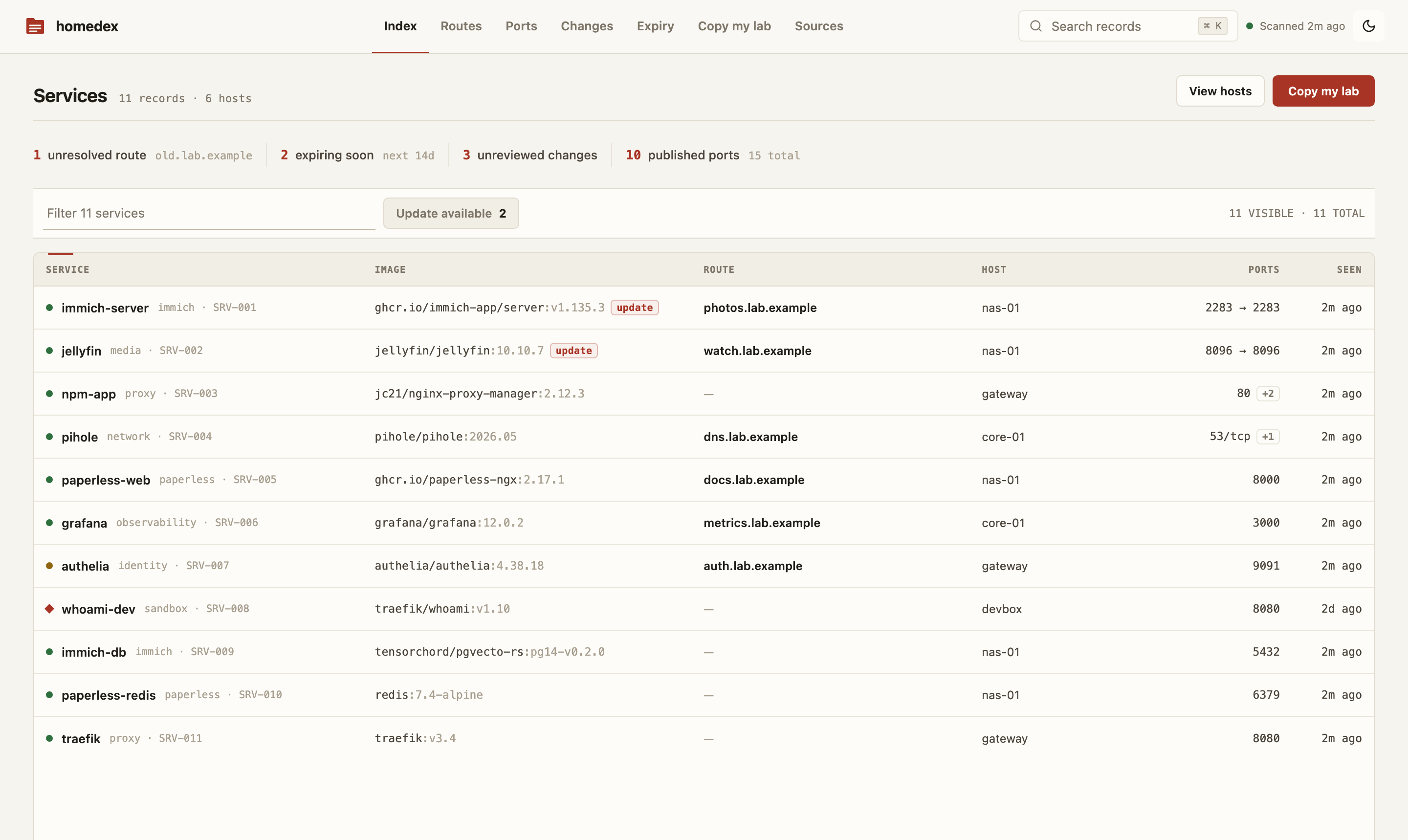
Web App
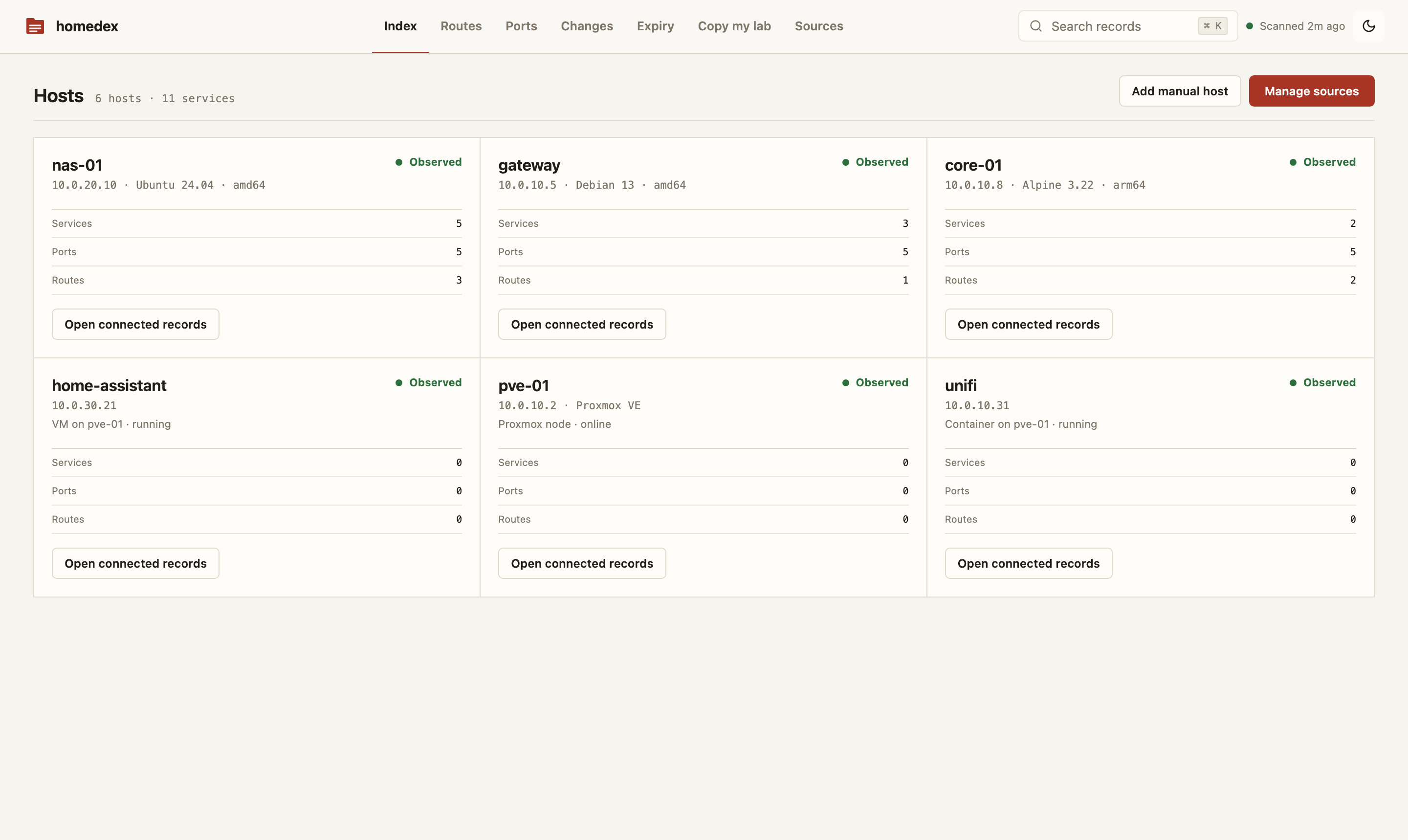
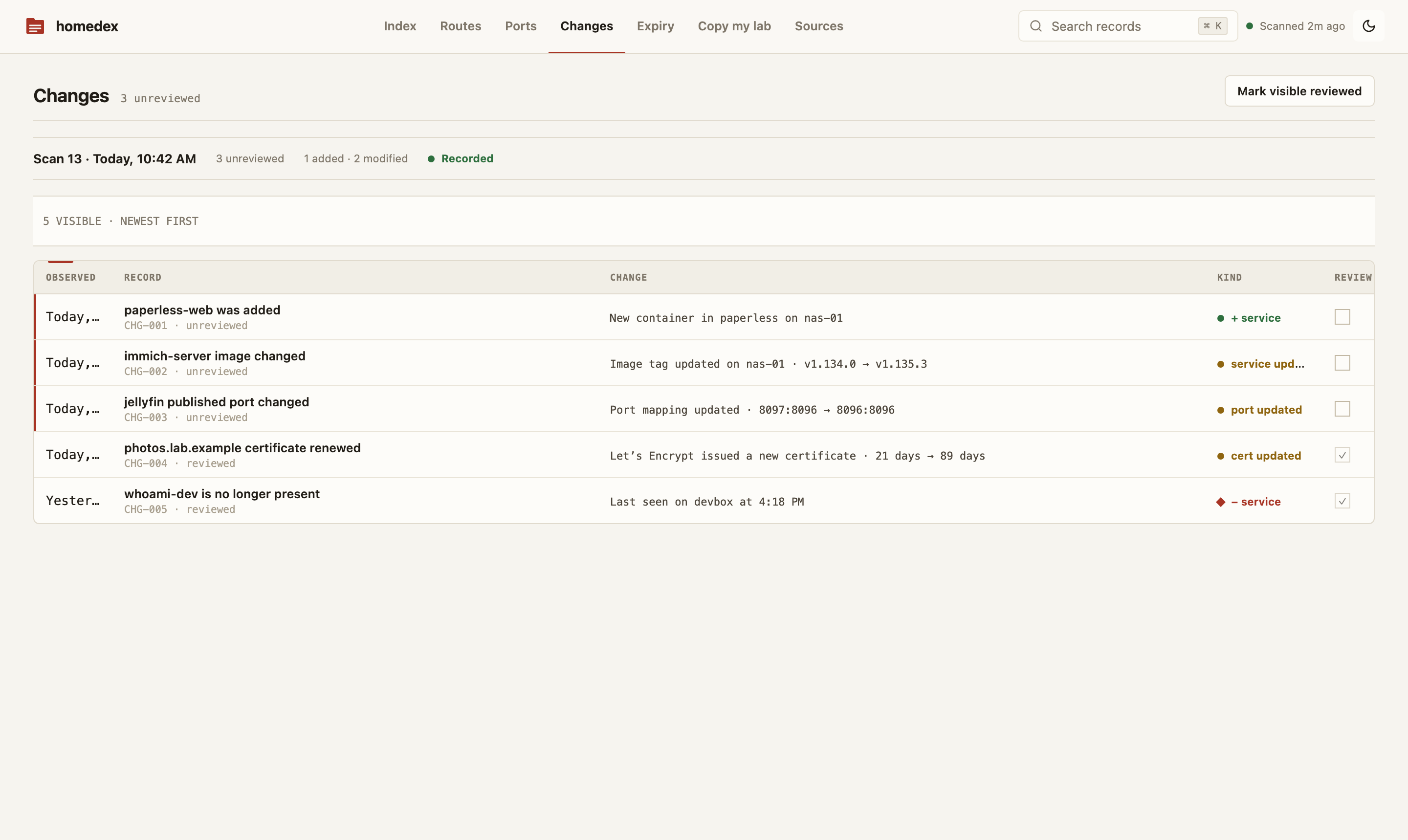
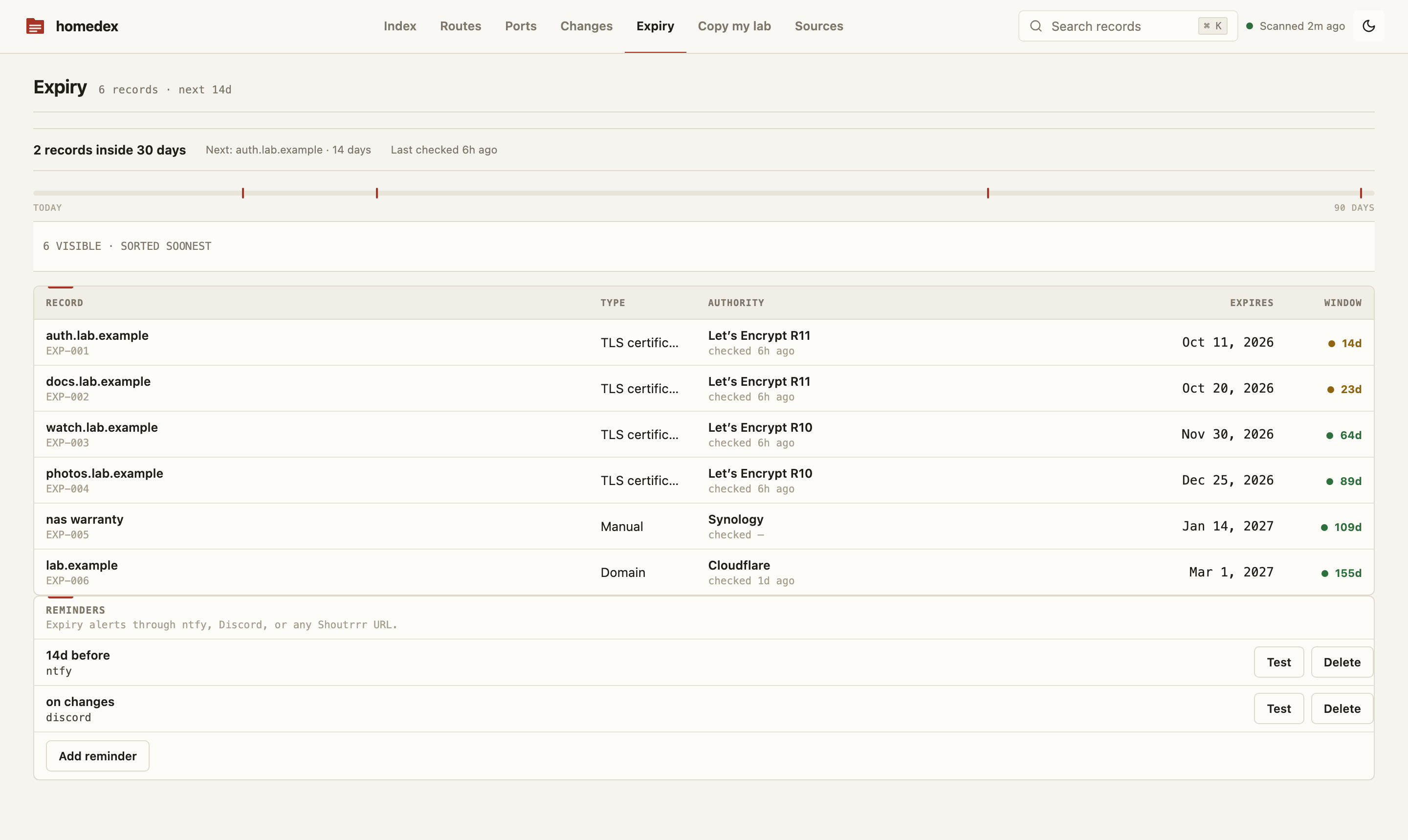
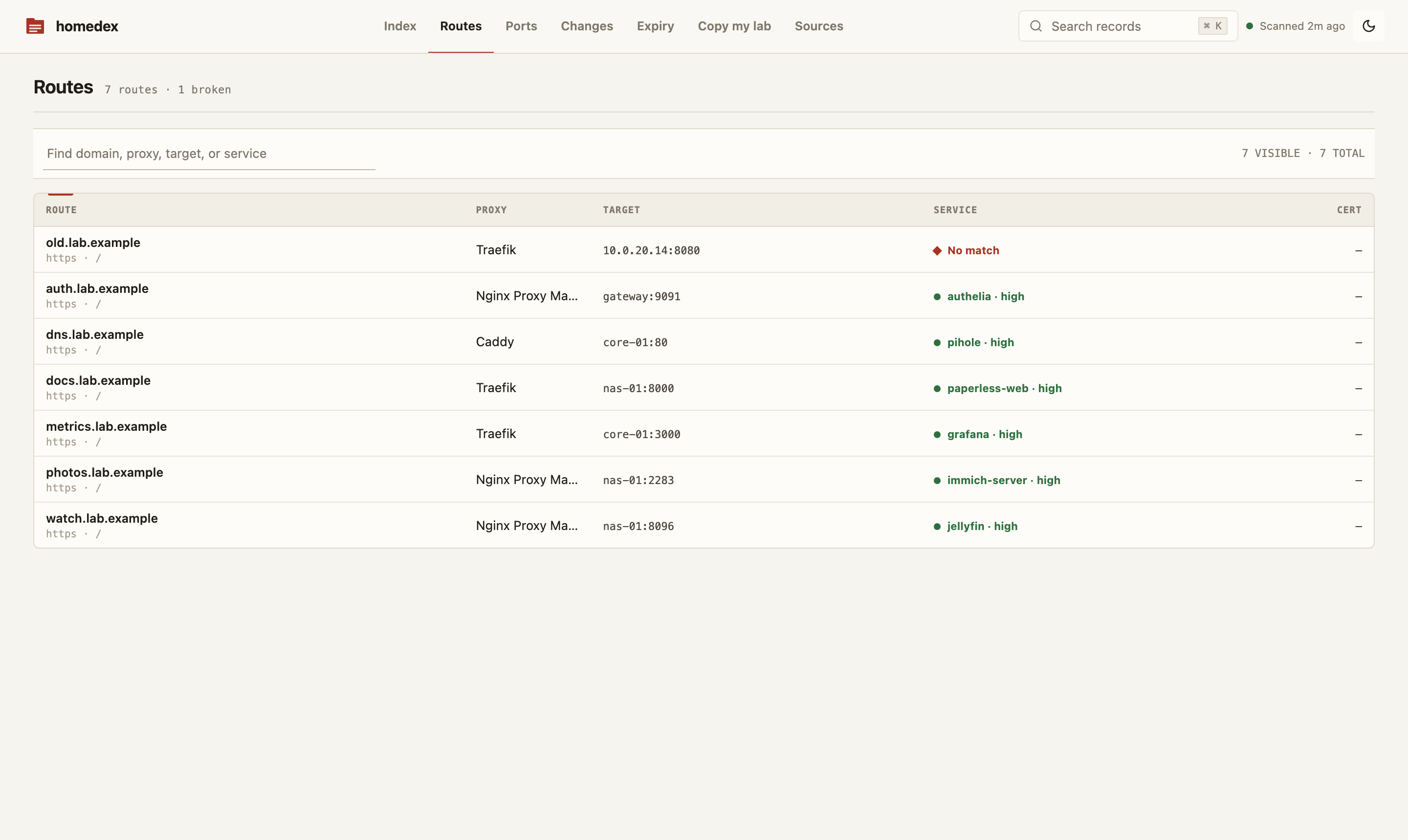
/http://localhost:6150/ A read-only homelab inventory. It scans Docker, Proxmox, Tailscale and your reverse proxy, then builds a searchable record of services, hosts, ports, routes, certificates, domains and changes.
Features
- Finds every container, image, port and network on your Docker hosts
- Shows which reverse proxy route leads to which container, and flags broken ones
- Tracks certificate and domain expiry by days remaining
- Change feed shows what moved between scans
- Read-only by design: a filtering socket proxy blocks any Docker action that changes something
- SQLite storage in the app data folder
How to use
- Open Homedex from your dashboard.
- Sign in with the admin password from the app settings.
- In the setup wizard, keep the source
tcp://docker-socket-proxy:2375and run the first scan. - Add more sources later under Sources: Traefik, Caddy, Nginx Proxy Manager, Proxmox, Tailscale and more.
- Export Markdown, JSON or CSV, or share a read-only view.
Before you install
HOMEDEX_ADMIN_PASSWORD is your admin password. It comes filled with a random value; change it to your own of 12 or more characters if you like, and write it down. It is only used on the first start, before an admin exists. Homedex reads Docker through a small proxy that blocks every change, so it can only look. Open http://your-zimaos-ip:6150, sign in, and keep tcp://docker-socket-proxy:2375 as the Docker source in the setup wizard. More settings are in the Variables tab; add them in the app settings.
The settings in the first table are already in the app settings. To use any other one, open the app settings, add the variable with your value, save, and the app restarts with it. A setting you leave out uses its default.
In the app settings
| Variable | Default value | Description |
|---|---|---|
TZ | $TZ | Your time zone. It is filled in from your ZimaOS time zone. Leave it unless you need another. |
HOMEDEX_ | change-me | Your admin password. It is pre-filled with a random value; you can replace it with your own of 12 or more characters. It is only used on the first start, before an admin exists. |
Server
| Variable | Default value | Description |
|---|---|---|
HOMEDEX_ | false | Set to true when you open Homedex over HTTPS through a reverse proxy, so the sign-in cookie is only sent over HTTPS. |
HOMEDEX_ | — | IPs or ranges of your reverse proxy, comma separated, like 192.168.1.10/32. Homedex then trusts the visitor address it forwards. |
HOMEDEX_ | 30 | How many days Homedex keeps things that are gone (like a removed container) before it forgets them. |
HOMEDEX_ | — | A base64 key that encrypts saved source credentials. Leave it out to use the key made on first start in the data folder. |
name: homedex
services:
docker-socket-proxy:
image: tecnativa/docker-socket-proxy:v0.4.2
container_name: homedex-socket-proxy
restart: unless-stopped
stop_grace_period: 40s
environment:
- CONTAINERS=1
- IMAGES=1
- INFO=1
- NETWORKS=1
- VERSION=1
- POST=0
- ALLOW_START=0
- ALLOW_STOP=0
- ALLOW_RESTARTS=0
volumes:
- type: bind
source: /var/run/docker.sock
target: /var/run/docker.sock
read_only: true
read_only: true
tmpfs:
- /run
- /tmp
cap_drop:
- ALL
security_opt:
- no-new-privileges:true
networks:
- discovery
deploy:
resources:
limits:
cpus: "0.50"
memory: 128M
reservations:
cpus: "0.00"
memory: 32M
labels:
icon: https://cdn.jsdelivr.net/gh/HSinghHira/IceStore@main/Apps/homedex/icon.png
x-casaos:
id: com.icestore.homedex
envs:
- container: CONTAINERS
description:
en_US: Lets Homedex list containers. Keep it at 1.
- container: IMAGES
description:
en_US: Lets Homedex list images. Keep it at 1.
- container: INFO
description:
en_US: Lets Homedex read Docker host info. Keep it at 1.
- container: NETWORKS
description:
en_US: Lets Homedex list networks. Keep it at 1.
- container: VERSION
description:
en_US: Lets Homedex read the Docker version. Keep it at 1.
- container: POST
description:
en_US: >-
Keep this at 0. It blocks every Docker action that changes
something, so Homedex can only read.
- container: ALLOW_START
description:
en_US: Keep this at 0, so containers cannot be started through the proxy.
- container: ALLOW_STOP
description:
en_US: Keep this at 0, so containers cannot be stopped through the proxy.
- container: ALLOW_RESTARTS
description:
en_US: Keep this at 0, so containers cannot be restarted through the proxy.
volumes:
- container: /var/run/docker.sock
description:
en_US: >-
The Docker socket, read-only. Only this filtering proxy sees it;
Homedex talks to the proxy on a private network.
homedex:
image: ghcr.io/harshshah0203/homedex:0.2.5
container_name: homedex
restart: unless-stopped
stop_grace_period: 40s
user: "0:0"
depends_on:
- docker-socket-proxy
environment:
- TZ=$TZ
- HOMEDEX_ADMIN_PASSWORD=change-me
ports:
- target: 7377
published: "6150"
protocol: tcp
volumes:
- type: bind
source: /DATA/AppData/$AppID/data
target: /data
bind:
create_host_path: true
read_only: true
tmpfs:
- /tmp
cap_drop:
- ALL
security_opt:
- no-new-privileges:true
networks:
- app
- discovery
deploy:
resources:
limits:
cpus: "1.00"
memory: 512M
reservations:
cpus: "0.00"
memory: 128M
labels:
icon: https://cdn.jsdelivr.net/gh/HSinghHira/IceStore@main/Apps/homedex/icon.png
x-casaos:
id: com.icestore.homedex
envs:
- container: TZ
description:
en_US: >-
Your time zone. It is filled in from your ZimaOS time zone.
Leave it unless you need another.
- container: HOMEDEX_ADMIN_PASSWORD
description:
en_US: >-
Your admin password. It is pre-filled with a random value; you
can replace it with your own of 12 or more characters. It is
only used on the first start, before an admin exists.
ports:
- container: "7377"
description:
en_US: Homedex web UI and API, published on host as 6150
volumes:
- container: /data
description:
en_US: The Homedex SQLite database, its settings and its encryption key.
networks:
app:
internal: false
discovery:
internal: true
x-casaos:
id: com.icestore.homedex
architectures:
- amd64
- arm64
main: homedex
author: HSinghHira
category: Networking
developer: Harsh Shah
icon: https://cdn.jsdelivr.net/gh/HSinghHira/IceStore@main/Apps/homedex/icon.png
thumbnail: https://cdn.jsdelivr.net/gh/HSinghHira/IceStore@main/Apps/homedex/screenshot-1.png
screenshot_link:
- https://cdn.jsdelivr.net/gh/HSinghHira/IceStore@main/Apps/homedex/screenshot-1.png
- https://cdn.jsdelivr.net/gh/HSinghHira/IceStore@main/Apps/homedex/screenshot-2.png
- https://cdn.jsdelivr.net/gh/HSinghHira/IceStore@main/Apps/homedex/screenshot-3.png
- https://cdn.jsdelivr.net/gh/HSinghHira/IceStore@main/Apps/homedex/screenshot-4.png
- https://cdn.jsdelivr.net/gh/HSinghHira/IceStore@main/Apps/homedex/screenshot-5.png
title:
en_US: Homedex
tagline:
en_US: The missing inventory for your homelab
description:
en_US: >-
A read-only homelab inventory. It scans Docker, Proxmox, Tailscale and
your reverse proxy, then builds a searchable record of services, hosts,
ports, routes, certificates, domains and changes.
**Features**
- Finds every container, image, port and network on your Docker hosts
- Shows which reverse proxy route leads to which container, and flags
broken ones
- Tracks certificate and domain expiry by days remaining
- Change feed shows what moved between scans
- Read-only by design: a filtering socket proxy blocks any Docker
action that changes something
- SQLite storage in the app data folder
**How to use?**
1. Open Homedex from the Zima OS dashboard.
2. Sign in with the admin password from the app settings.
3. In the setup wizard, keep the source tcp://docker-socket-proxy:2375
and run the first scan.
4. Add more sources later under Sources: Traefik, Caddy, Nginx Proxy
Manager, Proxmox, Tailscale and more.
5. Export Markdown, JSON or CSV, or share a read-only view.
tips:
before_install:
en_US: >-
1. Open the app configuration before you install.
2. Find HOMEDEX_ADMIN_PASSWORD. It is your admin password, filled
with a random value.
3. You can change it to your own. Use 12 or more characters.
4. Write it down. You need it to sign in.
5. More settings are listed on the Homedex page at
https://icestore.hsinghhira.me/app/homedex/ (Variables tab). You
can add them now or later in the app settings.
6. Start the installation.
7. Open http://your-zimaos-ip:6150 and sign in with the password.
8. In the setup wizard, keep tcp://docker-socket-proxy:2375 as the
Docker source and run the first scan.
index: /
port_map: "6150"
scheme: http
is_uncontrolled: false
version: "0.2.5"
update_at: "2026-10-25"
release_notes:
en_US: |-
- Moved to IceStore, now on port 6150
- ghcr.io/harshshah0203/homedex 0.2.5
- tecnativa/docker-socket-proxy v0.4.2, read-only (the version upstream ships with)
repo: "https://github.com/HarshShah0203/homedex"
support: "https://github.com/HarshShah0203/homedex/issues"
docs: "https://github.com/HarshShah0203/homedex/tree/main/docs" ZimaOS
 CasaOS
 Homeio