
Odoo
All-in-one open source business apps, from CRM and sales to accounting and inventory
- ghcr.io/hsinghhira/odoo:latest
- port 6156
- Productivity

Web App
/http://localhost:6156/ Database Manager
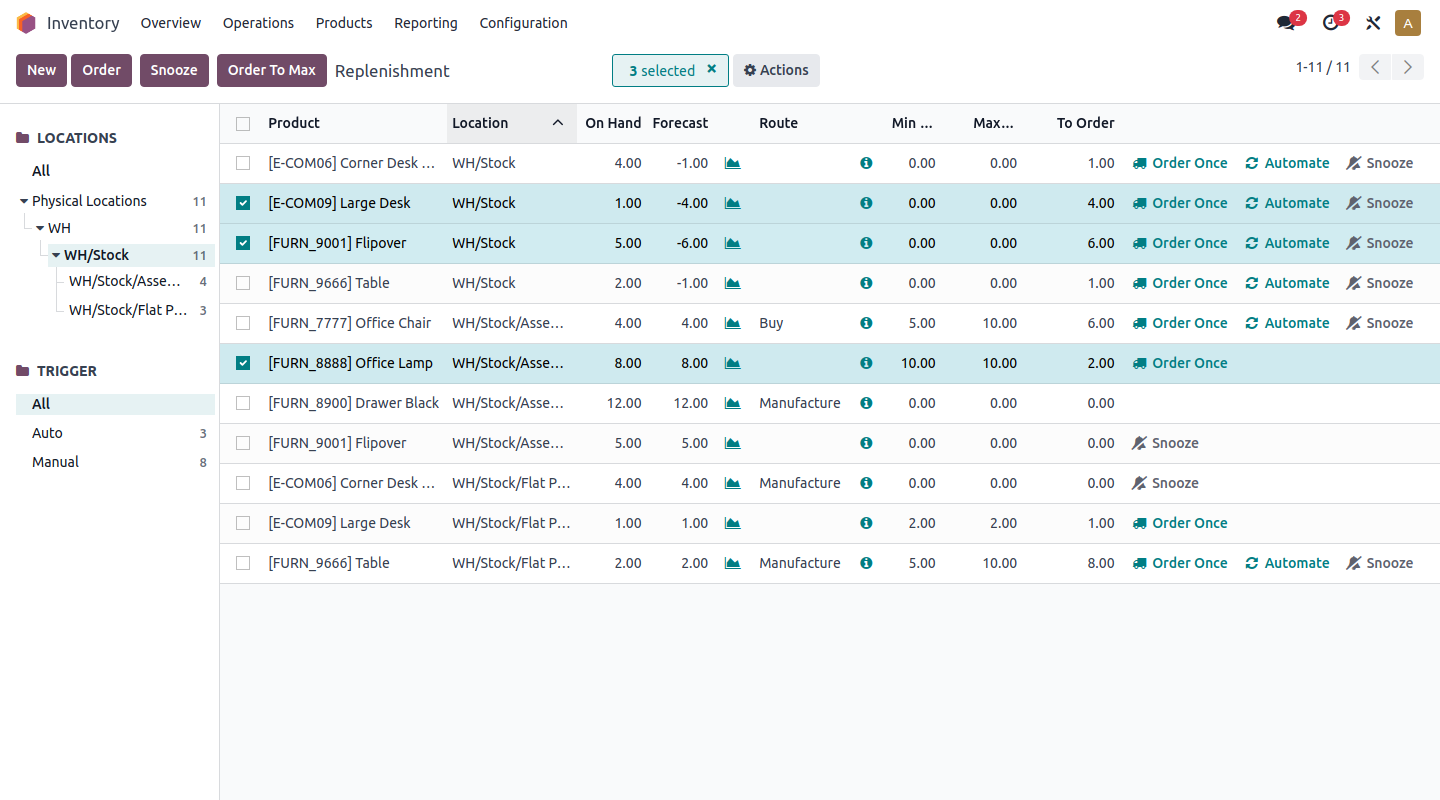
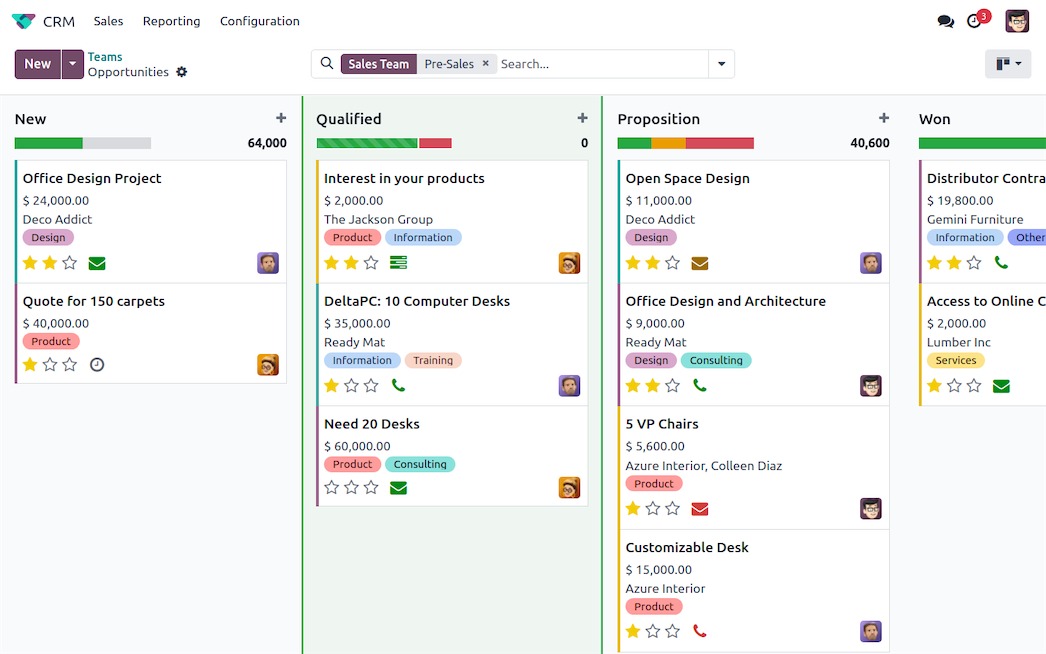
/web/database/managerhttp://localhost:6156/web/database/manager Odoo is a suite of open source business apps that run your company in one place, including CRM, sales, accounting, inventory, projects, and a website builder. This is Odoo in a single container, with one port and one data folder. The database passwords and the master password are made for you on first start.
Features
- CRM, sales, invoicing, accounting, inventory, and purchasing apps
- Website, eCommerce, and project management apps
- Install only the apps you need and add more later
- Your own add-on modules in the addons folder
- PostgreSQL 16 inside, nothing else to set up
How to use
- Open Odoo from your dashboard.
- On the first screen, create a database. Type the master password from the app log, a database name, your email, and a password for your admin account.
- Sign in and pick the apps you want to install.
- Put your own add-on modules in the addons folder, then update the app list in Odoo.
- Manage databases later at the
/web/database/managerpage.
Before you install
There is nothing you must set. Leave ODOO_MASTER_PASSWORD blank to get a random one, or type your own. The first start takes about three minutes. If you left it blank, find the line "master password is" in the app log; you need it to create, back up, restore and delete databases. Then open http://your-zimaos-ip:6156 and create your first database and admin account. Your own modules go in addons/ inside the app's data folder. Email, worker and log settings are in the Variables tab; add them in the app settings.
The settings in the first table are already in the app settings. To use any other one, open the app settings, add the variable with your value, save, and the app restarts with it. A setting you leave out uses its default.
In the app settings
| Variable | Default value | Description |
|---|---|---|
TZ | $TZ | Your time zone. It is filled in from your ZimaOS time zone. Leave it unless you need another. |
ODOO_ | — | The master password. Odoo asks for it when you create, back up, restore or delete a database. Leave it blank and the app makes a random one on first start. It is shown in the app log and saved in the data folder. Or type your own. |
Email (SMTP)
| Variable | Default value | Description |
|---|---|---|
ODOO_ | localhost | Your mail server, like smtp.gmail.com. Odoo only uses these settings when no outgoing mail server is set up in Settings, Technical, Outgoing Mail Servers. |
ODOO_ | 25 | Your mail server's port. Usually 587, or 465 with ODOO_SMTP_SSL. |
ODOO_ | — | The user name for your mail server. |
ODOO_ | — | The password for your mail server. |
ODOO_ | False | Set to True to use an encrypted (STARTTLS) connection to the mail server. |
ODOO_ | — | The sender address on emails Odoo sends, like [email protected]. |
Databases
| Variable | Default value | Description |
|---|---|---|
ODOO_ | True | Set to False to hide the database list and the database manager page. Only do this once your database exists. |
ODOO_ | — | Only show databases whose name matches this pattern, like ^mycompany$. Useful when you keep one database for real use and others for tests. |
Performance
| Variable | Default value | Description |
|---|---|---|
ODOO_ | 0 | How many worker processes Odoo runs. 0 runs everything in one process, which is fine for a few users. For more users, try 2 to 4 and raise the memory limit of the app. |
ODOO_ | 2 | How many scheduled jobs (like sending emails) can run at the same time. |
ODOO_ | 60 | Seconds of CPU time one request may use before Odoo stops it. Only used when ODOO_WORKERS is above 0. |
ODOO_ | 120 | Seconds one request may take in total before Odoo stops it. Raise it if big imports or reports time out. Only used when ODOO_WORKERS is above 0. |
ODOO_ | 2147483648 | Memory in bytes a worker may use before Odoo restarts it after the current request. Only used when ODOO_WORKERS is above 0. |
ODOO_ | 2684354560 | Memory in bytes at which Odoo stops a worker right away. Only used when ODOO_WORKERS is above 0. |
Logs
| Variable | Default value | Description |
|---|---|---|
ODOO_ | info | How much Odoo writes to the app log: debug, info, warn, error or critical. |
name: odoo
services:
odoo:
image: ghcr.io/hsinghhira/odoo:latest
container_name: odoo
restart: unless-stopped
stop_grace_period: 90s
privileged: true
environment:
- TZ=$TZ
- ODOO_MASTER_PASSWORD=
ports:
- target: 8080
published: "6156"
protocol: tcp
volumes:
- type: bind
source: /DATA/AppData/$AppID/data
target: /data
bind:
create_host_path: true
healthcheck:
test: ["CMD", "curl", "-fsS", "-o", "/dev/null", "http://127.0.0.1:8080/web/health"]
interval: 30s
timeout: 10s
retries: 5
start_period: 180s
deploy:
resources:
limits:
cpus: "2.00"
memory: 3072M
reservations:
cpus: "0.00"
memory: 512M
labels:
icon: https://cdn.jsdelivr.net/gh/HSinghHira/IceStore@main/Apps/odoo/icon.png
x-casaos:
id: com.icestore.odoo
envs:
- container: TZ
description:
en_US: >-
Your time zone. It is filled in from your ZimaOS time zone.
Leave it unless you need another.
- container: ODOO_MASTER_PASSWORD
description:
en_US: >-
The master password. Odoo asks for it when you create, back up,
restore or delete a database. Leave it blank and the app makes a
random one on first start. It is shown in the app log and saved
in the data folder. Or type your own.
ports:
- container: "8080"
description:
en_US: Odoo web app, published on host as 6156
volumes:
- container: /data
description:
en_US: >-
Everything Odoo keeps: the PostgreSQL database (postgres/), the
file store with attachments (odoo/), your own add-on modules
(addons/) and the secret keys (state/). Back this folder up.
x-casaos:
id: com.icestore.odoo
architectures:
- amd64
- arm64
main: odoo
author: HSinghHira
category: Productivity
developer: Odoo S.A.
icon: https://cdn.jsdelivr.net/gh/HSinghHira/IceStore@main/Apps/odoo/icon.png
thumbnail: https://cdn.jsdelivr.net/gh/HSinghHira/IceStore@main/Apps/odoo/screenshot-1.png
screenshot_link:
- https://cdn.jsdelivr.net/gh/HSinghHira/IceStore@main/Apps/odoo/screenshot-1.png
- https://cdn.jsdelivr.net/gh/HSinghHira/IceStore@main/Apps/odoo/screenshot-2.png
- https://cdn.jsdelivr.net/gh/HSinghHira/IceStore@main/Apps/odoo/screenshot-3.jpg
title:
en_US: Odoo
tagline:
en_US: All-in-one open source business apps, from CRM and sales to accounting and inventory
description:
en_US: >-
Odoo is a suite of open source business apps that run your company in
one place, including CRM, sales, accounting, inventory, projects, and
a website builder. This is Odoo in a single container, with one port
and one data folder. The database passwords and the master password
are made for you on first start.
**Features**
- CRM, sales, invoicing, accounting, inventory, and purchasing apps
- Website, eCommerce, and project management apps
- Install only the apps you need and add more later
- Your own add-on modules in the addons folder
- PostgreSQL 16 inside, nothing else to set up
**How to use?**
1. Open Odoo from the Zima OS dashboard.
2. On the first screen, create a database. Type the master password
from the app log, a database name, your email, and a password for
your admin account.
3. Sign in and pick the apps you want to install.
4. Put your own add-on modules in the addons folder, then update the
app list in Odoo.
5. Manage databases later at the /web/database/manager page.
tips:
before_install:
en_US: >-
1. Start the installation. There is nothing you must set first.
2. Want your own master password? Type it in ODOO_MASTER_PASSWORD
first. Or leave it blank to get a random one.
3. Wait about three minutes for the first start.
4. If you left ODOO_MASTER_PASSWORD blank, open the app log. Find
the line that says "master password is". Write it down.
5. Open http://your-zimaos-ip:6156 in your browser.
6. Type the master password. Then pick a database name, your email
and a password for your admin account.
7. Click Create database. This takes a minute or two.
8. More settings, like email, workers and log level, are listed on
the Odoo page at https://icestore.hsinghhira.me/app/odoo/
(Variables tab). You can add them now or later in the app
settings.
index: /
port_map: "6156"
scheme: http
is_uncontrolled: false
version: "20.0-20261015"
update_at: "2026-10-25"
release_notes:
en_US: |-
- Moved to IceStore as a single container, now on port 6156
- Odoo and its PostgreSQL 16 database now run in one container with one data folder
- No passwords in the compose file any more: they are made on first start and kept in the data folder
- odoo 20.0-20261015
repo: "https://github.com/odoo/odoo"
support: "https://github.com/odoo/odoo/issues"
docs: "https://www.odoo.com/documentation/20.0/" ZimaOS
 CasaOS
 Homeio