
portracker
Live, self-hosted port monitoring and discovery for your homelab
- mostafawahied/portracker:1.3.14
- port 6158
- Networking
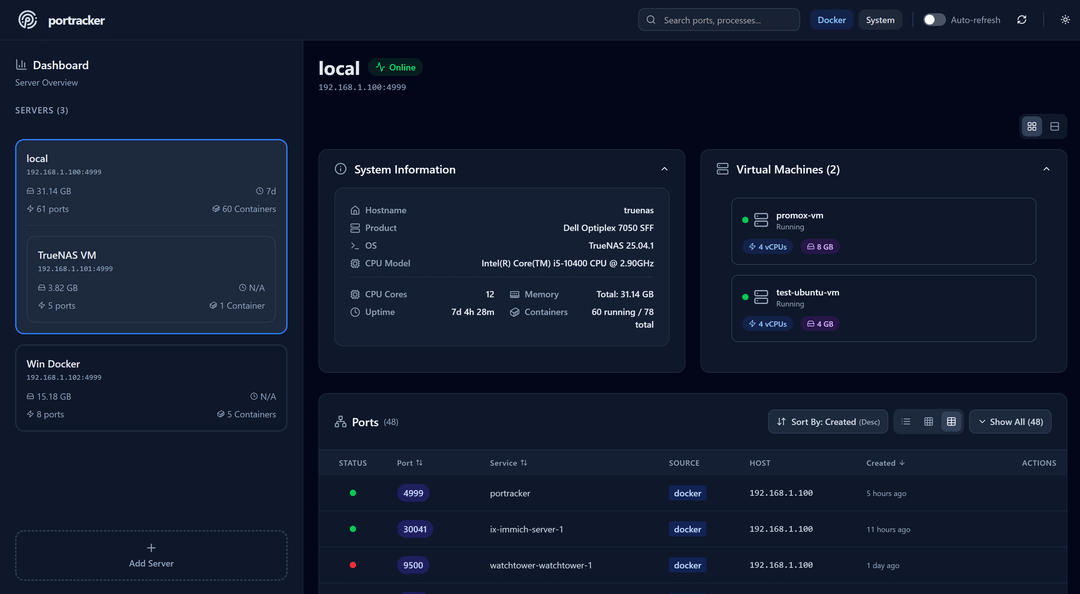
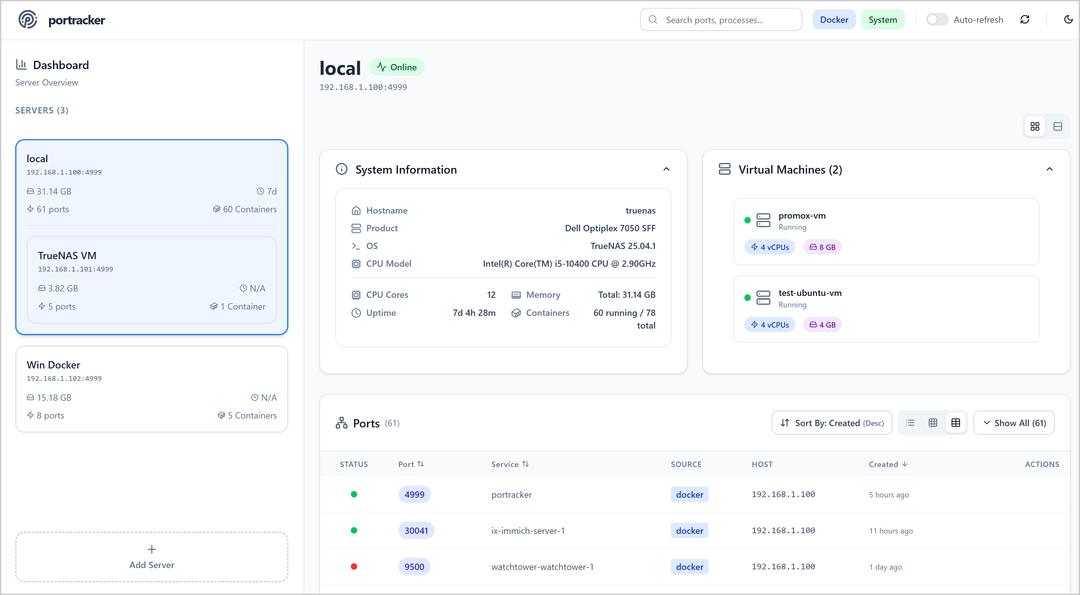
Dashboard
/http://localhost:6158/ portracker scans your host and your Docker containers and builds a live map of every port in use, so messy spreadsheets and surprise port conflicts stop happening.
Features
- Finds ports on the host and in Docker containers by itself, and shows internal and published ports apart
- Add other portracker servers as peers to see every server, container and VM on one dashboard
- Built-in login with a first-run setup wizard (no OIDC or other sign-in providers yet)
- One small container with a built-in SQLite database
How to use
- Open portracker from your dashboard.
- Follow the setup wizard and make your admin username and password.
- portracker starts scanning right away. There is nothing else to set up to see host and Docker ports.
- To watch more machines, install portracker there too and add it as a peer from the Settings gear.
Before you install
There is nothing you must set. SESSION_SECRET comes filled with a random value that keeps you signed in across restarts. The app starts in a few seconds; open http://your-zimaos-ip:6158 and follow the setup wizard. portracker gets read-only access to Docker and sees the host's processes, which is how it finds ports. If you forget your password, add RECOVERY_MODE=true in the app settings and find the recovery code in the app log. UDP scanning, TrueNAS and other settings are in the Variables tab; add them in the app settings.
The settings in the first table are already in the app settings. To use any other one, open the app settings, add the variable with your value, save, and the app restarts with it. A setting you leave out uses its default.
In the app settings
| Variable | Default value | Description |
|---|---|---|
TZ | $TZ | Your time zone. It is filled in from your ZimaOS time zone. Leave it unless you need another. |
ENABLE_ | true | Turns on portracker's login screen and setup wizard. Set to false to leave the dashboard open to anyone on your network. |
SESSION_ | change-me | Pre-filled with a random value. It keeps you signed in when the app restarts. You can replace it with your own random text. |
Sign-up and accounts
| Variable | Default value | Description |
|---|---|---|
RECOVERY_ | false | Set to true if you forgot your password. After a restart, a recovery code that works for 15 minutes appears in the app log. Take it out again afterwards. |
Server
| Variable | Default value | Description |
|---|---|---|
CORS_ | — | Browser addresses allowed to call portracker, comma-separated, like https://ports.example.com. Only needed behind a reverse proxy that changes the host name. |
Scanning
| Variable | Default value | Description |
|---|---|---|
INCLUDE_ | false | Set to true to list UDP ports too. This can add a lot of noise. |
MAX_ | 100 | The most unpublished ports listed for one container. Containers with more still show their published ports. |
CACHE_ | 60000 | How long scan results are kept before scanning again, in milliseconds. |
DISABLE_ | false | Set to true to scan on every page load. Slower; mostly for testing. |
TrueNAS
| Variable | Default value | Description |
|---|---|---|
TRUENAS_ | — | A TrueNAS API key (System Settings, API Keys) to also show TrueNAS apps, VMs and system details. |
TRUENAS_ | — | Your TrueNAS address, like ws://192.168.1.100:80. Leave it out to find it by itself. |
TRUENAS_ | 90000 | How long to wait for TrueNAS details, in milliseconds. Raise it to 120000 or more if you have many apps or VMs and see timeouts. |
Logs
| Variable | Default value | Description |
|---|---|---|
DEBUG | false | Set to true for detailed logs while you look for a problem. |
name: portracker
services:
portracker:
image: mostafawahied/portracker:1.3.14
container_name: portracker
restart: unless-stopped
stop_grace_period: 40s
network_mode: bridge
pid: "host"
cap_add:
- SYS_PTRACE
- SYS_ADMIN
security_opt:
- apparmor:unconfined
environment:
- TZ=$TZ
- ENABLE_AUTH=true
- SESSION_SECRET=change-me
ports:
- target: 4999
published: "6158"
protocol: tcp
volumes:
- type: bind
source: /DATA/AppData/$AppID/data
target: /data
bind:
create_host_path: true
- type: bind
source: /var/run/docker.sock
target: /var/run/docker.sock
read_only: true
deploy:
resources:
limits:
cpus: "1.00"
memory: 512M
reservations:
cpus: "0.00"
memory: 128M
labels:
icon: https://cdn.jsdelivr.net/gh/HSinghHira/IceStore@main/Apps/portracker/icon.png
x-casaos:
id: com.icestore.portracker
envs:
- container: TZ
description:
en_US: >-
Your time zone. It is filled in from your ZimaOS time zone.
Leave it unless you need another.
- container: ENABLE_AUTH
description:
en_US: >-
Turns on portracker's login screen and setup wizard. Set to
false to leave the dashboard open to anyone on your network.
- container: SESSION_SECRET
description:
en_US: >-
Pre-filled with a random value. It keeps you signed in when the
app restarts. You can replace it with your own random text.
ports:
- container: "4999"
description:
en_US: Dashboard web UI, published on host as 6158
volumes:
- container: /data
description:
en_US: The SQLite database with your settings, peers and login.
- container: /var/run/docker.sock
description:
en_US: >-
Read-only access to Docker, used to find your containers and
their ports.
x-casaos:
id: com.icestore.portracker
architectures:
- amd64
- arm64
main: portracker
author: HSinghHira
category: Networking
developer: mostafa-wahied
icon: https://cdn.jsdelivr.net/gh/HSinghHira/IceStore@main/Apps/portracker/icon.png
thumbnail: https://cdn.jsdelivr.net/gh/HSinghHira/IceStore@main/Apps/portracker/screenshot-1.png
screenshot_link:
- https://cdn.jsdelivr.net/gh/HSinghHira/IceStore@main/Apps/portracker/screenshot-1.png
- https://cdn.jsdelivr.net/gh/HSinghHira/IceStore@main/Apps/portracker/screenshot-2.png
title:
en_US: portracker
tagline:
en_US: Live, self-hosted port monitoring and discovery for your homelab
description:
en_US: >-
portracker scans your host and your Docker containers and builds a
live map of every port in use, so messy spreadsheets and surprise port
conflicts stop happening.
**Features**
- Finds ports on the host and in Docker containers by itself, and shows
internal and published ports apart
- Add other portracker servers as peers to see every server,
container and VM on one dashboard
- Built-in login with a first-run setup wizard (no OIDC or other
sign-in providers yet)
- One small container with a built-in SQLite database
**How to use?**
1. Open portracker from the Zima OS dashboard.
2. Follow the setup wizard and make your admin username and password.
3. portracker starts scanning right away. There is nothing else to set
up to see host and Docker ports.
4. To watch more machines, install portracker there too and add it as
a peer from the Settings gear.
tips:
before_install:
en_US: >-
1. Start the installation. There is nothing you must set first.
2. SESSION_SECRET is already filled with a random value. You can
type your own random text if you like.
3. Wait a few seconds for the first start.
4. Open http://your-zimaos-ip:6158 in your browser.
5. Follow the setup wizard to make your admin username and password.
6. Forgot your password? Add RECOVERY_MODE=true in the app settings,
restart, and find the recovery code in the app log.
7. More settings, like UDP scanning and TrueNAS, are listed on the
portracker page at https://icestore.hsinghhira.me/app/portracker/
(Variables tab). You can add them now or later in the app settings.
index: /
port_map: "6158"
scheme: http
is_uncontrolled: false
version: "1.3.14"
update_at: "2026-10-25"
release_notes:
en_US: |-
- Moved to IceStore, now on port 6158
- Pinned to mostafawahied/portracker 1.3.14
- Data moved to /DATA/AppData/portracker/data
repo: "https://github.com/mostafa-wahied/portracker"
support: "https://github.com/mostafa-wahied/portracker/issues"
docs: "https://github.com/mostafa-wahied/portracker#readme" ZimaOS
 CasaOS
 Homeio