
Yuvomi
One private home for tasks, calendar, budget, meals and everything else that runs a household
- ghcr.io/hsinghhira/yuvomi:latest
- port 6161
- Home
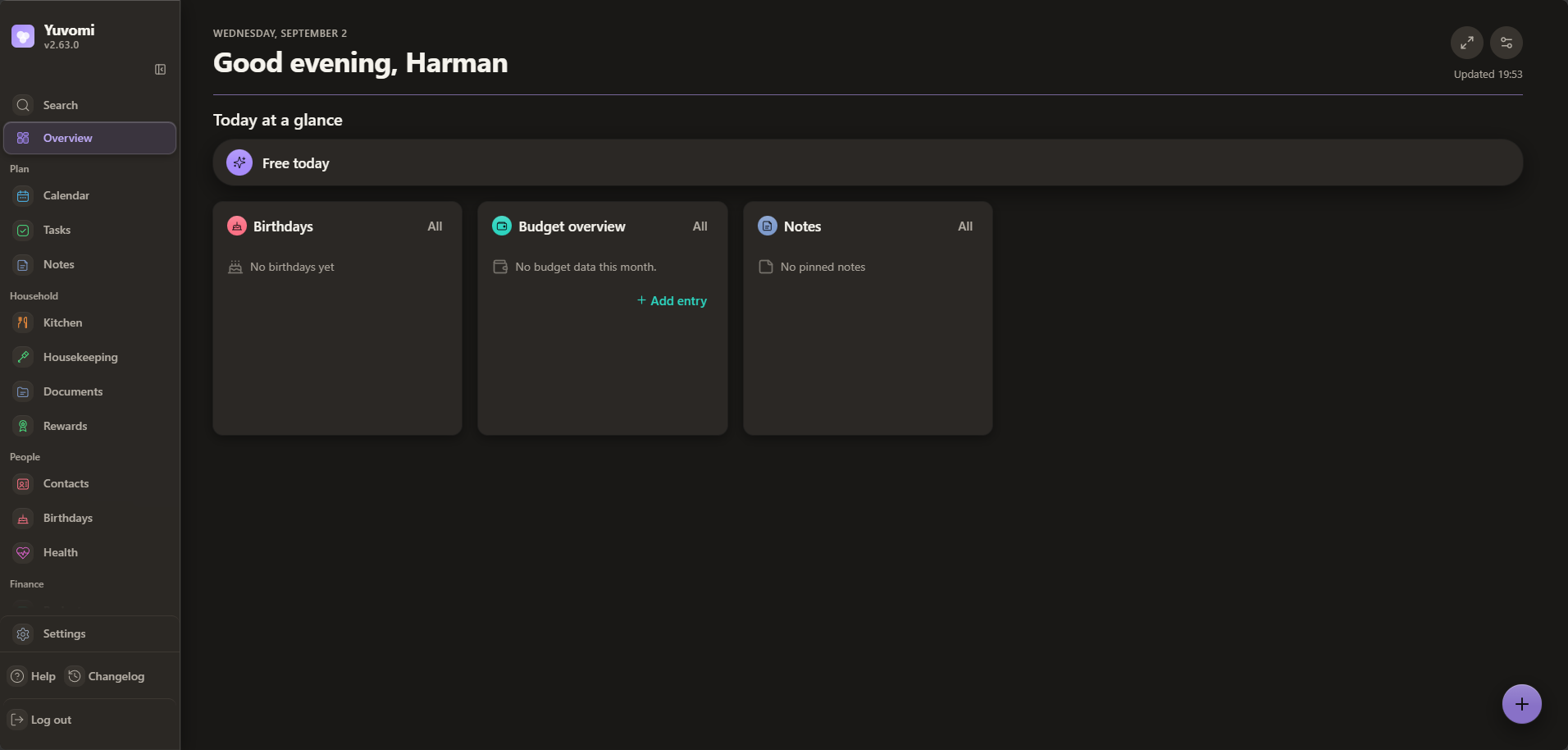
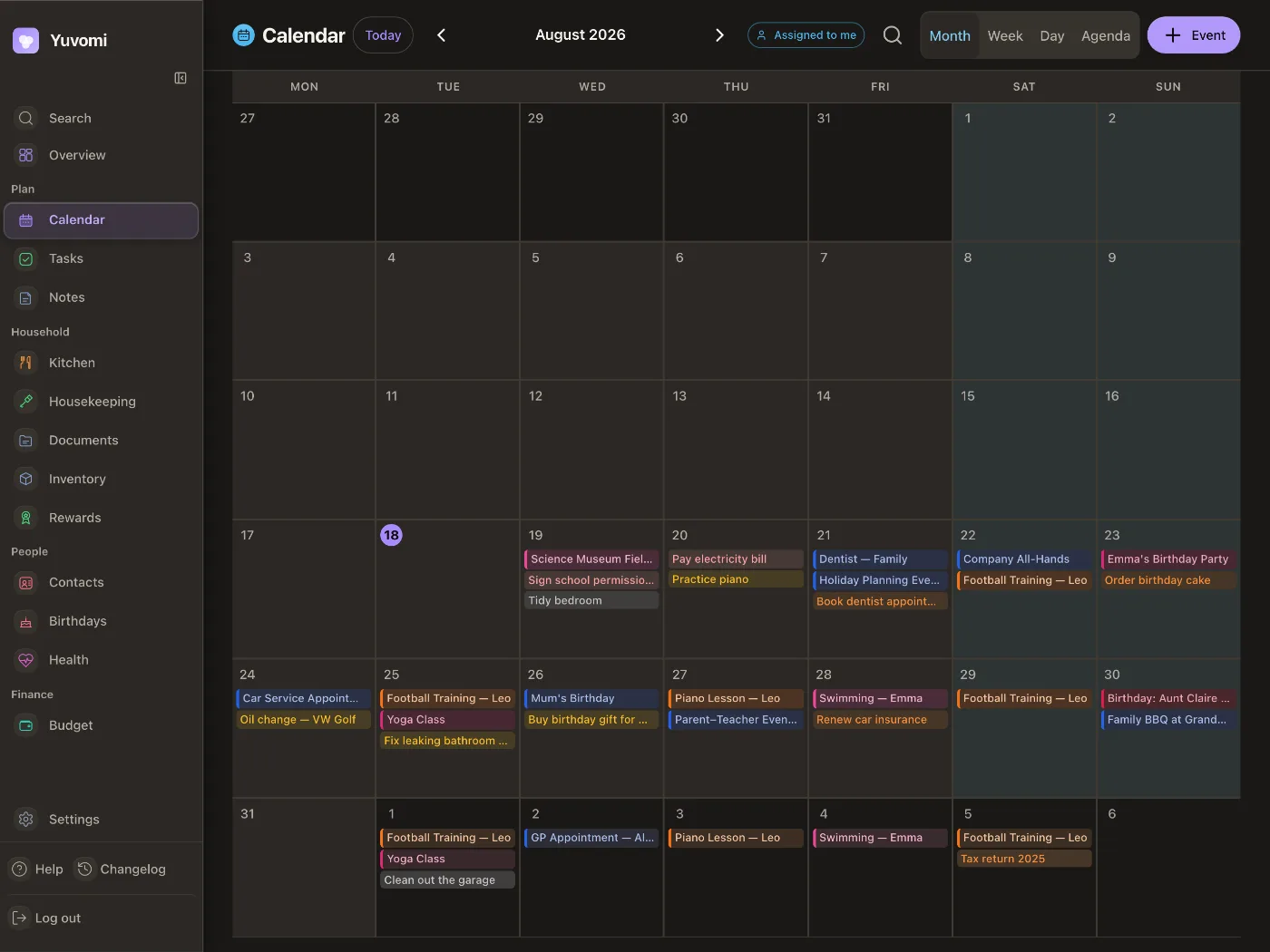
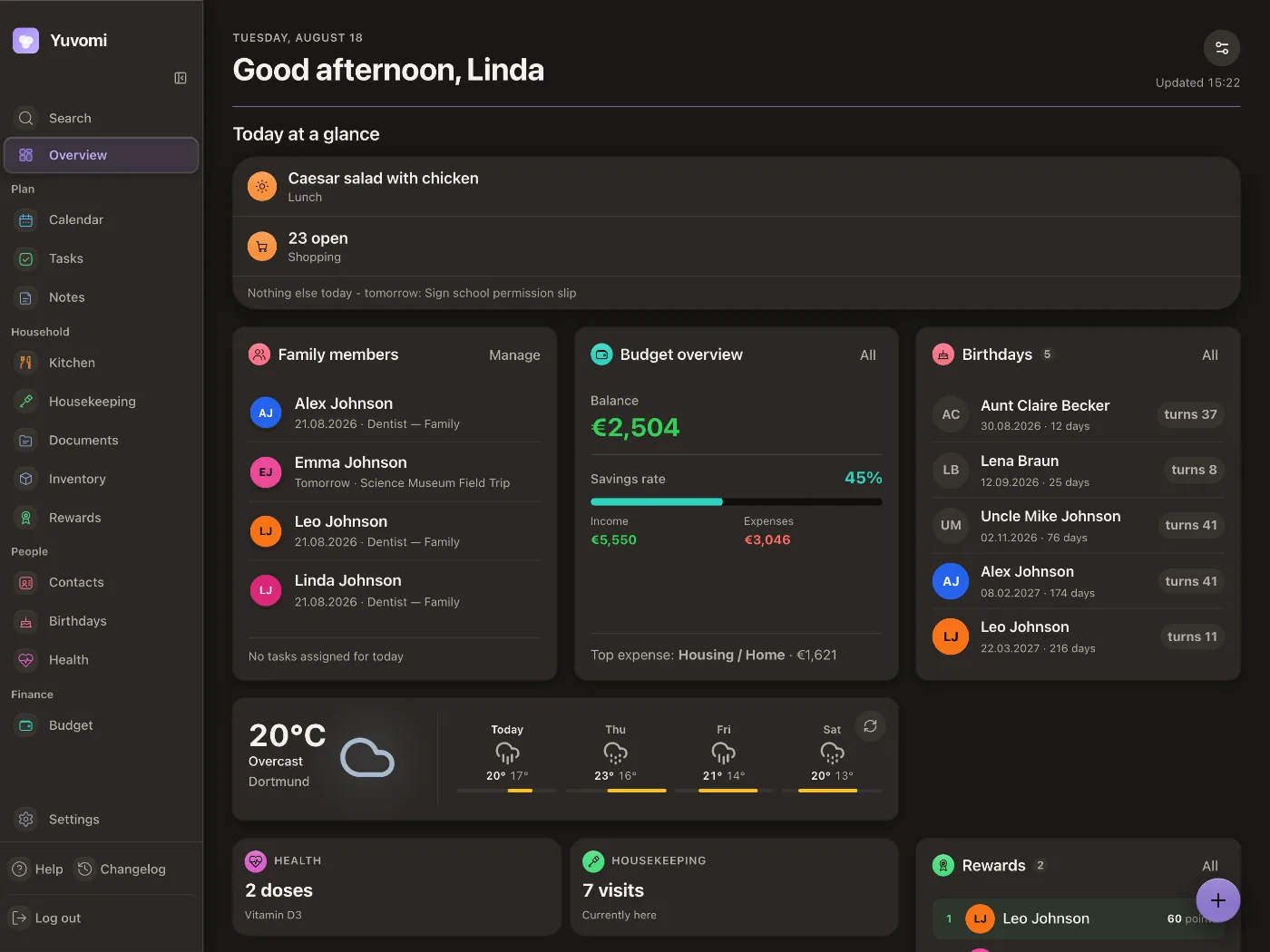
Web App
/http://localhost:6161/ Yuvomi is a self-hosted family planner that replaces a dozen separate apps (tasks, calendar, budget, shopping, meals and more) with one private place on your own server. Each install makes its own session secret and database key on first start, and the database is encrypted.
Features
- Modules for Tasks, Shopping, Meals, Recipes, Pantry, Calendar, Documents, Inventory, Budget, Housekeeping, Rewards, Health, Schedule, Notes and Contacts, Birthdays, Family, Reminders and Backup. Turn on only what your household needs.
- Modules work together: a meal plan fills the shopping list, a done chore pays reward points
- Two-way Google, Outlook and CalDAV calendar sync, sign-in with OIDC, two-factor sign-in and invite links for family members
- Encrypted database (SQLCipher), no telemetry, scheduled backups and a REST and MCP API
How to use
- Open Yuvomi from your dashboard.
- Make your household's admin account on the first screen.
- Turn on the modules you want in Settings.
- Invite the rest of the family with an invite link. Each person picks their own password.
- Calendar sync, weather, sign-in with OIDC and WebDAV backups can be added later in Settings or from the Variables tab.
Before you install
You don't need to change anything. On first start the app makes its own session secret and database key and keeps them in the data folder (.session_secret and .db_encryption_key). Back up the whole app folder: without the key, nobody can open the database. Email, weather, calendar sync, sign-in with OIDC and the other settings are in the Variables tab; add them in the app settings. Set BASE_URL to the address you open Yuvomi at if you want links in emails.
The settings in the first table are already in the app settings. To use any other one, open the app settings, add the variable with your value, save, and the app restarts with it. A setting you leave out uses its default.
In the app settings
| Variable | Default value | Description |
|---|---|---|
TZ | $TZ | Your time zone, used for backups and as the starting household time zone. It is filled in from your ZimaOS time zone. Leave it unless you need another. |
Server
| Variable | Default value | Description |
|---|---|---|
BASE_ | — | The address you open Yuvomi at, like http://192.168.1.20:6161. Needed for links in password-reset and invite emails. |
SESSION_ | false | Set to true only when Yuvomi is behind an HTTPS reverse proxy. |
TRUST_ | 1 | Which proxies to trust for the visitor's address: 1 (one proxy), loopback (no proxy) or a subnet like 172.16.0.0/12. |
LOG_ | info | How much the app logs: debug, info, warn or error. |
MAX_ | 5 | The largest file people can upload, in megabytes (1 to 100). |
Keys
| Variable | Default value | Description |
|---|---|---|
SESSION_ | — | Signs logins. Leave it out: one is made on first start and kept in .session_secret in the data folder. Changing it signs everyone out. |
DB_ | — | Encrypts the database. Leave it out: one is made on first start and kept in .db_encryption_key in the data folder. Never change it after the first start, or the database can't be opened. |
Email (SMTP)
| Variable | Default value | Description |
|---|---|---|
EMAIL_ | — | Your mail server, like smtp.gmail.com. Turns on password reset by email and email notifications. |
EMAIL_ | 587 | Your mail server's port. |
EMAIL_ | starttls | How to connect: ssl (port 465), starttls (port 587) or none. |
EMAIL_ | — | The user name for your mail server. |
EMAIL_ | — | The password for your mail server. |
EMAIL_ | — | The sender address on emails, like [email protected]. |
EMAIL_ | Yuvomi | The sender name on emails. |
Sign in with OIDC
| Variable | Default value | Description |
|---|---|---|
OIDC_ | — | Your sign-in provider's address, like https://auth.example.com/application/o/yuvomi/. All four OIDC values are needed. |
OIDC_ | — | The client ID from your sign-in provider. |
OIDC_ | — | The client secret from your sign-in provider. |
OIDC_ | — | Your Yuvomi address plus /api/v1/auth/oidc/callback. Add the same address at your provider. |
OIDC_ | true | Set to false so OIDC sign-in never makes new accounts. |
AUTH_ | true | Set to false to make OIDC the only way in, once an admin account is linked to it. |
Calendars
| Variable | Default value | Description |
|---|---|---|
GOOGLE_ | — | Google OAuth client ID, for Google Calendar sync. |
GOOGLE_ | — | Google OAuth client secret. |
GOOGLE_ | — | Your Yuvomi address plus /api/v1/calendar/google/callback, exactly as registered at Google. |
MS_ | — | Microsoft app client ID, to push events to Outlook. |
MS_ | — | Microsoft app client secret. |
MS_ | — | Your Yuvomi address plus /api/v1/calendar/outlook/callback. |
APPLE_ | https://caldav.icloud.com | The CalDAV server for Apple Calendar. |
APPLE_ | — | Your Apple ID email, for Apple Calendar sync. |
APPLE_ | — | An app-specific password from appleid.apple.com. |
SYNC_ | 15 | How often calendars and contacts sync, in minutes. |
ICS_ | false | Set to true to allow calendar feeds from your home network (Sonarr, Home Assistant...). |
Weather
| Variable | Default value | Description |
|---|---|---|
WEATHER_ | — | Your latitude for the weather widget (Open-Meteo, no key needed), like 52.52. |
WEATHER_ | — | Your longitude, like 13.41. |
WEATHER_ | — | The city name shown on the widget. |
WEATHER_ | metric | metric or imperial. |
Backups
| Variable | Default value | Description |
|---|---|---|
BACKUP_ | true | Set to false to turn off scheduled backups. |
BACKUP_ | 0 2 * * * | When backups run, as a cron line. The default is 2 AM every day. |
BACKUP_ | 7 | How many backups to keep. |
WEBDAV_ | false | Set to true to also upload each backup to a WebDAV server (Nextcloud, Hetzner Storage Box...). |
WEBDAV_ | — | The WebDAV address, like https://cloud.example.com/remote.php/dav/files/you/. |
WEBDAV_ | — | The WebDAV user name. |
WEBDAV_ | — | The WebDAV password. |
WEBDAV_ | /yuvomi/backups/ | The folder on the WebDAV server. |
Features
| Variable | Default value | Description |
|---|---|---|
NOTIFICATION_ | false | Set to true for Gotify, ntfy or webhook targets on your home network. |
MODULES_ | false | Set to true to let admins install extra modules from Settings. |
IMMICH_ | — | Your Immich server, for the photo screensaver. |
IMMICH_ | — | An Immich API key with asset.read and asset.view. |
FIXER_ | — | A Fixer API key, for live currency conversion in Budget. |
ENABLE_ | — | Set to true to show the API docs (/docs) to signed-in admins. |
name: yuvomi
services:
yuvomi:
image: ghcr.io/hsinghhira/yuvomi:latest
container_name: yuvomi
restart: unless-stopped
stop_grace_period: 40s
network_mode: bridge
environment:
- TZ=$TZ
ports:
- target: 3000
published: "6161"
protocol: tcp
volumes:
- type: bind
source: /DATA/AppData/$AppID/data
target: /data
bind:
create_host_path: true
- type: bind
source: /DATA/AppData/$AppID/backups
target: /backups
bind:
create_host_path: true
- type: bind
source: /DATA/AppData/$AppID/modules
target: /app/modules
bind:
create_host_path: true
healthcheck:
test: ["CMD", "node", "-e", "require('http').get('http://localhost:3000/health', r => process.exit(r.statusCode === 200 ? 0 : 1))"]
interval: 30s
timeout: 10s
retries: 3
start_period: 30s
deploy:
resources:
limits:
cpus: "1.00"
memory: 512M
reservations:
cpus: "0.00"
memory: 256M
labels:
icon: https://cdn.jsdelivr.net/gh/HSinghHira/IceStore@main/Apps/yuvomi/icon.png
x-casaos:
id: com.icestore.yuvomi
envs:
- container: TZ
description:
en_US: >-
Your time zone, used for backups and as the starting household
time zone. It is filled in from your ZimaOS time zone. Leave it
unless you need another.
ports:
- container: "3000"
description:
en_US: Yuvomi web app, published on host as 6161
volumes:
- container: /data
description:
en_US: >-
The database with all your household's data, and its two keys
(.session_secret and .db_encryption_key, made on first start).
Back up the whole folder: without .db_encryption_key the
database can't be opened.
- container: /backups
description:
en_US: Scheduled and manual backups. They need the same database key to restore.
- container: /app/modules
description:
en_US: Optional drop-in modules from other people (see MODULES.md upstream).
x-casaos:
id: com.icestore.yuvomi
architectures:
- amd64
- arm64
main: yuvomi
author: HSinghHira
category: Home
developer: ulsklyc
icon: https://cdn.jsdelivr.net/gh/HSinghHira/IceStore@main/Apps/yuvomi/icon.png
thumbnail: https://cdn.jsdelivr.net/gh/HSinghHira/IceStore@main/Apps/yuvomi/screenshot-1.png
screenshot_link:
- https://cdn.jsdelivr.net/gh/HSinghHira/IceStore@main/Apps/yuvomi/screenshot-1.png
- https://cdn.jsdelivr.net/gh/HSinghHira/IceStore@main/Apps/yuvomi/screenshot-2.png
- https://cdn.jsdelivr.net/gh/HSinghHira/IceStore@main/Apps/yuvomi/screenshot-3.png
title:
en_US: Yuvomi
tagline:
en_US: One private home for tasks, calendar, budget, meals and everything else that runs a household
description:
en_US: >-
Yuvomi is a self-hosted family planner that replaces a dozen separate
apps (tasks, calendar, budget, shopping, meals and more) with one
private place on your own server. Each install makes its own session
secret and database key on first start, and the database is encrypted.
**Features**
- Modules for Tasks, Shopping, Meals, Recipes, Pantry, Calendar,
Documents, Inventory, Budget, Housekeeping, Rewards, Health,
Schedule, Notes and Contacts, Birthdays, Family, Reminders and
Backup. Turn on only what your household needs.
- Modules work together: a meal plan fills the shopping list, a done
chore pays reward points
- Two-way Google, Outlook and CalDAV calendar sync, sign-in with
OIDC, two-factor sign-in and invite links for family members
- Encrypted database (SQLCipher), no telemetry, scheduled backups
and a REST and MCP API
**How to use?**
1. Open Yuvomi from the Zima OS dashboard.
2. Make your household's admin account on the first screen.
3. Turn on the modules you want in Settings.
4. Invite the rest of the family with an invite link. Each person
picks their own password.
5. Calendar sync, weather, sign-in with OIDC and WebDAV backups can be
added later in Settings or in the Variables tab on the IceStore
page.
tips:
before_install:
en_US: >-
1. Start the installation. You don't need to change anything.
2. Wait about 30 seconds.
3. Open Yuvomi from the Zima OS dashboard.
4. Make your admin account on the first screen.
5. Back up the app folder /DATA/AppData/yuvomi now and then. It
holds the database key (.db_encryption_key). Without it nobody
can open your data, not even the app maker.
6. More settings, like email, weather, calendar sync and sign-in
with OIDC, are listed on the Yuvomi page at
https://icestore.hsinghhira.me/app/yuvomi/ (Variables tab). You
can add them now or later in the app settings.
index: /
port_map: "6161"
scheme: http
is_uncontrolled: false
version: "2.79.0"
update_at: "2026-10-25"
release_notes:
en_US: |-
- Moved to IceStore. The port changed from 8434 to 6161 and the app id is now com.icestore.yuvomi.
- Now runs ghcr.io/hsinghhira/yuvomi: ghcr.io/ulsklyc/yuvomi 2.79.0 plus a start script that makes this install's SESSION_SECRET and DB_ENCRYPTION_KEY on first start and keeps them in the data folder. The compose file no longer ships fixed keys.
- Optional settings moved to the Variables tab on the IceStore website.
repo: "https://github.com/ulsklyc/yuvomi"
support: "https://github.com/ulsklyc/yuvomi/issues"
docs: "https://github.com/ulsklyc/yuvomi/tree/main/docs" ZimaOS
 CasaOS
 Homeio