
FCaptcha
Self-hosted CAPTCHA for web apps
- ghcr.io/hsinghhira/fcaptcha:1.0.0
- v1.51.1
- Updated 20 Nov 2026
- port 6790
- amd64 · arm64
- Developer
- 268 stars
Screenshots
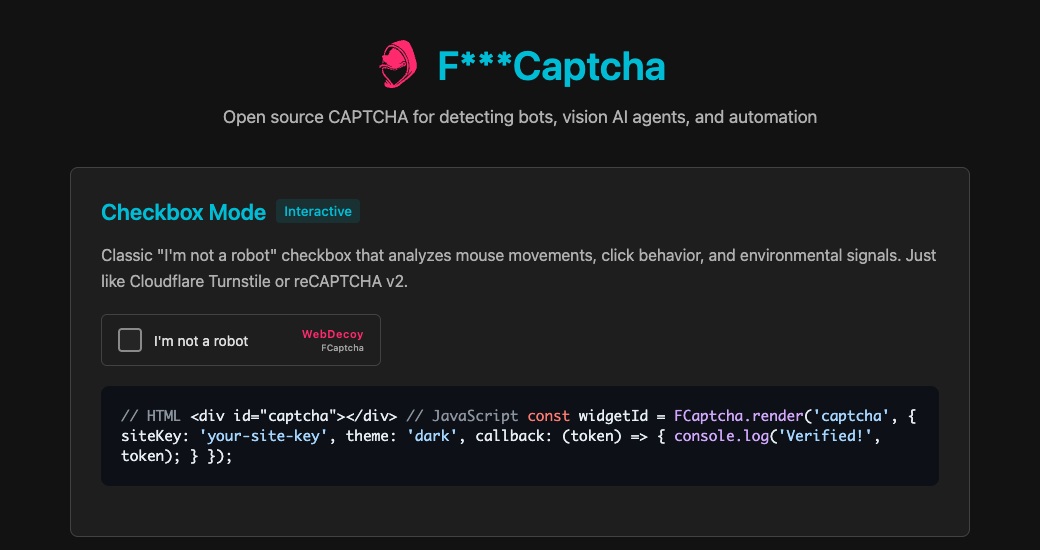
Open the app
About FCaptcha
FCaptcha provides a JavaScript widget that collects browser signals and a server endpoint that verifies tokens for app actions such as form submissions.
Try the demo
Open FCaptcha from your dashboard, or visit http://[ZIMAOS-IP-ADDRESS]:6790/demo/. The same service serves /fcaptcha.js and /health.
Connect an application
Follow the FCaptcha quickstart to add the widget and verify tokens from your backend. The second line of the app's private keys/keypair file is the backend verification key. An administrator can read that line locally with docker exec -u 65532:65532 fcaptcha sed -n '2p' /fcaptcha-data/keys/keypair. Keep both keys on the server and back up the data directory securely.
Configure HTTPS and set TRUSTED_PROXIES to the addresses or CIDRs of your actual ingress before exposing the service publicly. See the hardening guide.
The settings in the first table are already in the app settings. To use any other one, open the app settings, add the variable with your value, save, and the app restarts with it. A setting you leave out uses its default.
In the app settings
| Variable | Default value | Description |
|---|---|---|
TZ | $TZ | Your time zone. The dashboard fills this in for you. |
Credentials
| Variable | Default value | Description |
|---|---|---|
FCAPTCHA_ | — | Generate with openssl rand -hex 32, or leave blank for a private key on first start. |
FCAPTCHA_ | — | Generate with openssl rand -hex 32 separately, or leave blank for a separate private key on first start. |
Networking
| Variable | Default value | Description |
|---|---|---|
TRUSTED_ | — | Addresses or CIDRs of your actual reverse proxies. Leave blank to use the upstream loopback-only default. |
FCAPTCHA_ | — | Comma-separated hostnames allowed to mint tokens. Leave blank for the demo and unrestricted origins. |
Integration
| Variable | Default value | Description |
|---|---|---|
FCAPTCHA_ | — | Comma-separated accepted site keys. Leave blank for zero-config self-hosting. |
Scaling
| Variable | Default value | Description |
|---|---|---|
REDIS_ | — | Optional URL to a Redis instance for shared security state. Otherwise FCaptcha keeps state in memory. |
name: fcaptcha

services:
  fcaptcha:
    image: ghcr.io/hsinghhira/fcaptcha:1.0.0
    container_name: fcaptcha
    restart: unless-stopped
    network_mode: bridge
    environment:
      - TZ=$TZ
    ports:
      - target: 3000
        published: "6790"
        protocol: tcp
    volumes:
      - type: bind
        source: /DATA/AppData/$AppID/data
        target: /fcaptcha-data
        bind:
          create_host_path: true
    deploy:
      resources:
        limits:
          cpus: "1.00"
          memory: 512M
        reservations:
          cpus: "0.00"
          memory: 128M
    labels:
      icon: https://cdn.jsdelivr.net/gh/HSinghHira/IceStore@main/Apps/fcaptcha/icon.png
    x-casaos:
      id: com.icestore.fcaptcha
      envs:
        - container: TZ
          description:
            en_US: Your time zone. The dashboard fills this in for you.
      ports:
        - container: "3000"
          description:
            en_US: FCaptcha widget, demo, and API on host port 6790.
      volumes:
        - container: /fcaptcha-data
          description:
            en_US: Private signing and verification keys. Back up this directory securely.

x-casaos:
  id: com.icestore.fcaptcha
  architectures:
    - amd64
    - arm64
  main: fcaptcha
  author: HSinghHira
  category: Developer
  developer: WebDecoy
  icon: https://cdn.jsdelivr.net/gh/HSinghHira/IceStore@main/Apps/fcaptcha/icon.png
  thumbnail: https://cdn.jsdelivr.net/gh/HSinghHira/IceStore@main/Apps/fcaptcha/screenshot-1.jpg
  screenshot_link:
    - https://cdn.jsdelivr.net/gh/HSinghHira/IceStore@main/Apps/fcaptcha/screenshot-1.jpg
  title:
    en_US: FCaptcha
  tagline:
    en_US: Self-hosted CAPTCHA for web apps
  description:
    en_US: >-
      FCaptcha provides a JavaScript widget that collects browser signals and
      a server endpoint that verifies tokens for app actions such as form
      submissions. Open the app from your dashboard to try the interactive demo.


      **How to use?**


      1. Open FCaptcha from your dashboard to try the demo.


      2. Use the quickstart to add the widget and verify tokens from your app.


      Each installation makes a separate signing and verification key and saves
      them in its data directory. See the integration guide before exposing
      FCaptcha publicly.
  tips:
    before_install:
      en_US: >-
        Open the app from your dashboard to try the demo. For public use,
        configure HTTPS and follow the FCaptcha hardening guide.
  index: /demo/
  port_map: "6790"
  scheme: http
  is_uncontrolled: false
  version: "1.51.1"
  update_at: "2026-11-20"
  release_notes:
    en_US: |-
      - Initial IceStore package using ghcr.io/webdecoy/fcaptcha 1.51.1.
  repo: https://github.com/WebDecoy/FCaptcha
  support: https://github.com/WebDecoy/FCaptcha/issues
  docs: https://docs.webdecoy.com/fcaptcha/quickstart/
Install FCaptcha
Something not working with FCaptcha?
Report it so it gets fixed, or ask for an app that is not here yet.
 ZimaOS
Add the store link, then find FCaptcha in the App Store and install it.
 CasaOS
Add the store link, then find FCaptcha in the App Store and install it.
 ReCasaOS
Add the store link, then find FCaptcha in the App Store and install it.
 Homeio
Add the store link, then find FCaptcha in the App Store and install it.
 MOS
Add the repository in MOS Hub Settings, then find FCaptcha in Docker → MOS Hub and install it.
More Developer apps
See all
Gami.Fied
Self-hosted gamification engine for points, badges, levels and leaderboards in your apps.

Gitea
Your own GitHub-style home for code, with issues, reviews and CI

GitHub Release Monitor
Get told when your favourite GitHub, GitLab, Codeberg and Forgejo projects ship a release