
FileBrowser Quantum
A fast web file manager with search, previews and share links.
- ghcr.io/hsinghhira/filebrowser-quantum:latest
- v2.0.2-stable
- Updated 16 Nov 2026
- port 6738
- amd64 · arm64
- Others
- 9.3k stars
Screenshots
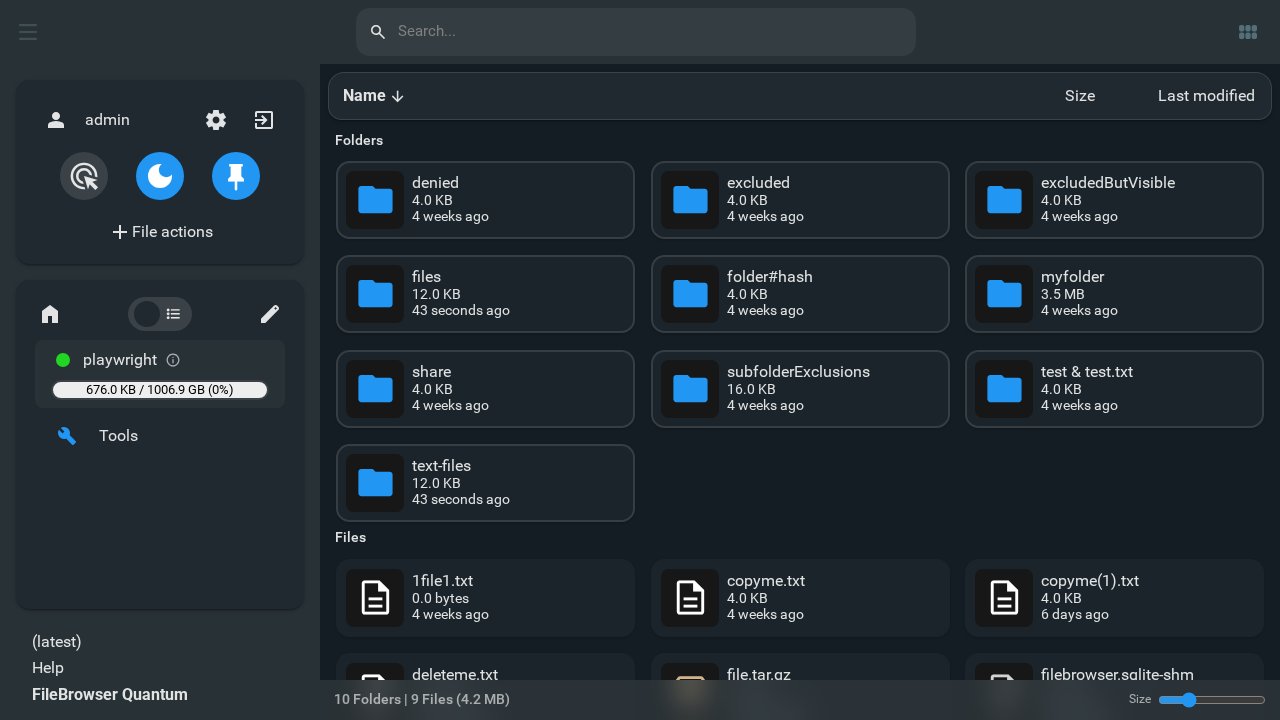
Open the app
About FileBrowser Quantum
FileBrowser Quantum is a web file manager for your files. Browse, upload, move and share files from any browser, find anything in a second with its search index, and preview photos, videos and documents without downloading them.
Features
- Very fast search across all your files
- Previews and thumbnails for images, videos, PDFs and Office files
- Share links with expiry and passwords
- Users with their own folders and permissions
- Sign-in with a password, OIDC or a proxy, with two-factor codes
- Upload large files and whole folders
How to use
- Open
http://[ZIMAOS-IP-ADDRESS]:6738and sign in as admin. The password is in the app's logs, in the box marked CREDENTIALS. - Browse your files under files.
- Right-click a file or folder to share, move or rename it.
Before you install
Leave FILEBROWSER_ADMIN_PASSWORD blank and the app makes a random admin password on first start. It is printed in the app's logs, in the box marked CREDENTIALS, and saved in /DATA/AppData/filebrowser-quantum/data/password.txt. The app sees all of /DATA and runs as root so it can change those files; to share less, point the /srv folder at a smaller one, like /DATA/Media. A starter config.yaml is made in the app folder on first start; edit it with the Files app for more sources, OIDC, OnlyOffice and the rest (it is never overwritten). The first start indexes your files, which can take a few minutes on big disks.
The settings in the first table are already in the app settings. To use any other one, open the app settings, add the variable with your value, save, and the app restarts with it. A setting you leave out uses its default.
In the app settings
| Variable | Default value | Description |
|---|---|---|
TZ | $TZ | Your time zone. It is filled in from your ZimaOS time zone. Leave it unless you need another. |
FILEBROWSER_ | — | The admin's password. Leave it blank and the app makes a random one on first start; find it in the app's logs, in the box marked CREDENTIALS. Only used when the admin is made; change it later in FileBrowser. |
Sign in with OIDC
| Variable | Default value | Description |
|---|---|---|
FILEBROWSER_ | — | The client ID from your OIDC provider. Turn OIDC on and set its issuer in config.yaml (auth, methods, oidc). |
FILEBROWSER_ | — | The client secret from your OIDC provider. |
Security
| Variable | Default value | Description |
|---|---|---|
FILEBROWSER_ | — | Your own secret for signing logins. Leave it out to let FileBrowser manage one. |
FILEBROWSER_ | — | A secret for two-factor codes. Leave it out to let FileBrowser manage one. |
Office
| Variable | Default value | Description |
|---|---|---|
FILEBROWSER_ | — | The JWT secret of your OnlyOffice Docs server, for editing Office files. Set its address in config.yaml (integrations, office). |
name: filebrowser-quantum

services:
  filebrowser-quantum:
    image: ghcr.io/hsinghhira/filebrowser-quantum:latest
    container_name: filebrowser-quantum
    restart: unless-stopped
    stop_grace_period: 20s
    network_mode: bridge
    environment:
      - TZ=$TZ
      - FILEBROWSER_ADMIN_PASSWORD=
    ports:
      - target: 80
        published: "6738"
        protocol: tcp
    volumes:
      - type: bind
        source: /DATA/AppData/$AppID/data
        target: /home/filebrowser/data
        bind:
          create_host_path: true
      - type: bind
        source: /DATA
        target: /srv
    healthcheck:
      test: ["CMD", "curl", "-fsS", "http://127.0.0.1:80/health"]
      interval: 30s
      timeout: 5s
      retries: 3
      start_period: 60s
    deploy:
      resources:
        limits:
          cpus: "2.00"
          memory: 1024M
        reservations:
          cpus: "0.00"
          memory: 64M
    labels:
      icon: https://cdn.jsdelivr.net/gh/HSinghHira/IceStore@main/Apps/filebrowser-quantum/icon.png
    x-casaos:
      id: com.icestore.filebrowser-quantum
      envs:
        - container: TZ
          description:
            en_US: >-
              Your time zone. It is filled in from your ZimaOS time zone.
              Leave it unless you need another.
        - container: FILEBROWSER_ADMIN_PASSWORD
          description:
            en_US: >-
              The admin's password. Leave it blank and the app makes a random
              one on first start; find it in the app's logs, in the box
              marked CREDENTIALS. Only used when the admin is made; change
              it later in FileBrowser.
      ports:
        - container: "80"
          description:
            en_US: FileBrowser Quantum web page and WebDAV, published on host as 6738
      volumes:
        - container: /home/filebrowser/data
          description:
            en_US: >-
              FileBrowser's settings (config.yaml), user database, cache and
              the first admin password (password.txt). Back this folder up.
        - container: /srv
          description:
            en_US: >-
              The files FileBrowser shows: all of your ZimaOS /DATA folder.
              Change this to a smaller folder to share less.

x-casaos:
  id: com.icestore.filebrowser-quantum
  architectures:
    - amd64
    - arm64
  main: filebrowser-quantum
  author: HSinghHira
  category: Others
  developer: gtsteffaniak
  icon: https://cdn.jsdelivr.net/gh/HSinghHira/IceStore@main/Apps/filebrowser-quantum/icon.png
  screenshot_link:
    - https://cdn.jsdelivr.net/gh/HSinghHira/IceStore@main/Apps/filebrowser-quantum/screenshot-1.jpg
  thumbnail: https://cdn.jsdelivr.net/gh/HSinghHira/IceStore@main/Apps/filebrowser-quantum/screenshot-1.jpg
  title:
    en_US: FileBrowser Quantum
  tagline:
    en_US: A fast web file manager with search, previews and share links.
  description:
    en_US: >-
      Visit: [https://icestore.hsinghhira.me/app/filebrowser-quantum/](https://icestore.hsinghhira.me/app/filebrowser-quantum/) for full details


      FileBrowser Quantum is a web file manager for your ZimaOS files. Browse,
      upload, move and share files from any browser, find anything in a
      second with its search index, and preview photos, videos and
      documents without downloading them.


      **Features**


      - Very fast search across all your files

      - Previews and thumbnails for images, videos, PDFs and Office files

      - Share links with expiry and passwords

      - Users with their own folders and permissions

      - Sign-in with a password, OIDC or a proxy, with two-factor codes

      - Upload large files and whole folders


      **How to use?**


      1. Open http://[ZIMAOS-IP-ADDRESS]:6738 and sign in as admin. The
         password is in the app's logs, in the box marked CREDENTIALS.


      2. Browse your ZimaOS files under files.


      3. Right-click a file or folder to share, move or rename it.
  tips:
    before_install:
      en_US: >-
        1. Leave FILEBROWSER_ADMIN_PASSWORD blank to get a random password,
           or type your own.


        2. The app sees all of /DATA. To share less, change the /srv folder
           to a smaller one, like /DATA/Media.


        3. Start the installation. The first start indexes your files, which
           can take a few minutes for big disks.


        4. Your login details and the app's address are in the app's logs,
           in the box marked CREDENTIALS. It is printed again on every start.


        5. Open http://[ZIMAOS-IP-ADDRESS]:6738 in your browser, like
           http://192.168.1.20:6738, and sign in as admin.


        6. More settings, like OIDC sign-in, are listed on the FileBrowser
           Quantum page at
           https://icestore.hsinghhira.me/app/filebrowser-quantum/
           (Variables tab). You can add them now or later in the app
           settings.
  index: /
  port_map: "6738"
  scheme: http
  is_uncontrolled: false
  version: "2.0.2-stable"
  update_at: "2026-11-16"
  release_notes:
    en_US: |-
      - First IceStore version, built on gtstef/filebrowser 2.0.2-stable
      - A starter config.yaml is made on first start, with your /DATA folder as the source
      - Each install makes its own random admin password, shown in the CREDENTIALS box
      - Web page on port 6738
  repo: "https://github.com/gtsteffaniak/filebrowser"
  support: "https://github.com/gtsteffaniak/filebrowser/issues"
  docs: "https://filebrowserquantum.com/en/docs/"
Install FileBrowser Quantum
Something not working with FileBrowser Quantum?
Report it so it gets fixed, or ask for an app that is not here yet.
 ZimaOS
Add the store link, then find FileBrowser Quantum in the App Store and install it.
 CasaOS
Add the store link, then find FileBrowser Quantum in the App Store and install it.
 ReCasaOS
Add the store link, then find FileBrowser Quantum in the App Store and install it.
 Homeio
Add the store link, then find FileBrowser Quantum in the App Store and install it.
 MOS
Add the repository in MOS Hub Settings, then find FileBrowser Quantum in Docker → MOS Hub and install it.


