
Reelsaw
Self-hosted AI clipper that turns long videos into vertical shorts
- ghcr.io/hsinghhira/reelsaw:latest
- v0.32.3
- Updated 8 Nov 2026
- port 6690
- amd64 · arm64
- Media
- 26 stars
Screenshots
Open the app
About Reelsaw
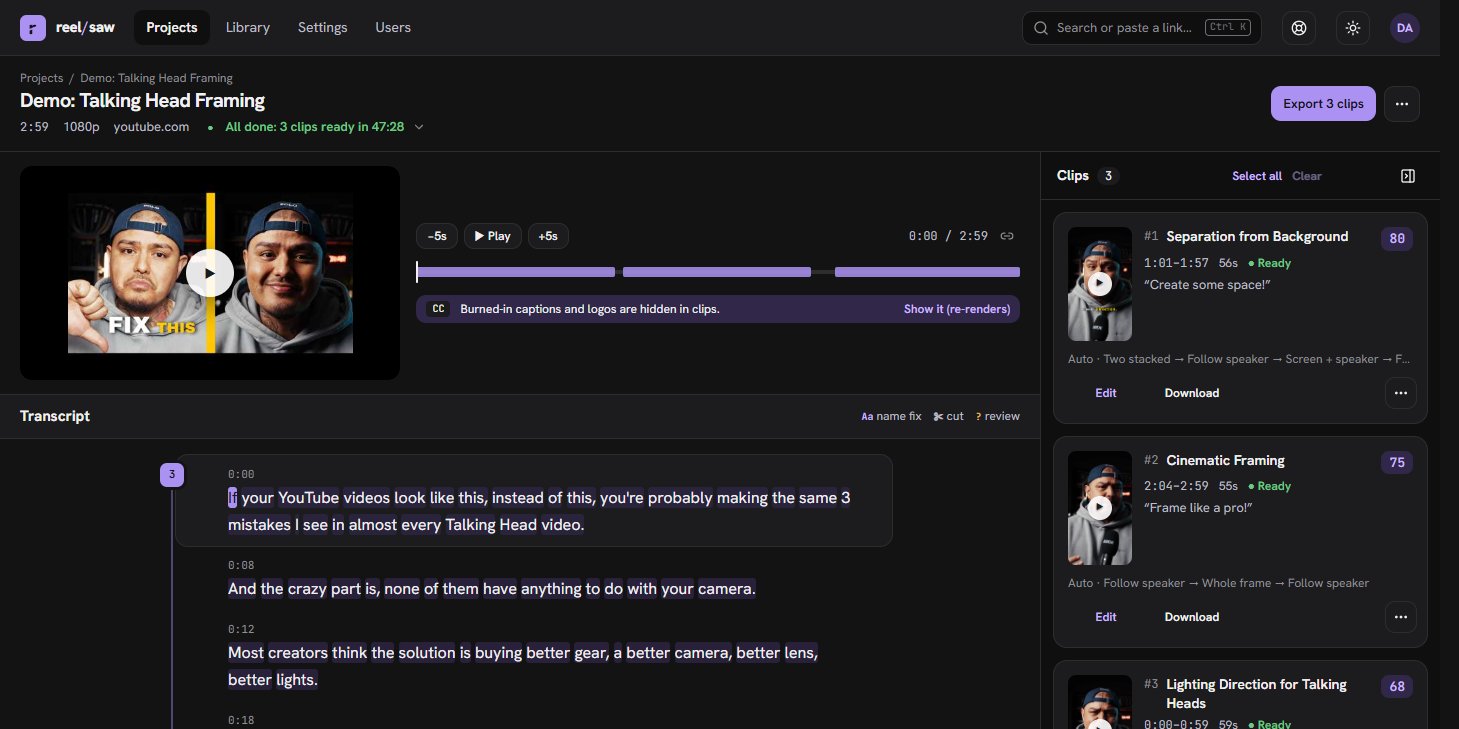
Reelsaw turns long videos into vertical 9:16 shorts. Paste a YouTube link or upload a video: it transcribes it, asks an AI for the best moments, cuts out fillers and renders clips with face-tracked framing and word-highlight captions. This is Reelsaw in a single container, with PostgreSQL inside, one port and one data folder. The AI runs at a provider you choose, or on your own Ollama.
Features
- Any AI provider: OpenAI, Anthropic, Google, Groq, Deepgram, or local Ollama and Whisper servers
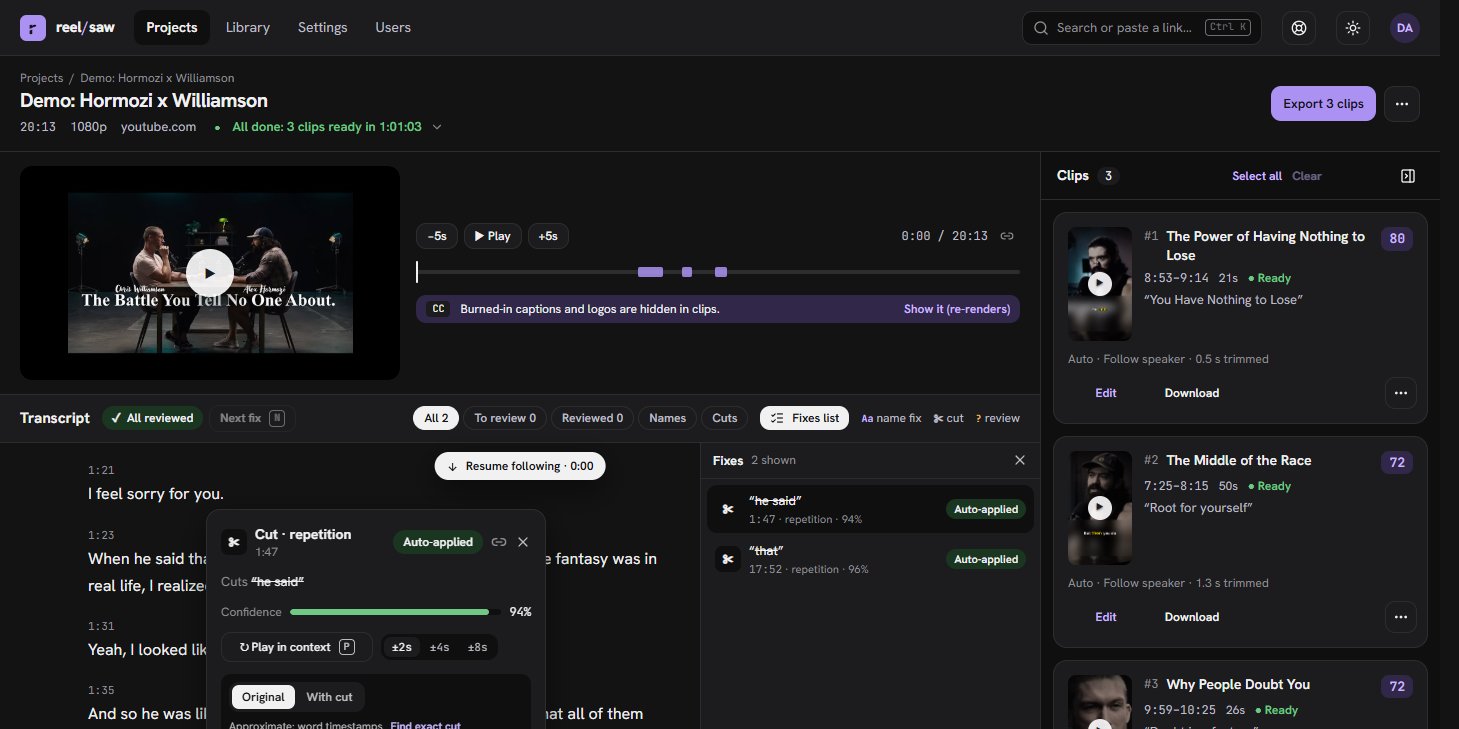
- Picks and ranks the most clippable moments, with an optional topic
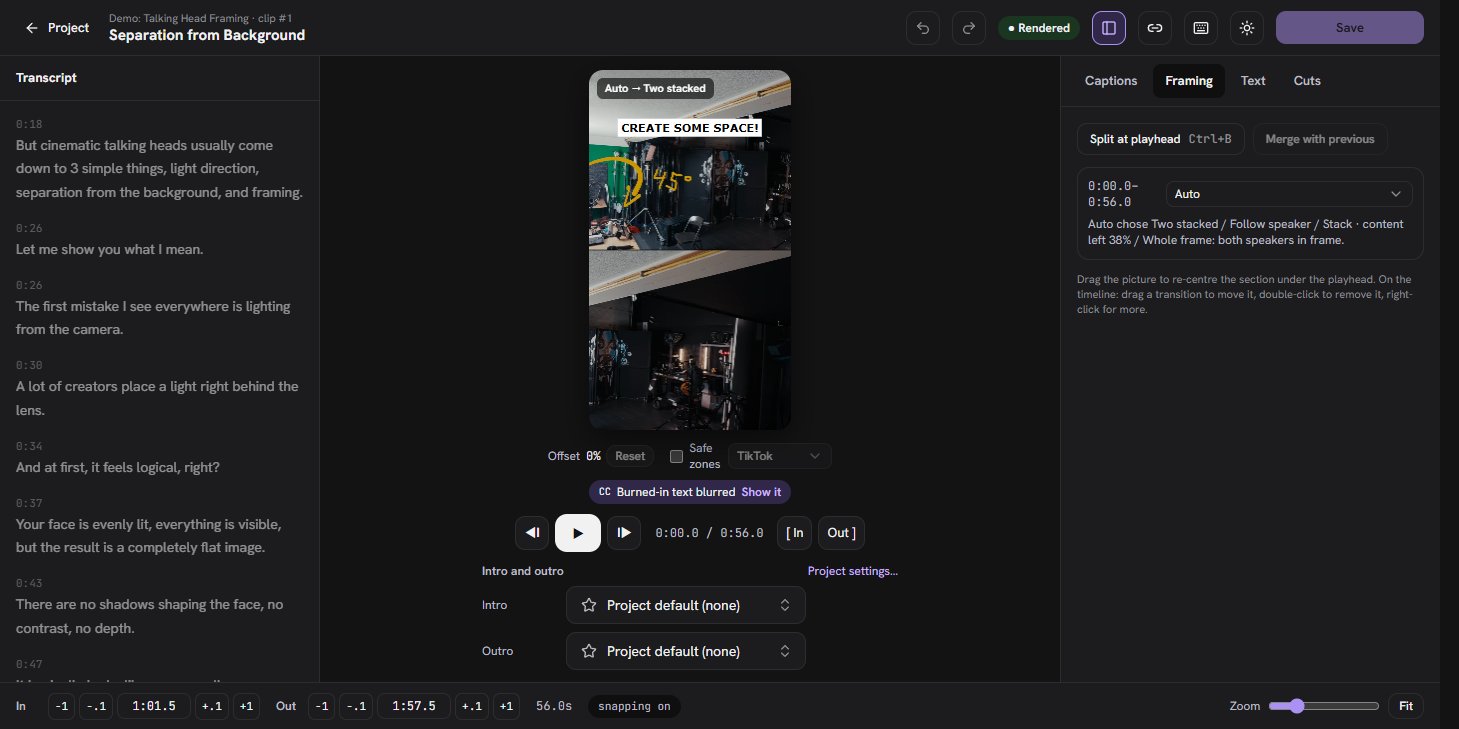
- Smart 9:16 framing: follows the speaker, splits two people, stacks slides and webcam
- Captions with highlighted words, hook overlay, filler cuts you can accept or undo
- Clip editor with timeline, layers, music, intros, outros and templates
- Export with titles and captions, share links, webhooks and an MCP server for AI agents
- PostgreSQL inside
How to use
- Open Reelsaw from your dashboard and sign up. The first account is the admin.
- Paste a YouTube link or upload a video.
- Wait for the clips, then edit, download or share them.
Before you install
You must set PUBLIC_URL first. It starts as http://[ZIMAOS-IP-ADDRESS]:6690: replace [ZIMAOS-IP-ADDRESS] with your ZimaOS IP, like http://192.168.1.20:6690, or use your https address. Sign-in only works on that address; until it is set, Reelsaw only opens on the server itself and shows a note everywhere else.
You must also set an AI provider, or Reelsaw stops at start and the page says so. With the default models that is OPENAI_API_KEY. For another provider, change AI_MODEL and TRANSCRIPTION_MODEL and add its key from the Variables tab; for your own Ollama, set OPENAI_COMPATIBLE_BASE_URL and AI_MODEL=compat:<model>. The speech-to-text model must return word times. After the first start, admins can switch models and enter keys in Settings, System, Models.
There is no password to set: the first person to sign up is the admin, and later sign-ups wait for approval (SIGNUP_MODE). Videos and renders take a lot of disk space. Email and the other settings are in the Variables tab; add them in the app settings. The first start takes about 2 minutes.
The settings in the first table are already in the app settings. To use any other one, open the app settings, add the variable with your value, save, and the app restarts with it. A setting you leave out uses its default.
In the app settings
| Variable | Default value | Description |
|---|---|---|
TZ | $TZ | Your time zone. It is filled in from your ZimaOS time zone. Leave it unless you need another. |
PUBLIC_ | http://[ZIMAOS-IP-ADDRESS]:6690 | Required. Replace [ZIMAOS-IP-ADDRESS] with your ZimaOS IP, like http://192.168.1.20:6690, or use your https address. Sign-in only works on this address. Keep the port at 6690. |
AI_ | openai:gpt-4o-mini | The language model that picks the moments, as provider:model, like openai:gpt-4o-mini, anthropic:claude-sonnet-4-5 or compat:qwen2.5:7b for your own Ollama. Admins can change it later in Settings. |
TRANSCRIPTION_ | openai:whisper-1 | The speech-to-text model, as provider:model. It must give word times: openai:whisper-1, groq:whisper-large-v3-turbo or deepgram:nova-3. |
OPENAI_ | — | Required with the default models. Your OpenAI API key. Using another provider instead? Leave it blank and add that provider's key from the Variables tab. |
Sign-up and accounts
| Variable | Default value | Description |
|---|---|---|
SIGNUP_ | approval | open lets anyone sign up, approval makes new accounts wait for an admin, closed turns sign-up off. The first account is always the admin. |
AI providers
| Variable | Default value | Description |
|---|---|---|
ANTHROPIC_ | — | Anthropic key, for AI_MODEL=anthropic:claude-sonnet-4-5. Anthropic has no speech-to-text, so pair it with another TRANSCRIPTION_MODEL. |
GOOGLE_ | — | Google Gemini key, for AI_MODEL=google:gemini-2.5-flash. |
GROQ_ | — | Groq key, for groq: language models and TRANSCRIPTION_MODEL=groq:whisper-large-v3-turbo. |
DEEPGRAM_ | — | Deepgram key, for TRANSCRIPTION_MODEL=deepgram:nova-3. |
ASSEMBLYAI_ | — | AssemblyAI key, for TRANSCRIPTION_MODEL=assemblyai:best. |
AI_ | — | Vercel AI Gateway key: every cloud vendor as gateway:<vendor>/<model>. |
Your own AI server
| Variable | Default value | Description |
|---|---|---|
OPENAI_ | — | Your Ollama or other OpenAI-compatible server, like http://192.168.1.20:11434/v1. Then use AI_MODEL=compat:qwen2.5:7b. |
OPENAI_ | — | The key for that server; ollama for Ollama. |
OPENAI_ | — | Point the openai provider at a local server, like Speaches for speech-to-text: http://192.168.1.20:8000/v1, with TRANSCRIPTION_MODEL=openai:Systran/faster-whisper-small and OPENAI_API_KEY=local. |
Models
| Variable | Default value | Description |
|---|---|---|
TRANSCRIPT_ | — | A second speech-to-text model that re-aligns cuts. Leave it out to use TRANSCRIPTION_MODEL. |
ANALYZE_ | — | A different language model that scores and compares the moments. |
| Variable | Default value | Description |
|---|---|---|
EMAIL_ | none | smtp or resend, for approval notices, password resets and "clips are ready" notes. |
EMAIL_ | — | The sender, like Reelsaw <[email protected]>. |
SMTP_ | — | Your email server, like smtps://user:[email protected]:465. |
RESEND_ | — | Your Resend key, with EMAIL_DRIVER=resend. |
REQUIRE_ | false | Set to true so people confirm their email before they can sign in. |
Videos
| Variable | Default value | Description |
|---|---|---|
MAX_ | 4096 | The largest video you can upload, in MB. |
MAX_ | 8192 | The largest file a link may download, in MB. |
ALLOW_ | false | Set to true to make clips from links on your own network, like a NAS. |
RENDER_ | — | How many clips render at the same time. Lower it on a small box. |
Stock media
| Variable | Default value | Description |
|---|---|---|
PEXELS_ | — | Free Pexels key: stock photos and videos in Library, Browse. |
PIXABAY_ | — | Free Pixabay key: stock images, videos and music. |
FREESOUND_ | — | Free Freesound key: sound effects. |
Server
| Variable | Default value | Description |
|---|---|---|
MCP_ | false | Set to true so claude.ai and Claude Desktop connectors sign in to the MCP server through the browser. API keys always work. |
UPDATE_ | true | Set to false to stop asking GitHub for new releases. |
Logs
| Variable | Default value | Description |
|---|---|---|
LOG_ | info | debug, info, warn or error. |
name: reelsaw

services:
  reelsaw:
    image: ghcr.io/hsinghhira/reelsaw:latest
    container_name: reelsaw
    restart: unless-stopped
    stop_grace_period: 90s
    privileged: true
    environment:
      - TZ=$TZ
      - PUBLIC_URL=http://[ZIMAOS-IP-ADDRESS]:6690
      - AI_MODEL=openai:gpt-4o-mini
      - TRANSCRIPTION_MODEL=openai:whisper-1
      - OPENAI_API_KEY=
    ports:
      - target: 8080
        published: "6690"
        protocol: tcp
    volumes:
      - type: bind
        source: /DATA/AppData/$AppID/data
        target: /data
        bind:
          create_host_path: true
    healthcheck:
      test: ["CMD", "curl", "-fsS", "-o", "/dev/null", "http://127.0.0.1:8080/api/health"]
      interval: 30s
      timeout: 10s
      retries: 5
      start_period: 180s
    deploy:
      resources:
        limits:
          cpus: "4.00"
          memory: 6144M
        reservations:
          cpus: "0.25"
          memory: 1024M
    labels:
      icon: https://cdn.jsdelivr.net/gh/HSinghHira/IceStore@main/Apps/reelsaw/icon.png
    x-casaos:
      id: com.icestore.reelsaw
      envs:
        - container: TZ
          description:
            en_US: >-
              Your time zone. It is filled in from your ZimaOS time zone.
              Leave it unless you need another.
        - container: PUBLIC_URL
          description:
            en_US: >-
              Required. Replace [ZIMAOS-IP-ADDRESS] with your ZimaOS IP, like
              http://192.168.1.20:6690, or use your https address. Sign-in
              only works on this address. Keep the port at 6690.
        - container: AI_MODEL
          description:
            en_US: >-
              The language model that picks the moments, as provider:model,
              like openai:gpt-4o-mini, anthropic:claude-sonnet-4-5 or
              compat:qwen2.5:7b for your own Ollama. Admins can change it
              later in Settings.
        - container: TRANSCRIPTION_MODEL
          description:
            en_US: >-
              The speech-to-text model, as provider:model. It must give word
              times: openai:whisper-1, groq:whisper-large-v3-turbo or
              deepgram:nova-3.
        - container: OPENAI_API_KEY
          description:
            en_US: >-
              Required with the default models. Your OpenAI API key. Using
              another provider instead? Leave it blank and add that
              provider's key from the Variables tab.
      ports:
        - container: "8080"
          description:
            en_US: Reelsaw web app, API and MCP server (/api/mcp), published on host as 6690
      volumes:
        - container: /data
          description:
            en_US: >-
              The PostgreSQL database, uploaded and downloaded videos, rendered
              clips, the library and this install's secret keys
              (state/secrets.env). Videos need a lot of room.

x-casaos:
  id: com.icestore.reelsaw
  architectures:
    - amd64
    - arm64
  main: reelsaw
  author: HSinghHira
  category: Media
  developer: osbytes
  icon: https://cdn.jsdelivr.net/gh/HSinghHira/IceStore@main/Apps/reelsaw/icon.png
  thumbnail: https://cdn.jsdelivr.net/gh/HSinghHira/IceStore@main/Apps/reelsaw/screenshot-1.jpg
  screenshot_link:
    - https://cdn.jsdelivr.net/gh/HSinghHira/IceStore@main/Apps/reelsaw/screenshot-1.jpg
    - https://cdn.jsdelivr.net/gh/HSinghHira/IceStore@main/Apps/reelsaw/screenshot-2.jpg
    - https://cdn.jsdelivr.net/gh/HSinghHira/IceStore@main/Apps/reelsaw/screenshot-3.jpg
  title:
    en_US: Reelsaw
  tagline:
    en_US: Self-hosted AI clipper that turns long videos into vertical shorts
  description:
    en_US: >-
      Visit: [https://icestore.hsinghhira.me/app/reelsaw/](https://icestore.hsinghhira.me/app/reelsaw/) for full details


      Reelsaw turns long videos into vertical 9:16 shorts. Paste a YouTube
      link or upload a video: it transcribes it, asks an AI for the best
      moments, cuts out fillers and renders clips with face-tracked framing
      and word-highlight captions. This is Reelsaw in a single container,
      with PostgreSQL inside, one port and one data folder. The AI runs at a
      provider you choose, or on your own Ollama.


      **Features**


      - Any AI provider: OpenAI, Anthropic, Google, Groq, Deepgram, or local
        Ollama and Whisper servers

      - Picks and ranks the most clippable moments, with an optional topic

      - Smart 9:16 framing: follows the speaker, splits two people, stacks
        slides and webcam

      - Captions with highlighted words, hook overlay, filler cuts you can
        accept or undo

      - Clip editor with timeline, layers, music, intros, outros and
        templates

      - Export with titles and captions, share links, webhooks and an MCP
        server for AI agents


      **How to use?**


      1. Open Reelsaw from the Zima OS dashboard and sign up. The first
         account is the admin.


      2. Paste a YouTube link or upload a video.


      3. Wait for the clips, then edit, download or share them.
  tips:
    before_install:
      en_US: >-
        1. Set PUBLIC_URL first. You must do this, or sign-in won't work.
           Replace [ZIMAOS-IP-ADDRESS] with your ZimaOS IP, like
           http://192.168.1.20:6690.


        2. Set OPENAI_API_KEY to your OpenAI key. You must set an AI
           provider, or Reelsaw won't start.


        3. Using another provider, like Groq, Anthropic or your own Ollama?
           Change AI_MODEL and TRANSCRIPTION_MODEL, and add its key or
           address. They are listed on the Reelsaw page at
           https://icestore.hsinghhira.me/app/reelsaw/ (Variables tab).


        4. Start the installation.


        5. Wait about 2 minutes for Reelsaw to start the first time.


        6. Open Reelsaw from the Zima OS dashboard and sign up. The first
           account is the admin. Others who sign up wait for your approval.


        7. Paste a YouTube link or upload a video.
  index: /
  port_map: "6690"
  scheme: http
  is_uncontrolled: false
  version: "0.32.3"
  update_at: "2026-11-08"
  release_notes:
    en_US: |-
      - Single-container Reelsaw with one port (6690) and one data folder
      - PostgreSQL 17 inside; web app and pipeline workers in one process, as in upstream's compose
      - The auth secret and database password are made on first start, so each install gets its own
      - Ollama, Speaches and MinIO are not included: use a hosted provider or your own servers
      - ghcr.io/osbytes/reelsaw 0.32.3
  repo: "https://github.com/osbytes/reelsaw"
  support: "https://github.com/osbytes/reelsaw/issues"
  docs: "https://github.com/osbytes/reelsaw/blob/main/docs/CONFIG.md"
Install Reelsaw
Something not working with Reelsaw?
Report it so it gets fixed, or ask for an app that is not here yet.
 ZimaOS
Add the store link, then find Reelsaw in the App Store and install it.
 CasaOS
Add the store link, then find Reelsaw in the App Store and install it.
 ReCasaOS
Add the store link, then find Reelsaw in the App Store and install it.
 Homeio
Add the store link, then find Reelsaw in the App Store and install it.
 MOS
Add the repository in MOS Hub Settings, then find Reelsaw in Docker → MOS Hub and install it.


