
Syncthing
Keeps folders in sync between your devices, with no cloud in between
- syncthing/syncthing:2.1.7
- v2.1.7
- Updated 22 Nov 2026
- amd64 · arm64
- Productivity
- 90.7k stars
Screenshots
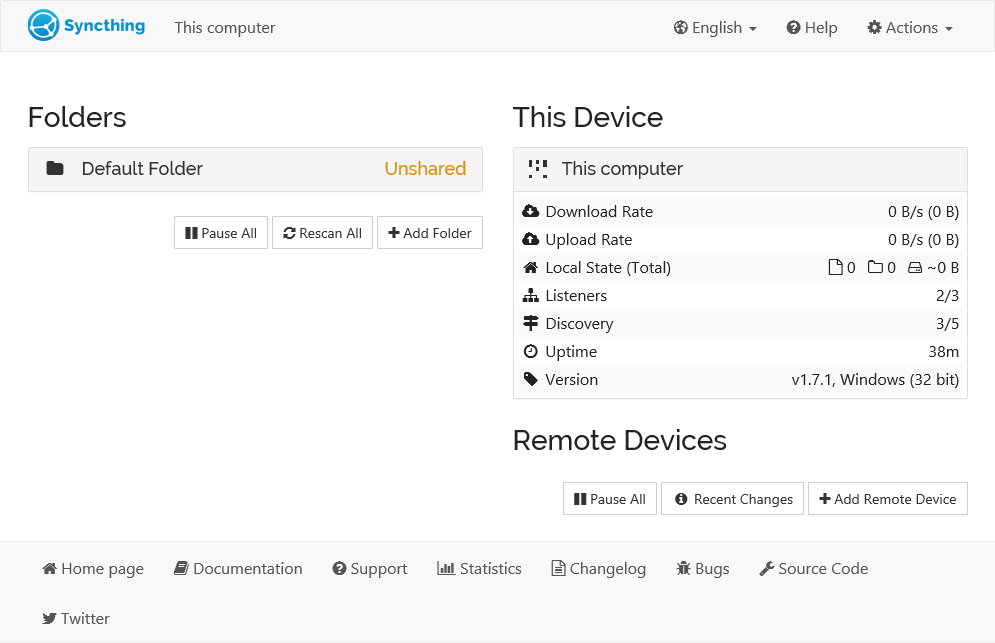
About Syncthing
Syncthing keeps the same folders on your computers, phone and ZimaOS, copying every change straight from device to device. Your files never pass through anyone else's server, and everything is encrypted on the way.
Features
- Two-way sync between any number of devices
- Apps for Windows, macOS, Linux and Android
- Works on your home network and over the internet
- File versions, so a deleted or changed file can be got back
- Send-only, receive-only and untrusted (encrypted) devices
- Share any folder under /DATA
How to use
- Open Syncthing from your dashboard.
- Set a user name and password under Actions > Settings > GUI.
- Install Syncthing on your other device and add each device's ID on the other (Add Remote Device).
- Add a folder, pick a path under /DATA, and share it with the other device.
Before you install
The web page has no password at first: right after installing, open http://[ZIMAOS-IP-ADDRESS]:6793 and set a user name and password under Actions > Settings > GUI. Syncthing uses host networking, so other devices find it on your network and sync over port 22000 (TCP and UDP) and discovery on 21027 (UDP); nothing else on the server may use those ports. Your ZimaOS storage is shared at /DATA, so a folder like /DATA/Documents can be synced. Settings and this device's ID are kept in /DATA/AppData/syncthing/syncthing/config. Everything else is set in the web page. It is ready in a few seconds.
| Variable | Default value | Description |
|---|---|---|
TZ | $TZ | Your time zone. It is filled in from your ZimaOS time zone. |
PUID | $PUID | The user Syncthing reads and writes your files as. It is filled in by ZimaOS. |
PGID | $PGID | The group Syncthing reads and writes your files as. It is filled in by ZimaOS. |
STGUIADDRESS | 0.0.0.0:6793 | Where the web page listens. Leave it at 0.0.0.0:6793, the same number as the app's port. |
name: syncthing

services:
  syncthing:
    image: syncthing/syncthing:2.1.7
    container_name: syncthing
    hostname: zimaos-syncthing
    restart: unless-stopped
    stop_grace_period: 30s
    network_mode: host
    environment:
      - TZ=$TZ
      - PUID=$PUID
      - PGID=$PGID
      - STGUIADDRESS=0.0.0.0:6793
    volumes:
      - type: bind
        source: /DATA/AppData/$AppID/syncthing
        target: /var/syncthing
        bind:
          create_host_path: true
      - type: bind
        source: /DATA
        target: /DATA
    healthcheck:
      test: ["CMD", "curl", "-fsS", "-m", "2", "-o", "/dev/null", "http://127.0.0.1:6793/rest/noauth/health"]
      interval: 60s
      timeout: 10s
      retries: 3
      start_period: 30s
    deploy:
      resources:
        limits:
          cpus: "2.00"
          memory: 1G
        reservations:
          cpus: "0.00"
          memory: 64M
    labels:
      icon: https://cdn.jsdelivr.net/gh/HSinghHira/IceStore@main/Apps/syncthing/icon.png
    x-casaos:
      id: com.icestore.syncthing
      envs:
        - container: TZ
          description:
            en_US: >-
              Your time zone. It is filled in from your ZimaOS time zone.
        - container: PUID
          description:
            en_US: >-
              The user Syncthing reads and writes your files as. It is
              filled in by ZimaOS.
        - container: PGID
          description:
            en_US: >-
              The group Syncthing reads and writes your files as. It is
              filled in by ZimaOS.
        - container: STGUIADDRESS
          description:
            en_US: >-
              Where the web page listens. Leave it at 0.0.0.0:6793, the
              same number as the app's port.
      volumes:
        - container: /var/syncthing
          description:
            en_US: >-
              Syncthing's settings, device keys and database, plus the
              Default Folder (Sync). Back up the config folder: it holds
              this device's ID.
        - container: /DATA
          description:
            en_US: >-
              Your ZimaOS storage, at the same path inside, so you can share
              any folder under /DATA.

x-casaos:
  id: com.icestore.syncthing
  architectures:
    - amd64
    - arm64
  main: syncthing
  author: HSinghHira
  category: Productivity
  developer: The Syncthing Foundation
  icon: https://cdn.jsdelivr.net/gh/HSinghHira/IceStore@main/Apps/syncthing/icon.png
  thumbnail: https://cdn.jsdelivr.net/gh/HSinghHira/IceStore@main/Apps/syncthing/screenshot-1.png
  screenshot_link:
    - https://cdn.jsdelivr.net/gh/HSinghHira/IceStore@main/Apps/syncthing/screenshot-1.png
  title:
    en_US: Syncthing
  tagline:
    en_US: Keeps folders in sync between your devices, with no cloud in between
  description:
    en_US: >-
      Syncthing keeps the same folders on your computers, phone and ZimaOS,
      copying every change straight from device to device. Your files never
      pass through anyone else's server, and everything is encrypted on
      the way.


      **Features**


      - Two-way sync between any number of devices

      - Apps for Windows, macOS, Linux and Android

      - Works on your home network and over the internet

      - File versions, so a deleted or changed file can be got back

      - Send-only, receive-only and untrusted (encrypted) devices

      - Share any folder under /DATA


      **How to use?**


      1. Open Syncthing from the ZimaOS dashboard.

      2. Set a user name and password under Actions > Settings > GUI.

      3. Install Syncthing on your other device and add each device's ID on
         the other (Add Remote Device).

      4. Add a folder, pick a path under /DATA, and share it with the other
         device.
  tips:
    before_install:
      en_US: >-
        1. Start the installation. It is ready in a few seconds.


        2. Open http://[ZIMAOS-IP-ADDRESS]:6793 right away.


        3. Go to Actions, then Settings, then GUI. Set a user name and a
           password, then Save. Until you do, anyone on your network can
           open it.


        4. To sync a folder you already have, add it with a path that
           starts with /DATA, like /DATA/Documents.
  index: /
  port_map: "6793"
  scheme: http
  is_uncontrolled: false
  version: "2.1.7"
  update_at: "2026-11-22"
  release_notes:
    en_US: |-
      - First IceStore release; the web page is on port 6793
      - The official syncthing/syncthing 2.1.7 image, on host networking so other devices find it on your network and sync on port 22000 directly
      - /DATA is shared at the same path, so any folder there can be synced
  repo: "https://github.com/syncthing/syncthing"
  support: "https://forum.syncthing.net/"
  docs: "https://docs.syncthing.net/"
Install Syncthing
Something not working with Syncthing?
Report it so it gets fixed, or ask for an app that is not here yet.
 ZimaOS
Add the store link, then find Syncthing in the App Store and install it.
 CasaOS
Add the store link, then find Syncthing in the App Store and install it.
 ReCasaOS
Add the store link, then find Syncthing in the App Store and install it.
 Homeio
Add the store link, then find Syncthing in the App Store and install it.
 MOS
Add the repository in MOS Hub Settings, then find Syncthing in Docker → MOS Hub and install it.


