
TEF Notes
Notes and tasks with a web app that works offline and an optional AI assistant.
- ghcr.io/hsinghhira/tef-notes:latest
- v0.8.0
- Updated 10 Nov 2026
- port 6718
- amd64 · arm64
- Productivity
- 2 stars
Screenshots
Open the app
About TEF Notes
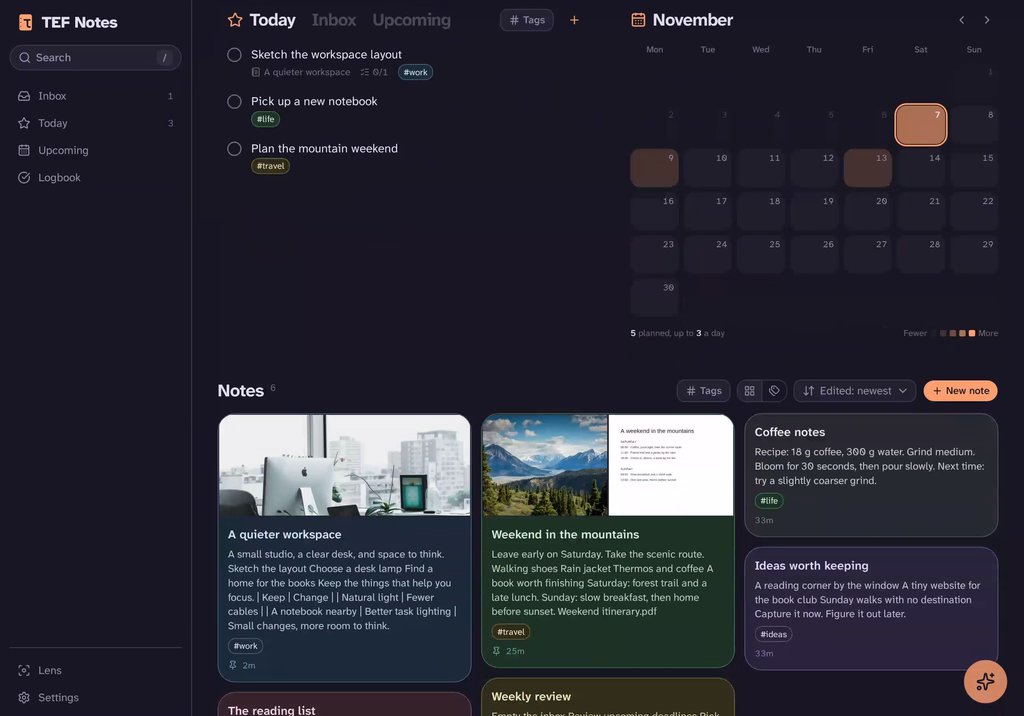
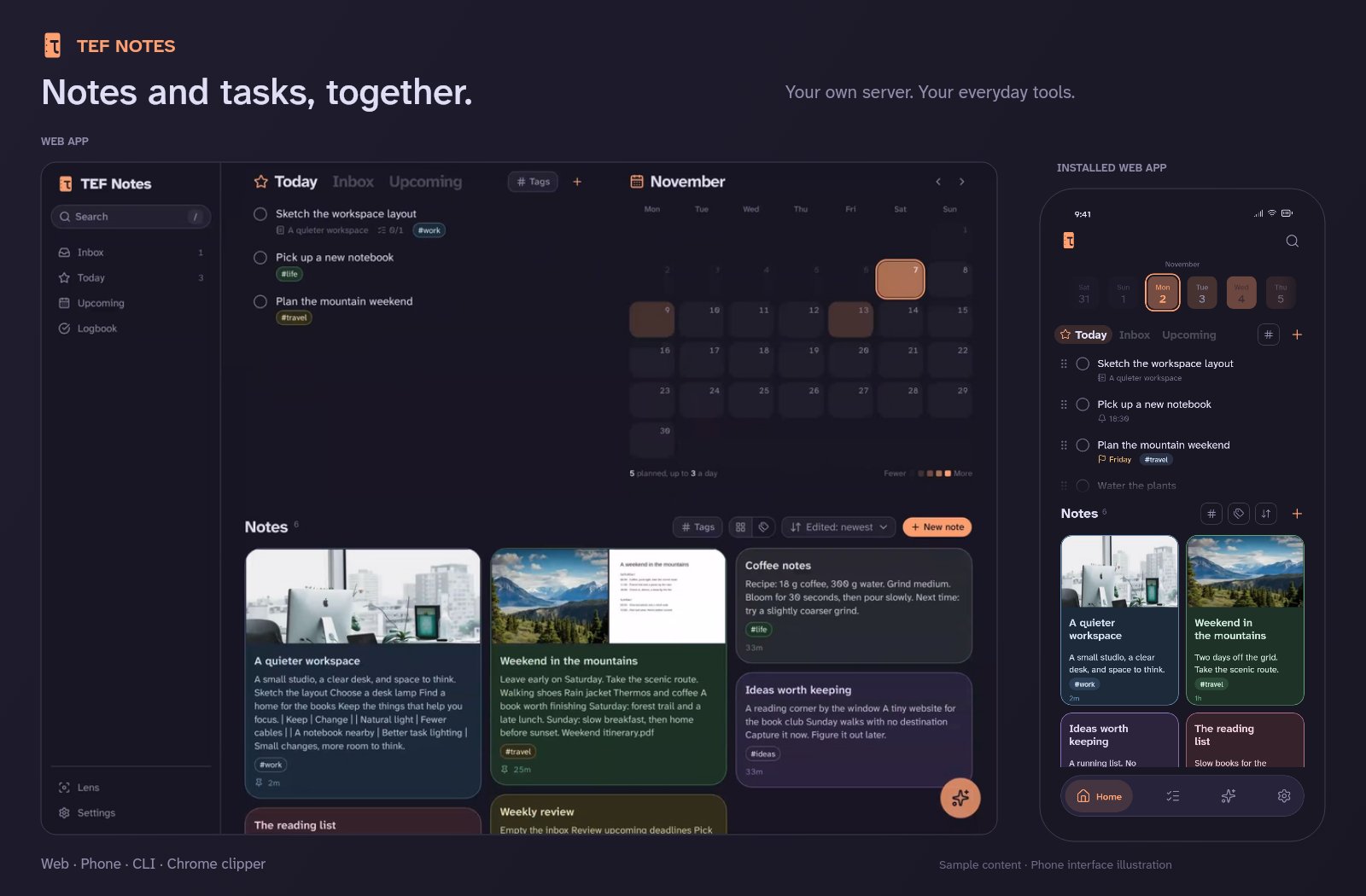
TEF Notes is a self-hosted home for notes and tasks: a web app you can install on your phone that works offline, a Chrome clipper, a CLI and an optional AI assistant that reads, writes and searches your notes. PocketBase, the assistant and voice input run inside this one container.
Features
- Notes with tags, images and attachments; tasks with Today, Upcoming and a calendar
- Works offline and installs as an app on Android (needs https)
- Optional AI assistant with the provider you choose (DeepSeek, Anthropic, OpenAI, Ollama and more) and search by meaning
- Voice input with speech-to-text on your server
- Task reminders as push notifications, a CLI and an MCP server
How to use
- Open TEF Notes from your dashboard.
- Write notes and add tasks; they sync to every device.
- For the assistant, set your provider's key in the app settings.
Before you install
TEF Notes has no sign-in. Anyone who can reach the port can read and change your notes, so keep it on your home network or behind a VPN like Tailscale, and never open it to the internet. The PocketBase admin UI at /_/ has its own login: on the first start PocketBase prints a one-time link in the logs to create it.
For the AI assistant set TEF_NOTES_PROVIDER and your key in TEF_NOTES_LLM_KEY; leave the key empty to use it without AI. Over plain http the web app works, but the microphone and "Install app" need https. Voice input downloads a speech model (~460 MB) the first time you use it. More settings are in the Variables tab.
The settings in the first table are already in the app settings. To use any other one, open the app settings, add the variable with your value, save, and the app restarts with it. A setting you leave out uses its default.
In the app settings
| Variable | Default value | Description |
|---|---|---|
TZ | $TZ | Your time zone. Notes are dated and task reminders ring by this zone's day and time. |
PUBLIC_ | http://localhost:6718 | The address you open TEF Notes at, like http://192.168.1.20:6718 or your https address. It is only shown in the logs; the app works from any address. |
TEF_ | deepseek | The AI model provider for the assistant and clip write-ups: deepseek, anthropic, openai, xai, qwen, zai or ollama. |
TEF_ | — | Your API key for that provider. Leave it empty to use TEF Notes without the AI assistant (Ollama needs none). |
AI assistant
| Variable | Default value | Description |
|---|---|---|
TEF_ | — | The model to use. Left out, the provider's default; Ollama needs a model you have pulled. |
TEF_ | — | The provider's API address, if not its own (for example another region). |
TEF_ | — | Your Ollama server with TEF_NOTES_PROVIDER=ollama, like http://192.168.1.20:11434. |
TEF_ | — | A JEV (typesafe) key for automatic tags and clip suggestions. |
TEF_ | — | An Exa key, so the assistant can search the web. |
TEF_ | 0 | Set to 1 to serve the note and task tools to other agents (Claude Code, Cursor...) at /agent/mcp. |
Voice input
| Variable | Default value | Description |
|---|---|---|
TEF_ | http://127.0.0.1:8099 | Set it empty to turn voice input off (nothing is downloaded then). |
Reminders
| Variable | Default value | Description |
|---|---|---|
TEF_ | — | A mailto: or https address the push services may reach you at. Task reminders on phones are off until it is set. |
TEF_ | — | Your own VAPID private key. Left out, one is made on first start. |
name: tef-notes

services:
  tef-notes:
    image: ghcr.io/hsinghhira/tef-notes:latest
    container_name: tef-notes
    restart: unless-stopped
    stop_grace_period: 60s
    privileged: true
    environment:
      - TZ=$TZ
      - PUBLIC_URL=http://localhost:6718
      - TEF_NOTES_PROVIDER=deepseek
      - TEF_NOTES_LLM_KEY=
    ports:
      - target: 8080
        published: "6718"
        protocol: tcp
    volumes:
      - type: bind
        source: /DATA/AppData/$AppID/data
        target: /data
        bind:
          create_host_path: true
    healthcheck:
      test: ["CMD", "curl", "-fsS", "-o", "/dev/null", "http://127.0.0.1:8080/api/health"]
      interval: 30s
      timeout: 10s
      retries: 5
      start_period: 90s
    deploy:
      resources:
        limits:
          cpus: "2.00"
          memory: 2048M
        reservations:
          cpus: "0.10"
          memory: 192M
    labels:
      icon: https://cdn.jsdelivr.net/gh/HSinghHira/IceStore@main/Apps/tef-notes/icon.png
    x-casaos:
      id: com.icestore.tef-notes
      envs:
        - container: TZ
          description:
            en_US: >-
              Your time zone. Notes are dated and task reminders ring by this
              zone's day and time.
        - container: PUBLIC_URL
          description:
            en_US: >-
              The address you open TEF Notes at, like http://192.168.1.20:6718
              or your https address. It is only shown in the logs; the app
              works from any address.
        - container: TEF_NOTES_PROVIDER
          description:
            en_US: >-
              The AI model provider for the assistant and clip write-ups:
              deepseek, anthropic, openai, xai, qwen, zai or ollama.
        - container: TEF_NOTES_LLM_KEY
          description:
            en_US: >-
              Your API key for that provider. Leave it empty to use TEF Notes
              without the AI assistant (Ollama needs none).
      ports:
        - container: "8080"
          description:
            en_US: TEF Notes web app, API (/api), agent (/agent) and PocketBase admin (/_/), published on host as 6718
      volumes:
        - container: /data
          description:
            en_US: >-
              The notes database (pb_data/), the agent's search index
              (agent/), the speech model (stt/), the key files (keys/) and the
              push key (state/). Back up the whole folder.

x-casaos:
  id: com.icestore.tef-notes
  architectures:
    - amd64
    - arm64
  main: tef-notes
  author: HSinghHira
  category: Productivity
  developer: spyrosbazios
  icon: https://cdn.jsdelivr.net/gh/HSinghHira/IceStore@main/Apps/tef-notes/icon.png
  thumbnail: https://cdn.jsdelivr.net/gh/HSinghHira/IceStore@main/Apps/tef-notes/screenshot-1.jpg
  screenshot_link:
    - https://cdn.jsdelivr.net/gh/HSinghHira/IceStore@main/Apps/tef-notes/screenshot-1.jpg
    - https://cdn.jsdelivr.net/gh/HSinghHira/IceStore@main/Apps/tef-notes/screenshot-2.jpg
  title:
    en_US: TEF Notes
  tagline:
    en_US: Notes and tasks with a web app that works offline and an optional AI assistant.
  description:
    en_US: >-
      Visit: [https://icestore.hsinghhira.me/app/tef-notes/](https://icestore.hsinghhira.me/app/tef-notes/) for full details


      TEF Notes is a self-hosted home for notes and tasks: a web app you can
      install on your phone that works offline, a Chrome clipper, a CLI and
      an optional AI assistant that reads, writes and searches your notes.
      PocketBase, the assistant and voice input run inside this one
      container.


      **Features**


      - Notes with tags, images and attachments; tasks with Today, Upcoming
        and a calendar

      - Works offline and installs as an app on Android (needs https)

      - Optional AI assistant with the provider you choose (DeepSeek,
        Anthropic, OpenAI, Ollama and more) and search by meaning

      - Voice input with speech-to-text on your server

      - Task reminders as push notifications, a CLI and an MCP server


      **How to use?**


      1. Open TEF Notes from the Zima OS dashboard.


      2. Write notes and add tasks; they sync to every device.


      3. For the assistant, set your provider's key in the app settings.
  tips:
    before_install:
      en_US: >-
        1. TEF Notes has no sign-in. Anyone who can reach it can read your
           notes, so keep it on your home network or behind a VPN, and never
           open the port to the internet.


        2. For the AI assistant, set TEF_NOTES_PROVIDER and your key in
           TEF_NOTES_LLM_KEY. Leave the key empty to use it without AI.


        3. Start the installation. It is ready in about a minute.


        4. Open TEF Notes from your dashboard. The microphone and "Install
           app" only work over https, for example through a VPN like
           Tailscale.


        5. More settings (the model, Ollama, web search, reminders) are
           listed on the TEF Notes page at
           https://icestore.hsinghhira.me/app/tef-notes/ (Variables tab).
  index: /
  port_map: "6718"
  scheme: http
  is_uncontrolled: false
  version: "0.8.0"
  update_at: "2026-11-10"
  release_notes:
    en_US: |-
      - First IceStore release: upstream's three services in one container on port 6718, with / to PocketBase and /agent to the agent as upstream's one-origin proxy rule asks.
      - AI keys are set as app settings and written to the key files upstream reads; a push (VAPID) key is made on first start.
      - tef-notes 0.8.0
      - tef-notes-agent 0.8.0
      - tef-notes-stt 0.8.0
  repo: "https://github.com/spyrosbazios/tef-notes"
  support: "https://github.com/spyrosbazios/tef-notes/issues"
  docs: "https://github.com/spyrosbazios/tef-notes/blob/main/server/README.md"
Install TEF Notes
Something not working with TEF Notes?
Report it so it gets fixed, or ask for an app that is not here yet.
 ZimaOS
Add the store link, then find TEF Notes in the App Store and install it.
 CasaOS
Add the store link, then find TEF Notes in the App Store and install it.
 ReCasaOS
Add the store link, then find TEF Notes in the App Store and install it.
 Homeio
Add the store link, then find TEF Notes in the App Store and install it.
 MOS
Add the repository in MOS Hub Settings, then find TEF Notes in Docker → MOS Hub and install it.


