
Umami
Privacy-friendly website analytics, a Google Analytics alternative
- ghcr.io/hsinghhira/umami:latest
- v3.5.0
- Updated 20 Nov 2026
- port 6750
- amd64 · arm64
- Others
- 40.3k stars
Screenshots
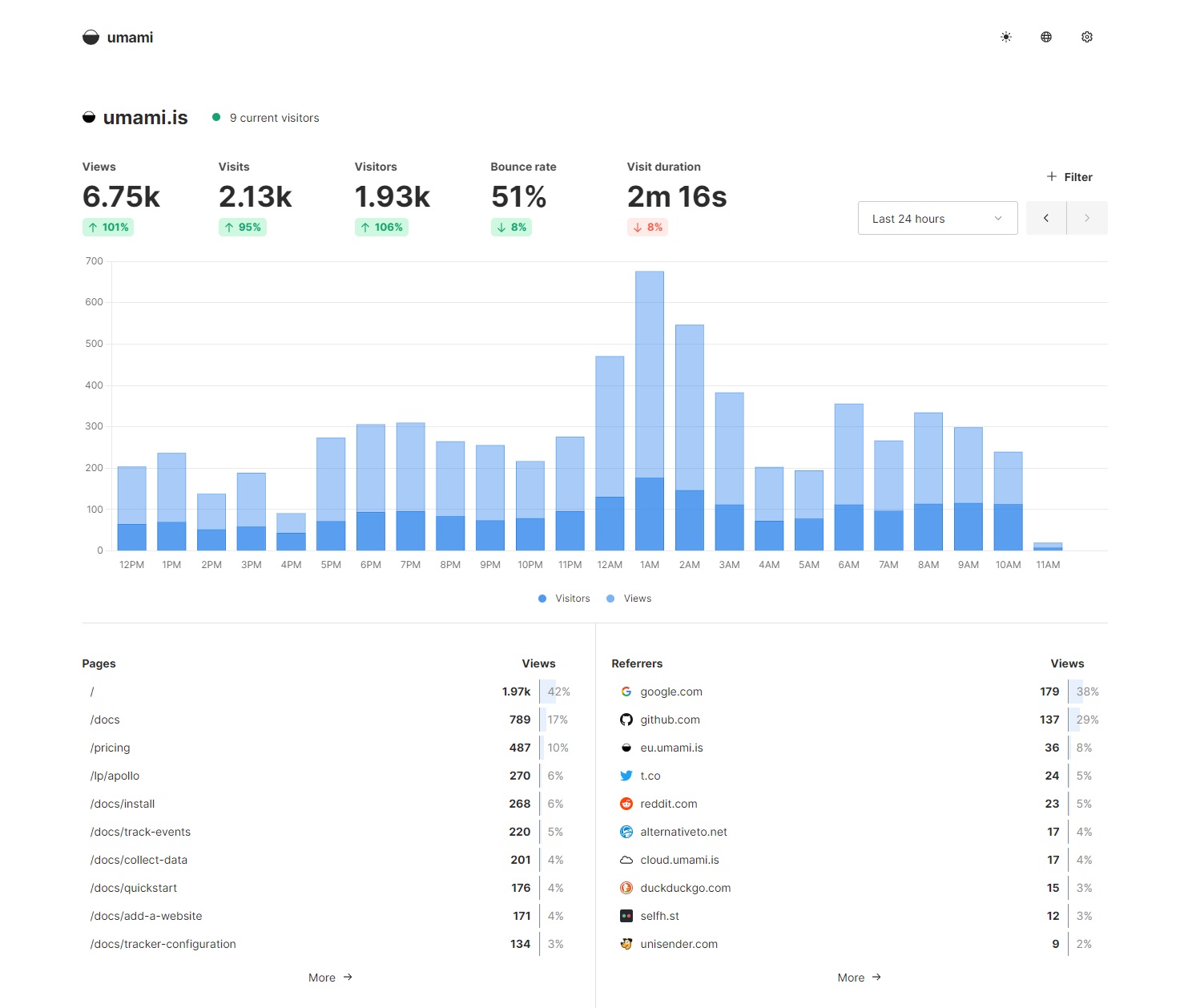
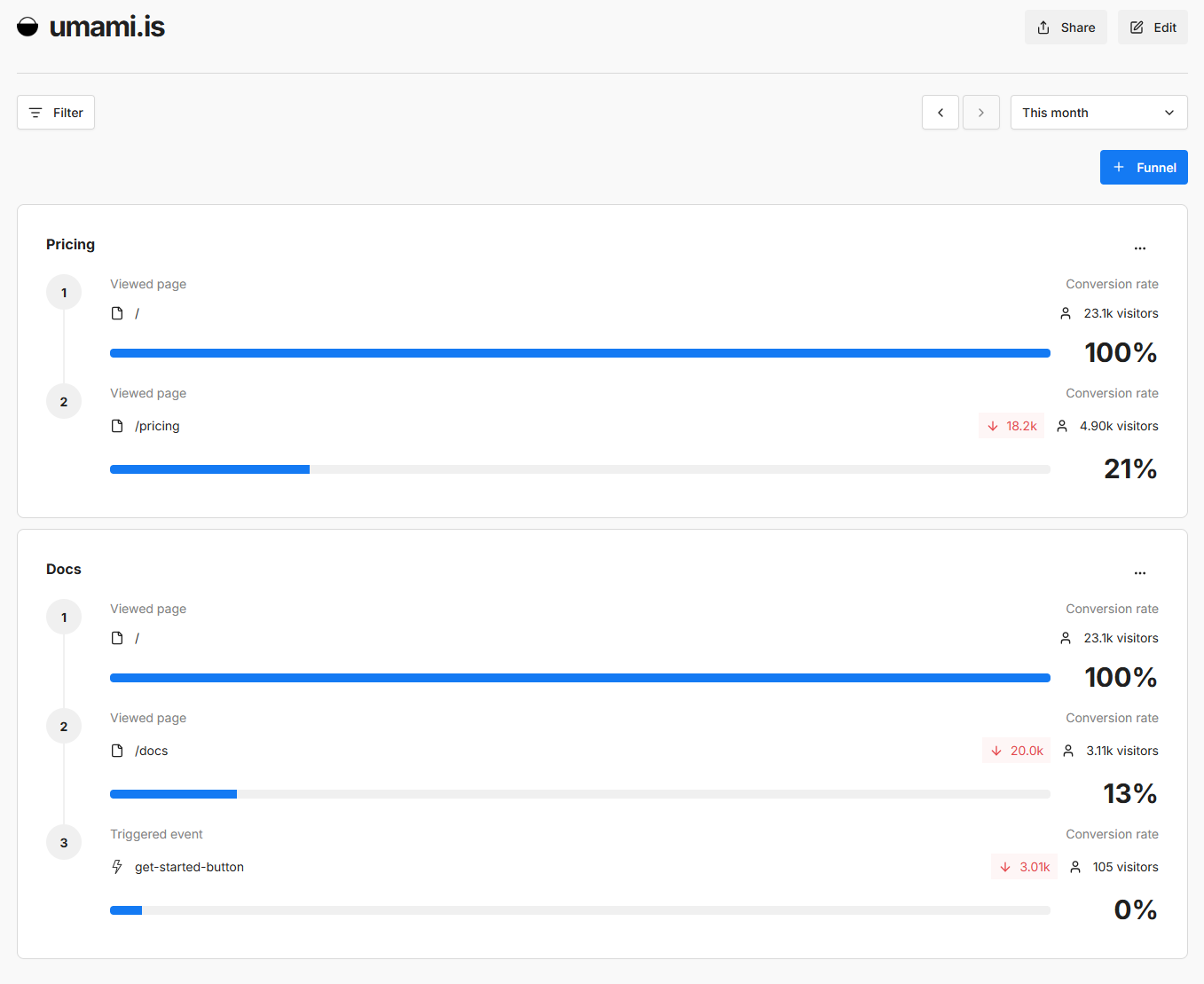
Open the app
About Umami
Umami shows you who visits your websites, where they come from and what they do, without cookies and without tracking people across the web. PostgreSQL is built in, so it is one container.
Features
- Visitors, page views, bounce rate and visit time on one simple dashboard
- Where people come from: referrers, countries, browsers and devices
- Custom events, funnels, user journeys and retention reports
- No cookies and no personal data, so most sites need no cookie banner
- As many websites, users and teams as you like, plus share links
- A small tracker script (about 2 KB) and a full API
How to use
- Open Umami from your dashboard.
- Sign in as
adminwith the password from the app's logs (the box marked CREDENTIALS). - Go to Settings, Websites and add your website.
- Copy its tracking code and paste it into the
<head>of your site. - Open your site once, then watch the visit show up on the dashboard.
Before you install
You can leave ADMIN_PASSWORD empty: on first start Umami's built-in admin/umami login is replaced with a password made for this install, shown in the app's logs in the box marked CREDENTIALS. Once you change it in Umami, yours is kept. Open it from other devices at http://[ZIMAOS-IP-ADDRESS]:6750. Your websites must be able to reach that address to send visits, so for sites on the internet put a domain with https in front of it. More settings are in the Variables tab; add them in the app settings. The first start takes about 2 minutes.
The settings in the first table are already in the app settings. To use any other one, open the app settings, add the variable with your value, save, and the app restarts with it. A setting you leave out uses its default.
In the app settings
| Variable | Default value | Description |
|---|---|---|
TZ | $TZ | Your time zone. It is filled in from your ZimaOS time zone. Leave it unless you need another. |
ADMIN_ | — | The password for the admin account. Leave it empty and one is made for you: it is shown in the app's logs, in the box marked CREDENTIALS. Only used while admin still has Umami's built-in password; once you change it in Umami, yours is kept. |
Server
| Variable | Default value | Description |
|---|---|---|
DISABLE_ | 1 | Set to 0 to send anonymous usage numbers to the Umami team. |
DISABLE_ | — | Set to 1 to stop checking for new Umami versions. |
DISABLE_ | — | Set to 1 to turn off the sign-in page, so only share links work. |
PRIVATE_ | — | Set to 1 to hide Umami's own links and branding. |
FORCE_ | — | Set to 1 to send the Strict-Transport-Security header, when Umami is only reached over https. |
DEFAULT_ | — | The language of the dashboard for new users, like de-DE or fr-FR. |
DEFAULT_ | — | The currency for revenue reports, like EUR. |
Tracking
| Variable | Default value | Description |
|---|---|---|
TRACKER_ | — | Other names for the tracker script, like stats.js, so ad blockers miss it. Separate several with commas. |
COLLECT_ | — | Another path for the collect API instead of /api/send, like /api/collect. |
CLIENT_ | — | The header your reverse proxy puts the visitor's IP in, like CF-Connecting-IP for Cloudflare. |
IGNORE_ | — | IP addresses or ranges not to count, separated by commas, like 192.168.1.0/24. |
DISABLE_ | — | Set to 1 to count visits from bots too. |
CORS_ | 86400 | How long browsers may cache the CORS answer, in seconds. |
Logs
| Variable | Default value | Description |
|---|---|---|
LOG_ | — | Set to 1 to log every database query. |
DEBUG | — | Parts to log in detail, like umami:*. |
name: umami

services:
  umami:
    image: ghcr.io/hsinghhira/umami:latest
    container_name: umami
    restart: unless-stopped
    stop_grace_period: 90s
    privileged: true
    environment:
      - TZ=$TZ
      - ADMIN_PASSWORD=
    ports:
      - target: 8080
        published: "6750"
        protocol: tcp
    volumes:
      - type: bind
        source: /DATA/AppData/$AppID/data
        target: /data
        bind:
          create_host_path: true
    healthcheck:
      test: ["CMD", "curl", "-fsS", "-o", "/dev/null", "http://127.0.0.1:8080/api/heartbeat"]
      interval: 30s
      timeout: 10s
      retries: 5
      start_period: 180s
    deploy:
      resources:
        limits:
          cpus: "1.50"
          memory: 1536M
        reservations:
          cpus: "0.10"
          memory: 256M
    labels:
      icon: https://cdn.jsdelivr.net/gh/HSinghHira/IceStore@main/Apps/umami/icon.png
    x-casaos:
      id: com.icestore.umami
      envs:
        - container: TZ
          description:
            en_US: >-
              Your time zone. It is filled in from your ZimaOS time zone.
              Leave it unless you need another.
        - container: ADMIN_PASSWORD
          description:
            en_US: >-
              The password for the admin account. Leave it empty and one is
              made for you: it is shown in the app's logs, in the box marked
              CREDENTIALS. Only used while admin still has Umami's built-in
              password; once you change it in Umami, yours is kept.
      ports:
        - container: "8080"
          description:
            en_US: Umami dashboard, tracker script and collect API, published on host as 6750
      volumes:
        - container: /data
          description:
            en_US: >-
              The PostgreSQL database with your websites and visits, and
              state/secrets.env, this install's own keys made on first
              start. Back it up.

x-casaos:
  id: com.icestore.umami
  architectures:
    - amd64
    - arm64
  main: umami
  author: HSinghHira
  category: Others
  developer: Umami Software
  icon: https://cdn.jsdelivr.net/gh/HSinghHira/IceStore@main/Apps/umami/icon.png
  thumbnail: https://cdn.jsdelivr.net/gh/HSinghHira/IceStore@main/Apps/umami/screenshot-1.jpg
  screenshot_link:
    - https://cdn.jsdelivr.net/gh/HSinghHira/IceStore@main/Apps/umami/screenshot-1.jpg
    - https://cdn.jsdelivr.net/gh/HSinghHira/IceStore@main/Apps/umami/screenshot-2.png
  title:
    en_US: Umami
  tagline:
    en_US: Privacy-friendly website analytics, a Google Analytics alternative
  description:
    en_US: >-
      Umami shows you who visits your websites, where they come from and
      what they do, without cookies and without tracking people across the
      web. PostgreSQL is built in, so it is one container.


      **Features**


      - Visitors, page views, bounce rate and visit time on one simple
        dashboard

      - Where people come from: referrers, countries, browsers and devices

      - Custom events, funnels, user journeys and retention reports

      - No cookies and no personal data, so most sites need no cookie
        banner

      - As many websites, users and teams as you like, plus share links

      - A small tracker script (about 2 KB) and a full API


      **How to use?**


      1. Open Umami from the ZimaOS dashboard.

      2. Sign in as admin with the password from the app's logs (the box
         marked CREDENTIALS).

      3. Go to Settings, Websites and add your website.

      4. Copy its tracking code and paste it into the head of your site.

      5. Open your site once, then watch the visit show up on the
         dashboard.
  tips:
    before_install:
      en_US: >-
        1. You can leave ADMIN_PASSWORD empty. A password is made for you.


        2. More settings, like hiding the update check or renaming the
           tracker script, are listed on the Umami page at
           https://icestore.hsinghhira.me/app/umami/ (Variables tab). You
           can add them now or later in the app settings.


        3. Start the installation. The first start takes about 2 minutes.


        4. Open the app's logs. Find the box marked CREDENTIALS. It has the
           admin password.


        5. Open http://[ZIMAOS-IP-ADDRESS]:6750 and sign in as admin.


        6. Your websites must reach this address to send visits. For sites
           on the internet, put a domain with https in front of it.
  index: /
  port_map: "6750"
  scheme: http
  is_uncontrolled: false
  version: "3.5.0"
  update_at: "2026-11-20"
  release_notes:
    en_US: |-
      - First IceStore release, on port 6750
      - All in one container: ghcr.io/umami-software/umami 3.5.0, PostgreSQL 15 and an nginx gateway
      - Each install makes its own APP_SECRET, TWO_FACTOR_ENCRYPTION_KEY and database password on first start
      - The built-in admin/umami login is replaced with this install's own password on first start
  repo: "https://github.com/umami-software/umami"
  support: "https://github.com/umami-software/umami/issues"
  docs: "https://umami.is/docs"
Install Umami
Something not working with Umami?
Report it so it gets fixed, or ask for an app that is not here yet.
 ZimaOS
Add the store link, then find Umami in the App Store and install it.
 CasaOS
Add the store link, then find Umami in the App Store and install it.
 ReCasaOS
Add the store link, then find Umami in the App Store and install it.
 Homeio
Add the store link, then find Umami in the App Store and install it.
 MOS
Add the repository in MOS Hub Settings, then find Umami in Docker → MOS Hub and install it.


