
Warracker
Keeps track of product warranties, receipts and expiry dates
- ghcr.io/hsinghhira/warracker:latest
- v1.0.6
- Updated 21 Nov 2026
- port 6769
- amd64 · arm64
- Home
- 1.6k stars
Screenshots
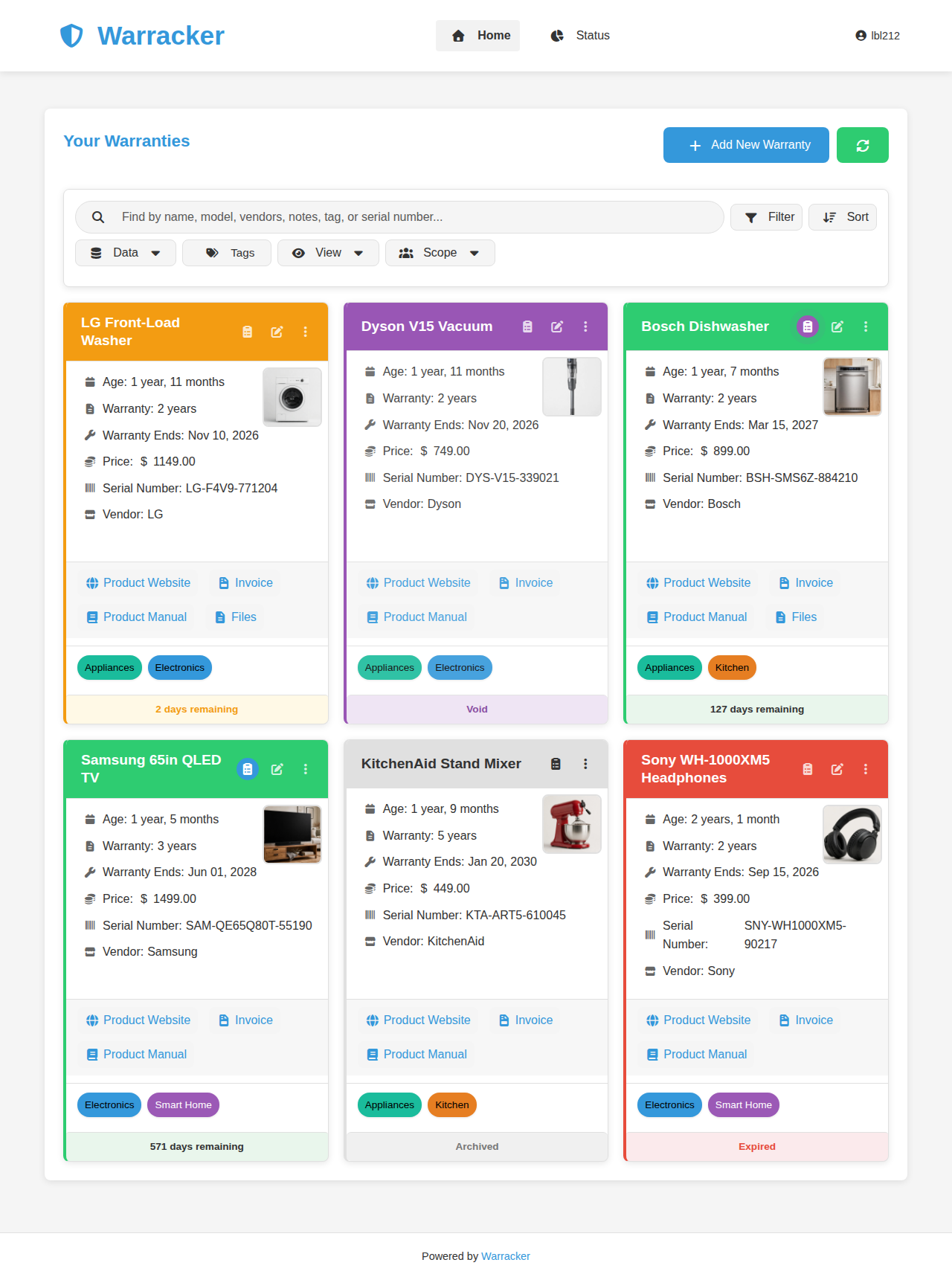
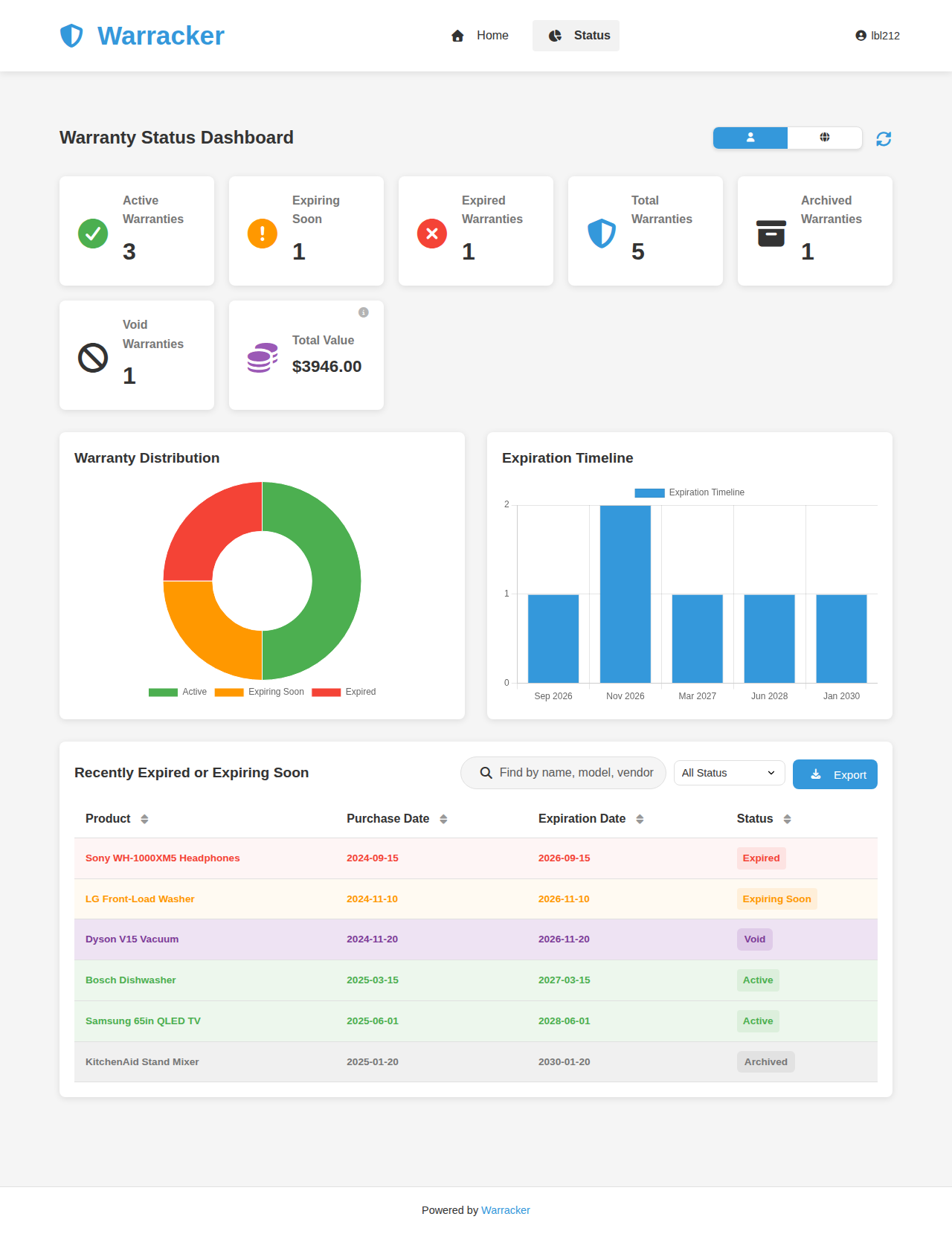
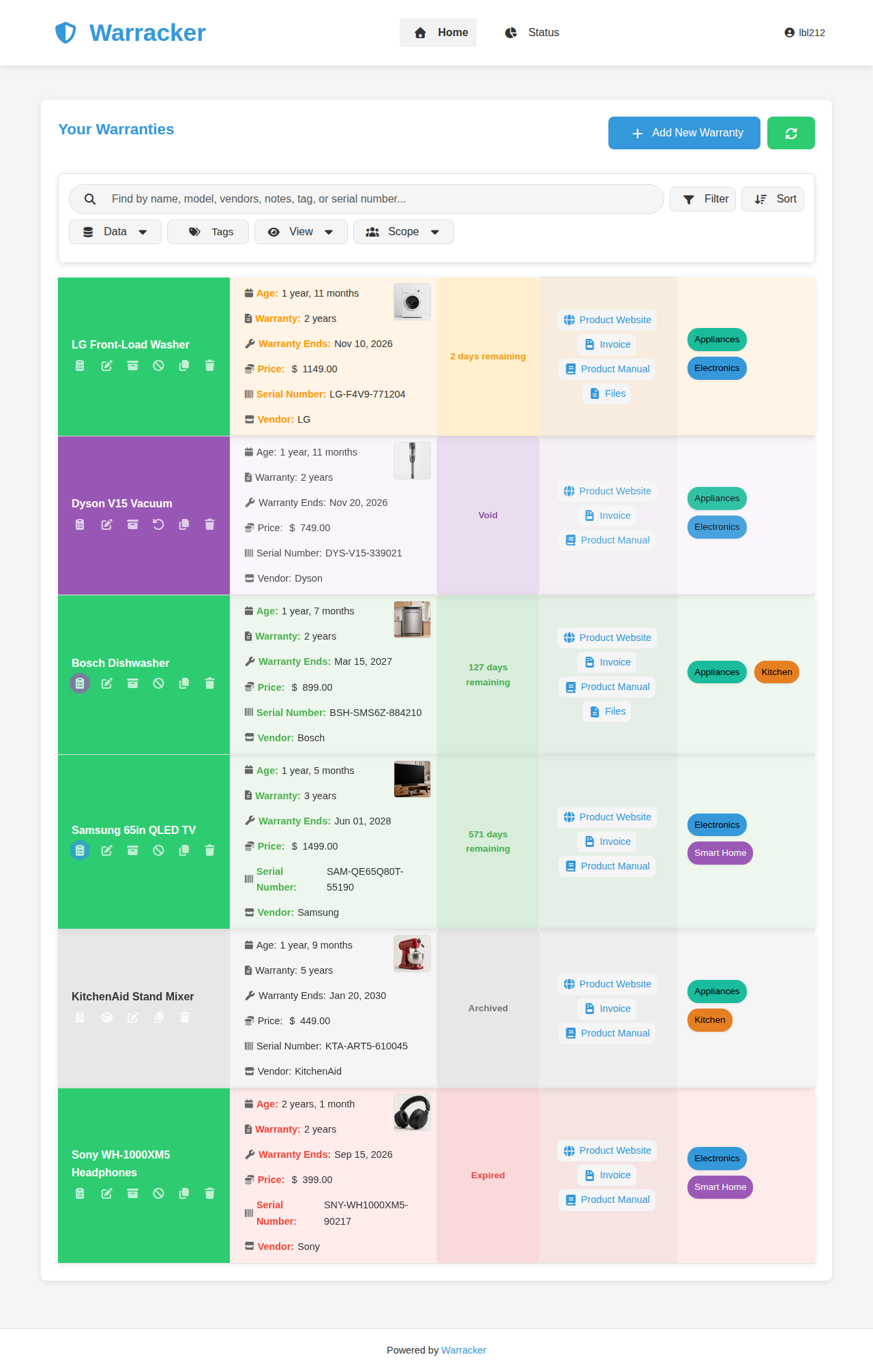
Open the app
About Warracker
Warracker keeps every warranty in one place: what you bought, when, the receipt and manual, and when the warranty runs out. It reminds you before a warranty ends. The PostgreSQL database is built in, so it is one container with nothing else to set up.
Features
- Warranties with purchase date, length, price, serial numbers and notes
- Receipts, invoices, manuals and photos attached to each item
- Reminders by email or Apprise (Discord, Telegram, ntfy and more)
- Dashboard of what is active, ending soon and expired
- Tags, search, CSV import and export
- Several users, with an admin, and single sign-on (OIDC)
- Paperless-ngx link for your documents
How to use
- Open Warracker from your dashboard.
- Click Register and make your account. The first account is the admin.
- Click Add Warranty and fill in the product, the dates and the receipt.
- Turn on reminders in Settings.
Before you install
You can install it as it is and open it at http://[ZIMAOS-IP-ADDRESS]:6769. There is no account yet: click Register, and the first account you make is the admin. The database password and the secret key are made for you on first start and kept in /DATA/AppData/warracker/data. Email, Apprise reminders, single sign-on and the address used in email links (FRONTEND_URL) are in the Variables tab and are added in the app settings. It is ready in about a minute.
The settings in the first table are already in the app settings. To use any other one, open the app settings, add the variable with your value, save, and the app restarts with it. A setting you leave out uses its default.
In the app settings
| Variable | Default value | Description |
|---|---|---|
TZ | $TZ | Your time zone. It is filled in from your ZimaOS time zone and used for reminder times. |
MAX_ | 32 | The biggest file you can attach (receipts, manuals, photos), in MB. |
NGINX_ | 32M | The same limit for the built-in web server. Keep it the same as MAX_UPLOAD_MB, with an M at the end, like 32M. |
Server
| Variable | Default value | Description |
|---|---|---|
FRONTEND_ | http://localhost:6769 | The address you open Warracker at, like http://192.168.1.20:6769. Used in email links and for single sign-on redirects. |
TRUST_ | false | Set to true only when a reverse proxy on a public IP is in front of Warracker. Proxies on your own network are trusted already. |
WARRACKER_ | optimized | optimized, or ultra-light for small machines with little memory. |
JWT_ | 24 | How many hours people stay signed in. |
PHOTO_ | 60 | How long to wait when fetching a product photo from a link, in seconds. |
Email (SMTP)
| Variable | Default value | Description |
|---|---|---|
SMTP_ | — | Your email server, like smtp.gmail.com, for password resets and reminders. |
SMTP_ | 587 | Your email server port, usually 587 or 465. |
SMTP_ | — | The user name for your email server. |
SMTP_ | — | The password for your email server. |
SMTP_ | — | The address emails are sent from. |
SMTP_ | true | Use STARTTLS. Set to false for a server without it. |
Apprise reminders
| Variable | Default value | Description |
|---|---|---|
APPRISE_ | false | Set to true to send reminders through Apprise. |
APPRISE_ | — | Where to send reminders, comma separated Apprise links like ntfy://topic or discord://webhook_id/webhook_token. |
APPRISE_ | 7,30 | How many days before a warranty ends to remind you, comma separated. |
APPRISE_ | 09:00 | The time of day reminders are sent, as HH:MM. |
APPRISE_ | [Warracker] | Text at the start of every reminder title. |
Single sign-on (OIDC)
| Variable | Default value | Description |
|---|---|---|
OIDC_ | oidc | The name shown on the sign-in button. |
OIDC_ | — | The client ID from your sign-in provider. |
OIDC_ | — | The client secret from your sign-in provider. |
OIDC_ | — | Your provider's issuer address, like https://auth.example.com/realms/home. |
OIDC_ | openid email profile | The scopes Warracker asks for. |
OIDC_ | — | People in this group become admins (needs the groups scope). |
name: warracker

services:
  warracker:
    image: ghcr.io/hsinghhira/warracker:latest
    container_name: warracker
    restart: unless-stopped
    stop_grace_period: 60s
    network_mode: bridge
    environment:
      - TZ=$TZ
      - MAX_UPLOAD_MB=32
      - NGINX_MAX_BODY_SIZE_VALUE=32M
    ports:
      - target: 80
        published: "6769"
        protocol: tcp
    volumes:
      - type: bind
        source: /DATA/AppData/$AppID/data
        target: /data
        bind:
          create_host_path: true
    healthcheck:
      test: ["CMD", "curl", "-fsS", "-o", "/dev/null", "http://127.0.0.1:80/api/health"]
      interval: 30s
      timeout: 10s
      retries: 5
      start_period: 120s
    deploy:
      resources:
        limits:
          cpus: "1.00"
          memory: 1024M
        reservations:
          cpus: "0.05"
          memory: 192M
    labels:
      icon: https://cdn.jsdelivr.net/gh/HSinghHira/IceStore@main/Apps/warracker/icon.png
    x-casaos:
      id: com.icestore.warracker
      envs:
        - container: TZ
          description:
            en_US: >-
              Your time zone. It is filled in from your ZimaOS time zone and
              used for reminder times.
        - container: MAX_UPLOAD_MB
          description:
            en_US: >-
              The biggest file you can attach (receipts, manuals, photos), in
              MB.
        - container: NGINX_MAX_BODY_SIZE_VALUE
          description:
            en_US: >-
              The same limit for the built-in web server. Keep it the same as
              MAX_UPLOAD_MB, with an M at the end, like 32M.
      ports:
        - container: "80"
          description:
            en_US: Warracker web UI and API, published on host as 6769
      volumes:
        - container: /data
          description:
            en_US: >-
              Everything Warracker keeps: the PostgreSQL database (postgres),
              your uploaded receipts and files (uploads) and this install's
              own keys (secrets.env, uploads/.secret_key). Back it up.

x-casaos:
  id: com.icestore.warracker
  architectures:
    - amd64
    - arm64
  main: warracker
  author: HSinghHira
  category: Home
  developer: sassanix
  icon: https://cdn.jsdelivr.net/gh/HSinghHira/IceStore@main/Apps/warracker/icon.png
  thumbnail: https://cdn.jsdelivr.net/gh/HSinghHira/IceStore@main/Apps/warracker/screenshot-1.png
  screenshot_link:
    - https://cdn.jsdelivr.net/gh/HSinghHira/IceStore@main/Apps/warracker/screenshot-1.png
    - https://cdn.jsdelivr.net/gh/HSinghHira/IceStore@main/Apps/warracker/screenshot-2.png
    - https://cdn.jsdelivr.net/gh/HSinghHira/IceStore@main/Apps/warracker/screenshot-3.png
  title:
    en_US: Warracker
  tagline:
    en_US: Keeps track of product warranties, receipts and expiry dates
  description:
    en_US: >-
      Warracker keeps every warranty in one place: what you bought, when,
      the receipt and manual, and when the warranty runs out. It reminds you
      before a warranty ends. The PostgreSQL database is built in, so it is
      one container with nothing else to set up.


      **Features**


      - Warranties with purchase date, length, price, serial numbers and notes

      - Receipts, invoices, manuals and photos attached to each item

      - Reminders by email or Apprise (Discord, Telegram, ntfy and more)

      - Dashboard of what is active, ending soon and expired

      - Tags, search, CSV import and export

      - Several users, with an admin, and single sign-on (OIDC)

      - Paperless-ngx link for your documents


      **How to use?**


      1. Open Warracker from the ZimaOS dashboard.

      2. Click Register and make your account. The first account is the
         admin.

      3. Click Add Warranty and fill in the product, the dates and the
         receipt.

      4. Turn on reminders in Settings.
  tips:
    before_install:
      en_US: >-
        1. More settings, like email, Apprise reminders and the address
           used in email links (FRONTEND_URL), are listed on the Warracker
           page at
           https://icestore.hsinghhira.me/app/warracker/ (Variables tab).
           You can add them now or later in the app settings.


        2. Start the installation. It is ready in about a minute.


        3. Open http://[ZIMAOS-IP-ADDRESS]:6769 and click Register. The
           first account you make is the admin.
  index: /
  port_map: "6769"
  scheme: http
  is_uncontrolled: false
  version: "1.0.6"
  update_at: "2026-11-21"
  release_notes:
    en_US: |-
      - First IceStore release, on port 6769
      - Built on ghcr.io/sassanix/warracker/main 1.0.6, with PostgreSQL 17 inside the same container
      - Each install makes its own database password on first start; Warracker makes its own secret key, and the first account you register is the admin
  repo: "https://github.com/sassanix/Warracker"
  support: "https://github.com/sassanix/Warracker/issues"
  docs: "https://github.com/sassanix/Warracker#readme"
Install Warracker
Something not working with Warracker?
Report it so it gets fixed, or ask for an app that is not here yet.
 ZimaOS
Add the store link, then find Warracker in the App Store and install it.
 CasaOS
Add the store link, then find Warracker in the App Store and install it.
 ReCasaOS
Add the store link, then find Warracker in the App Store and install it.
 Homeio
Add the store link, then find Warracker in the App Store and install it.
 MOS
Add the repository in MOS Hub Settings, then find Warracker in Docker → MOS Hub and install it.


