
WatchSense
TV series recommendations from your own viewing history and an AI model you pick
- ghcr.io/peppeg/watchsense:1.1.1
- v1.1.1
- Updated 29 Oct 2026
- port 6173
- amd64 · arm64
- Media
- 0 stars
Screenshots
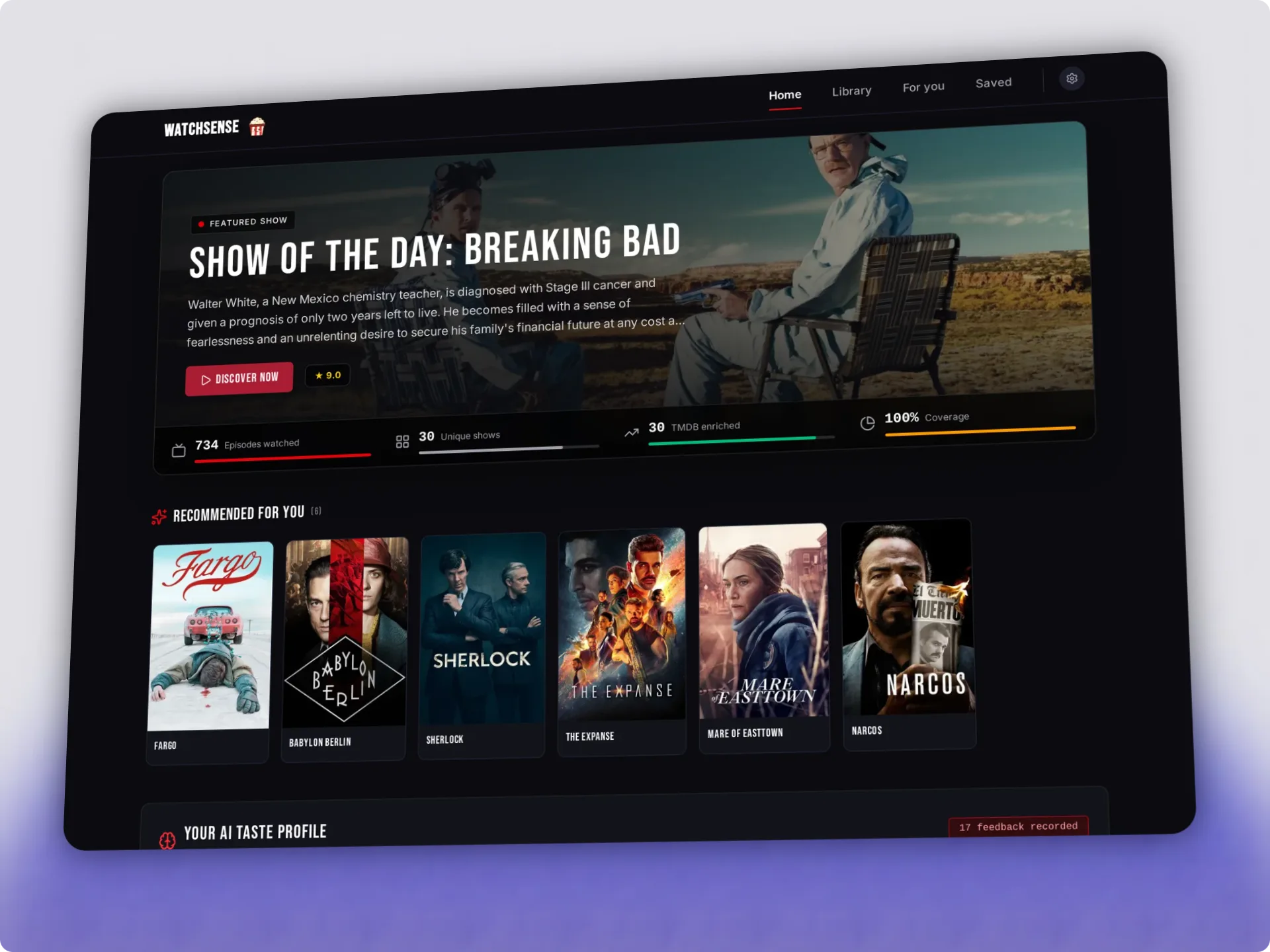
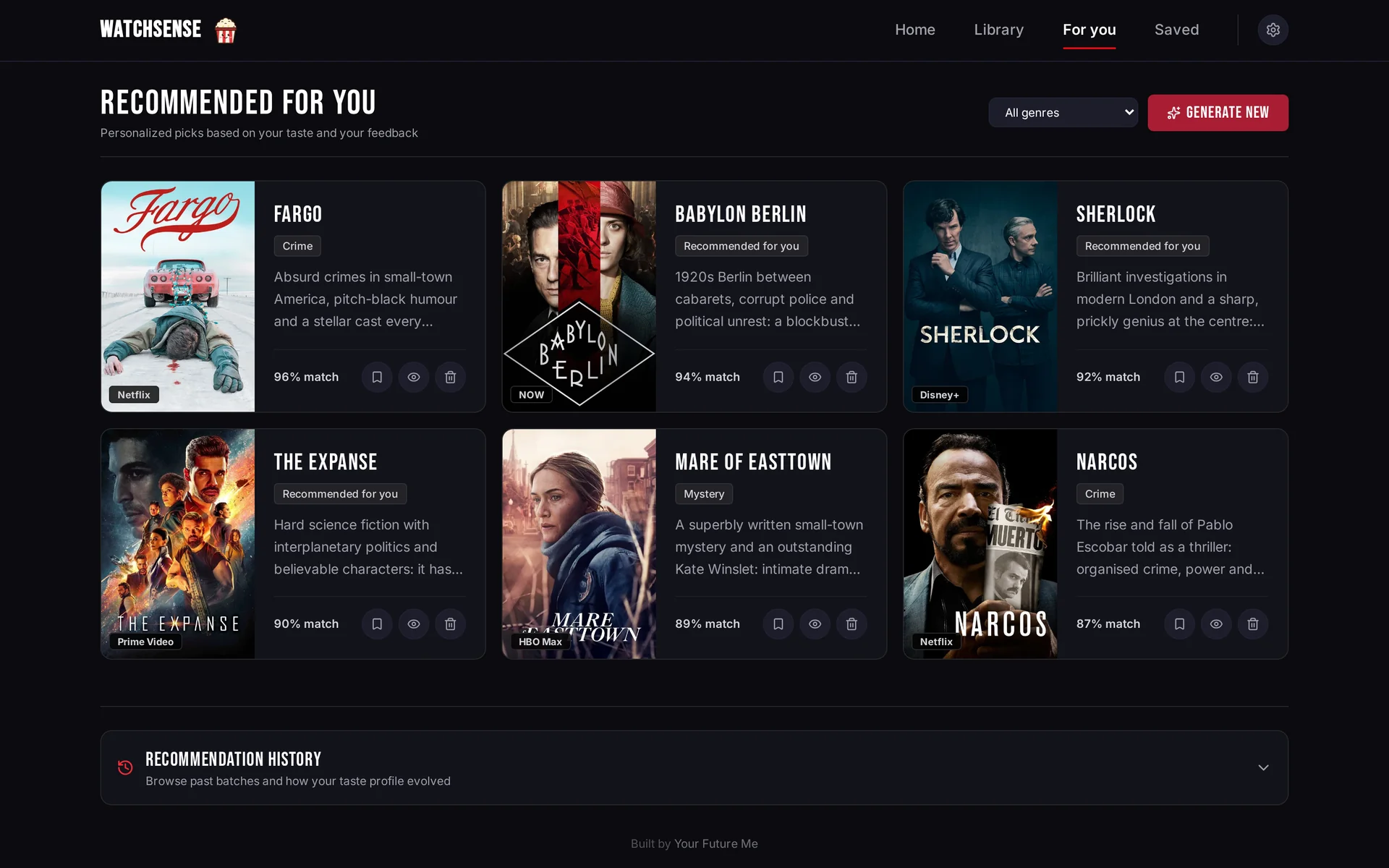
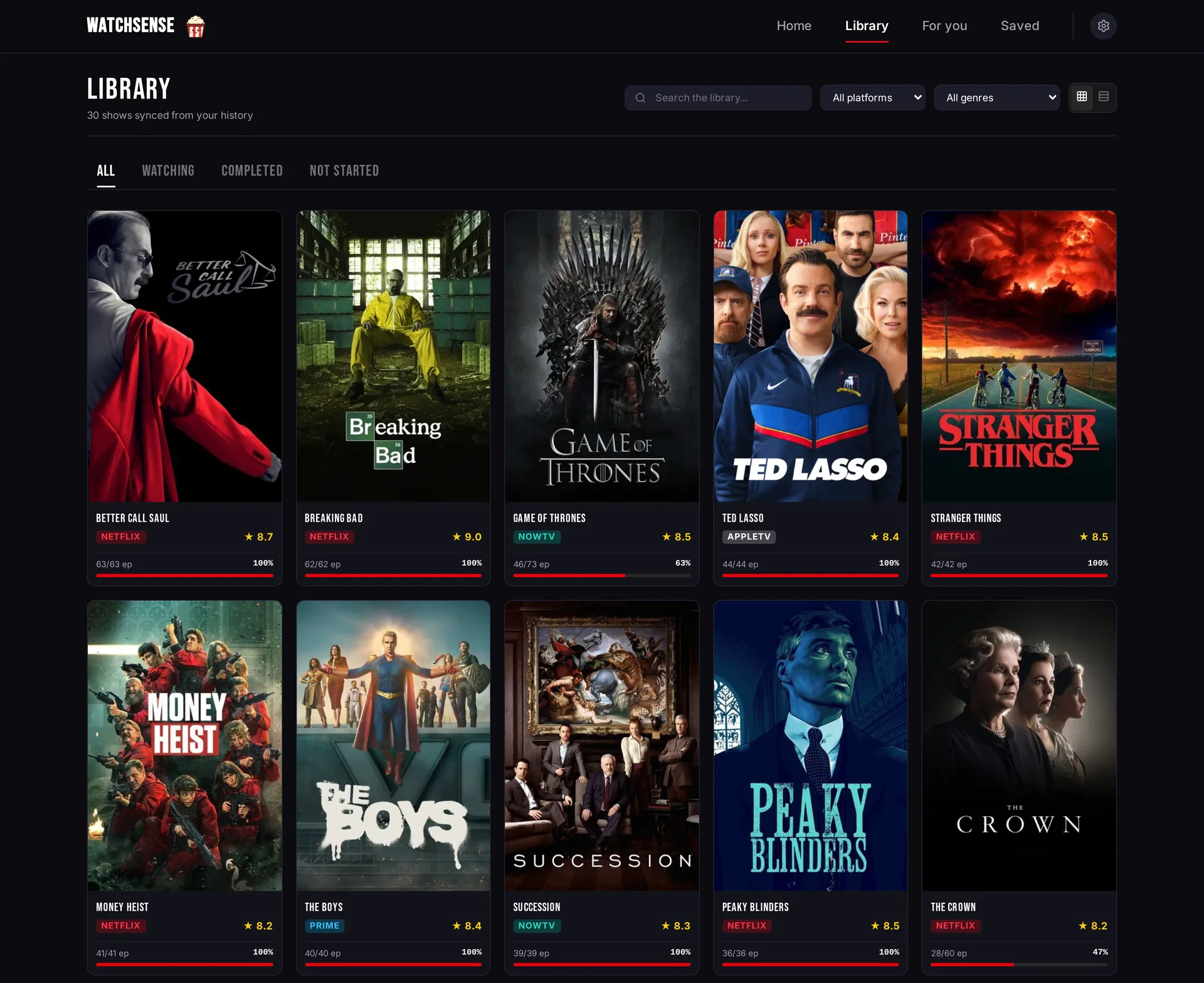
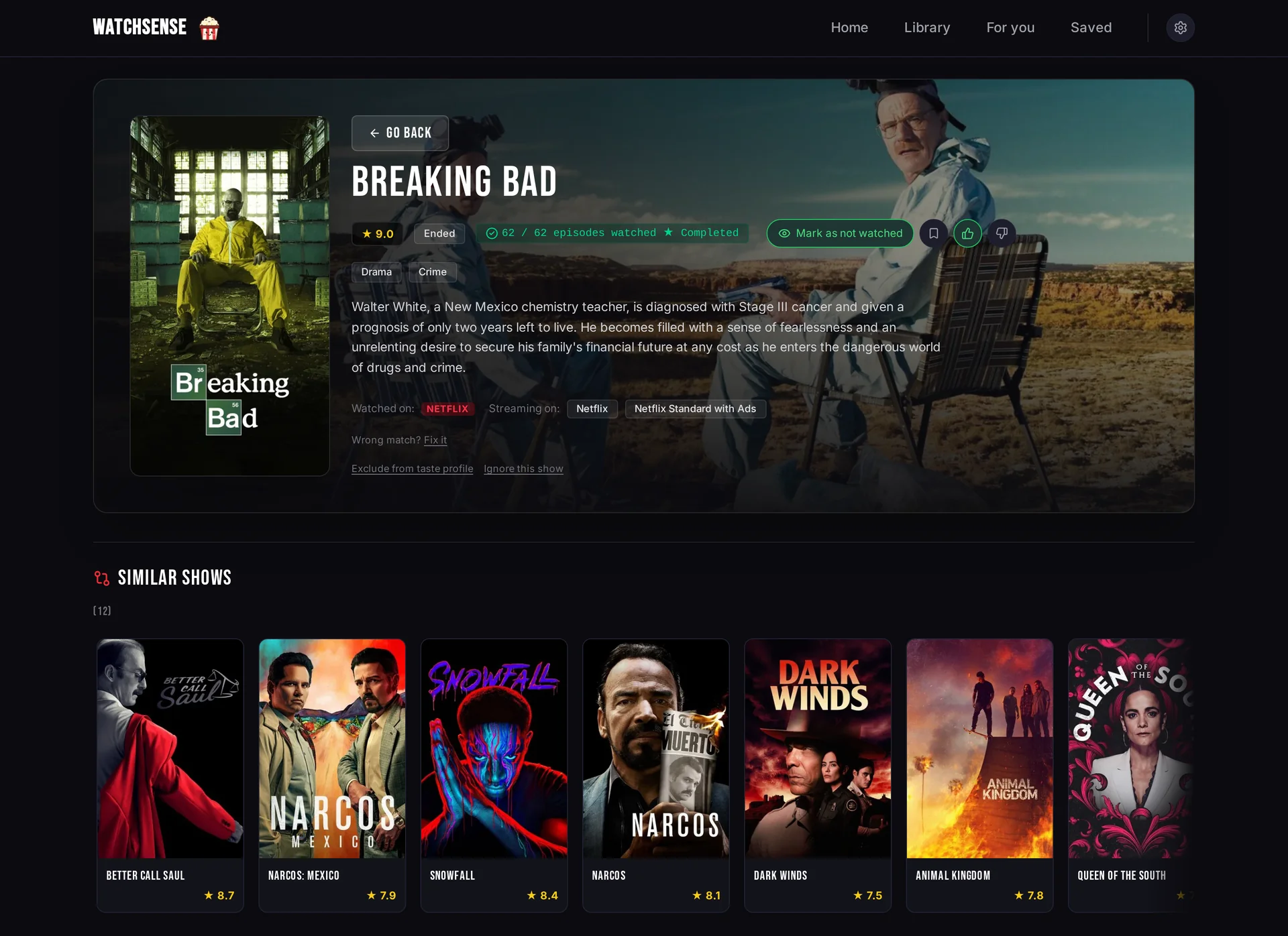
Open the app
About WatchSense
WatchSense collects what you watched on Netflix, Prime Video, Stremio and Trakt, adds TMDB details and asks an AI model of your choice (cloud or local, like Ollama) what you should watch next. Your thumbs up, thumbs down and taste notes shape the next suggestions.
Features
- Imports your history from Netflix (automatic sync, bookmarklet or CSV), Prime Video, Stremio and Trakt
- TMDB details in your language: posters, genres and where each show is streaming in your country
- Works with any OpenAI-compatible AI service: OpenRouter, OpenAI, Groq, DeepSeek, Mistral, Kilo, Ollama, LM Studio and more
- Ratings, show status and taste notes feed the next recommendations
- Export your whole history (CSV) and viewer profile (JSON) any time
- Everything in one SQLite file
How to use
- Open WatchSense from your dashboard.
- Follow the Getting started list on the Home page: language and country, your TMDB key, a viewing source and an AI model.
- Import or sync your viewing history.
- Open For you to get recommendations, and rate them to make the next ones better.
Before you install
Get a free TMDB API key at https://www.themoviedb.org/settings/api and pick an AI service (OpenRouter, OpenAI, a local Ollama...). You type both in Settings after install, so nothing has to be set first. From other devices, open http://[ZIMAOS-IP-ADDRESS]:6173. There is no login unless you add WATCHSENSE_TOKEN, so anyone who can reach the address can use it. For the Trakt import, put your Trakt export in the exports/trakt folder of the app data. Every other setting is optional and listed in the Variables tab; to use one, add it in the app settings. WatchSense is ready a few seconds after install. Back up the data folder with secret.key in it: the API keys you saved can't be read without it.
The settings in the first table are already in the app settings. To use any other one, open the app settings, add the variable with your value, save, and the app restarts with it. A setting you leave out uses its default.
In the app settings
| Variable | Default value | Description |
|---|---|---|
TZ | $TZ | Your time zone. It is filled in from your ZimaOS time zone. Leave it unless you need another. |
PUID | $PUID | The user that owns the data folder. It is filled in by ZimaOS. Leave it. |
PGID | $PGID | The group that owns the data folder. It is filled in by ZimaOS. Leave it. |
TMDB
| Variable | Default value | Description |
|---|---|---|
TMDB_ | — | Your free TMDB v3 API key from https://www.themoviedb.org/settings/api. You can also type it in Settings; a key saved there wins. |
Language and region
| Variable | Default value | Description |
|---|---|---|
TMDB_ | en-US | Language of titles and summaries from TMDB, like en-GB or it-IT. Only used on the first start; change it later in Settings. |
TMDB_ | US | Your country as a two-letter code, like GB or IT, for streaming services and charts. Only used on the first start; change it later in Settings. |
WATCHSENSE_ | en | Language of the app and of the AI's answers: en or it. Only used on the first start; change it later in Settings. |
AI model
| Variable | Default value | Description |
|---|---|---|
LLM_ | — | Address of an OpenAI-compatible AI service, like https://openrouter.ai/api/v1, or http://[ZIMAOS-IP-ADDRESS]:11434/v1 for Ollama. Values saved in Settings win. |
LLM_ | — | The API key for that service. Not needed for a local Ollama or LM Studio. |
LLM_ | kilo-auto/free | The model name, like openai/gpt-4o-mini. The default only exists on Kilo, so set it for any other service. |
KILO_ | — | Older setting: a Kilo key, used only when LLM_BASE_URL and LLM_API_KEY are empty. |
KILO_ | https://api.kilo.ai/api/gateway | Older setting: the Kilo address used with KILO_API_KEY. |
OPENROUTER_ | — | Older setting: an OpenRouter key, used only when LLM_BASE_URL and LLM_API_KEY are empty. |
Sync
| Variable | Default value | Description |
|---|---|---|
SYNC_ | 12 | How often, in hours, Netflix is synced on its own. A value picked in Settings (6, 12 or 24) wins. |
Access and security
| Variable | Default value | Description |
|---|---|---|
WATCHSENSE_ | — | A long random password to open WatchSense. Leave it out and anyone who can reach the address can use it. Use https too if it is reachable from the internet. |
WATCHSENSE_ | — | Your own key for the saved secrets: 64 hex characters or 32 bytes in base64. Leave it out: WatchSense makes secret.key in the data folder on first start. Don't change it after you saved keys in Settings. |
name: watchsense

services:
  watchsense:
    image: ghcr.io/peppeg/watchsense:1.1.1
    container_name: watchsense
    restart: unless-stopped
    stop_grace_period: 30s
    network_mode: bridge
    environment:
      - TZ=$TZ
      - PUID=$PUID
      - PGID=$PGID
    ports:
      - target: 3000
        published: "6173"
        protocol: tcp
    volumes:
      - type: bind
        source: /DATA/AppData/$AppID/data
        target: /app/data
        bind:
          create_host_path: true
      - type: bind
        source: /DATA/AppData/$AppID/exports
        target: /app/exports
        bind:
          create_host_path: true
    healthcheck:
      test: ["CMD", "node", "-e", "fetch('http://127.0.0.1:3000/api/health').then(r => process.exit(r.ok ? 0 : 1)).catch(() => process.exit(1))"]
      interval: 30s
      timeout: 5s
      retries: 3
      start_period: 30s
    deploy:
      resources:
        limits:
          cpus: "1.00"
          memory: 512M
        reservations:
          cpus: "0.00"
          memory: 96M
    labels:
      icon: https://cdn.jsdelivr.net/gh/HSinghHira/IceStore@main/Apps/watchsense/icon.png
    x-casaos:
      id: com.icestore.watchsense
      envs:
        - container: TZ
          description:
            en_US: >-
              Your time zone. It is filled in from your ZimaOS time zone.
              Leave it unless you need another.
        - container: PUID
          description:
            en_US: >-
              The user that owns the data folder. It is filled in by ZimaOS.
              Leave it.
        - container: PGID
          description:
            en_US: >-
              The group that owns the data folder. It is filled in by ZimaOS.
              Leave it.
      ports:
        - container: "3000"
          description:
            en_US: WatchSense web app, published on host as 6173
      volumes:
        - container: /app/data
          description:
            en_US: >-
              The SQLite database (watchsense.db) and secret.key, the key made
              on first start that encrypts the API keys and logins you save
              in Settings. Back up both together.
        - container: /app/exports
          description:
            en_US: >-
              Only for the Trakt import: put your Trakt data export in the
              trakt folder inside it. WatchSense only reads this folder.

x-casaos:
  id: com.icestore.watchsense
  architectures:
    - amd64
    - arm64
  main: watchsense
  author: HSinghHira
  category: Media
  developer: peppeg
  icon: https://cdn.jsdelivr.net/gh/HSinghHira/IceStore@main/Apps/watchsense/icon.png
  thumbnail: https://cdn.jsdelivr.net/gh/HSinghHira/IceStore@main/Apps/watchsense/screenshot-1.webp
  screenshot_link:
    - https://cdn.jsdelivr.net/gh/HSinghHira/IceStore@main/Apps/watchsense/screenshot-1.webp
    - https://cdn.jsdelivr.net/gh/HSinghHira/IceStore@main/Apps/watchsense/screenshot-2.webp
    - https://cdn.jsdelivr.net/gh/HSinghHira/IceStore@main/Apps/watchsense/screenshot-3.webp
    - https://cdn.jsdelivr.net/gh/HSinghHira/IceStore@main/Apps/watchsense/screenshot-4.webp
  title:
    en_US: WatchSense
  tagline:
    en_US: TV series recommendations from your own viewing history and an AI model you pick
  description:
    en_US: >-
      Visit: [https://icestore.hsinghhira.me/app/watchsense/](https://icestore.hsinghhira.me/app/watchsense/) for full details


      WatchSense collects what you watched on Netflix, Prime Video, Stremio
      and Trakt, adds TMDB details and asks an AI model of your choice (cloud
      or local, like Ollama) what you should watch next. Your thumbs up, thumbs
      down and taste notes shape the next suggestions.


      **Features**


      - Imports your history from Netflix (automatic sync, bookmarklet or
        CSV), Prime Video, Stremio and Trakt

      - TMDB details in your language: posters, genres and where each show
        is streaming in your country

      - Works with any OpenAI-compatible AI service: OpenRouter, OpenAI,
        Groq, DeepSeek, Mistral, Kilo, Ollama, LM Studio and more

      - Ratings, show status and taste notes feed the next recommendations

      - Export your whole history (CSV) and viewer profile (JSON) any time

      - Everything in one SQLite file


      **How to use?**


      1. Open WatchSense from the Zima OS dashboard.


      2. Follow the Getting started list on the Home page: language and
         country, your TMDB key, a viewing source and an AI model.


      3. Import or sync your viewing history.


      4. Open For you to get recommendations, and rate them to make the next
         ones better.
  tips:
    before_install:
      en_US: >-
        1. Get a free TMDB API key at https://www.themoviedb.org/settings/api.
           You type it in later, in Settings.


        2. Pick an AI service, like OpenRouter or a local Ollama. Have its
           address, key and model name ready.


        3. Start the installation. It is ready in a few seconds.


        4. Open WatchSense from the Zima OS dashboard, or go to
           http://[ZIMAOS-IP-ADDRESS]:6173 from another device.


        5. Follow the Getting started list on the Home page.


        6. Anyone who can open the address can use WatchSense. To ask for a
           password, add WATCHSENSE_TOKEN in the app settings.


        7. More settings, like the language, the country and the AI model,
           are listed on the WatchSense page at
           https://icestore.hsinghhira.me/app/watchsense/ (Variables tab). You
           can add them now or later in the app settings.
  index: /
  port_map: "6173"
  scheme: http
  is_uncontrolled: false
  version: "1.1.1"
  update_at: "2026-10-29"
  release_notes:
    en_US: |-
      - First version in IceStore, on port 6173
      - Uses ghcr.io/peppeg/watchsense 1.1.1 as upstream ships it
      - The encryption key for saved secrets is made by WatchSense on first start and kept in the data folder
  repo: "https://github.com/peppeg/watchsense"
  support: "https://github.com/peppeg/watchsense/issues"
  docs: "https://github.com/peppeg/watchsense/blob/main/docs/CONFIGURATION.md"
Install WatchSense
 ZimaOS
Add the store link, then find WatchSense in the App Store and install it.
 CasaOS
Add the store link, then find WatchSense in the App Store and install it.
 Homeio
Add the store link, then find WatchSense in the App Store and install it.
Something not working with WatchSense? Report a problem or request another app.


