
Ech0
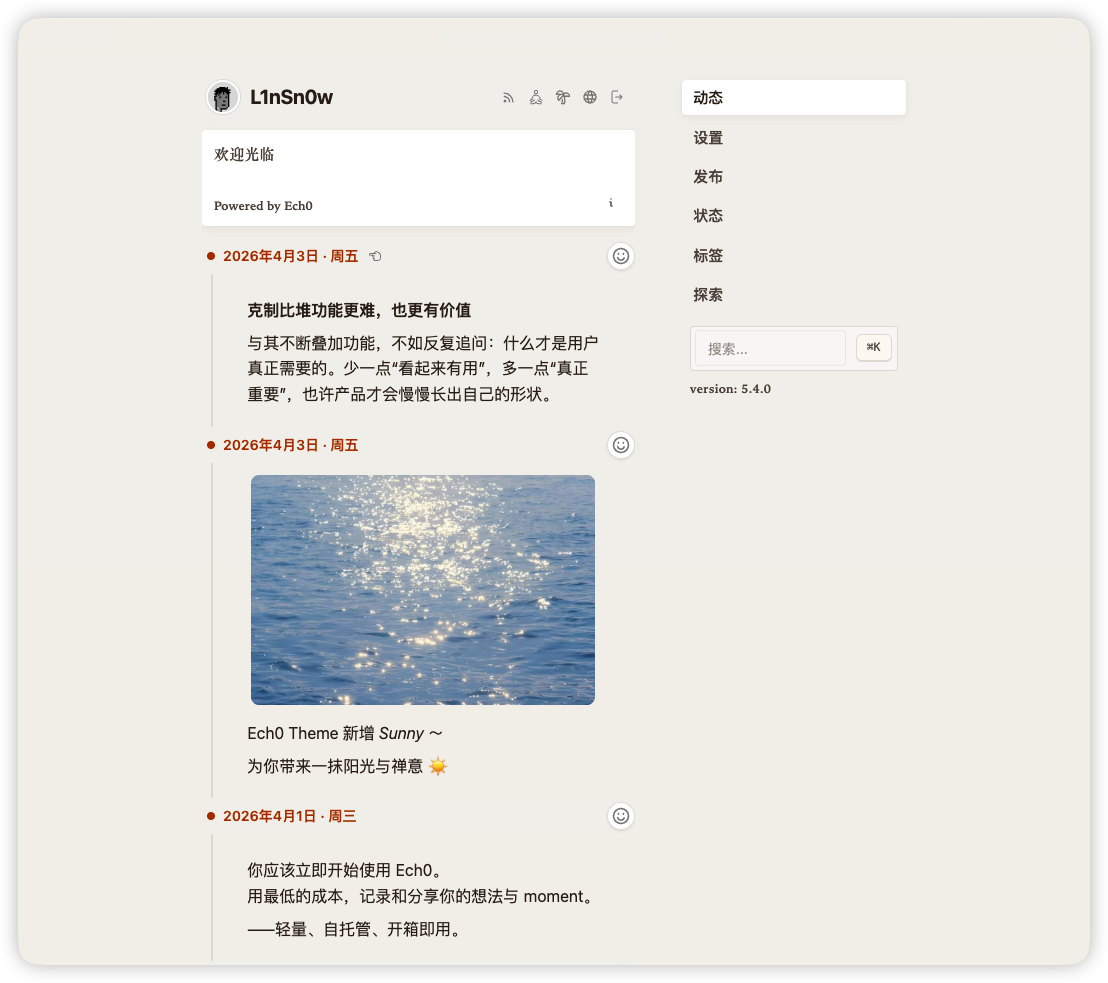
Your own microblog timeline for short posts, links and media
- ghcr.io/hsinghhira/ech0:latest
- v5.9.10
- Updated 21 Nov 2026
- port 6782
- amd64 · arm64
- Social
- 2.1k stars
Screenshots
Open the app
About Ech0
Ech0 is a small personal microblog. Post short thoughts, links, pictures and videos to your own timeline, and let others follow it by RSS, comment and react. It is light enough for a Raspberry Pi, and your posts stay on your server.
Features
- Short posts in Markdown, with tags and search
- Images, audio and video, and cards for links and GitHub projects
- Comments, emoji reactions and an RSS feed
- Several accounts, passkeys and single sign-on (OAuth2, OIDC)
- Backups, exports and S3 storage
- An API, webhooks, an MCP server and an AI helper for your posts
How to use
- Open Ech0 from your dashboard.
- Click Register and make your account. The first account is the owner.
- Write your first post on the timeline.
- Open the admin panel to set your site name, comments and storage.
Before you install
You can install it as it is and open it at http://[ZIMAOS-IP-ADDRESS]:6782. There is no account yet: click Register, and the first account is the owner. The sign-in secret is made for you on first start and kept in /DATA/AppData/ech0/data, so you stay signed in across restarts. Most settings (comments, S3 storage, sign-in providers) are in Ech0's admin panel; the few others are in the Variables tab and are added in the app settings. It is ready in under a minute.
The settings in the first table are already in the app settings. To use any other one, open the app settings, add the variable with your value, save, and the app restarts with it. A setting you leave out uses its default.
In the app settings
| Variable | Default value | Description |
|---|---|---|
TZ | $TZ | Your time zone. It is filled in from your ZimaOS time zone. |
Server
| Variable | Default value | Description |
|---|---|---|
JWT_ | — | The key sign-ins are signed with. It is made on first start and kept in /app/data/secrets.env. Only set it to use your own. |
ECH0_ | 900 | How long a sign-in token lasts, in seconds. |
ECH0_ | 604800 | How long people stay signed in, in seconds (a week). |
ECH0_ | info | How much goes in the log: debug, info, warn or error. |
ECH0_ | false | Set to true so link cards and webhooks may reach addresses on your own network. |
Uploads
| Variable | Default value | Description |
|---|---|---|
ECH0_ | 20971520 | The biggest image you can upload, in bytes (20 MiB). |
ECH0_ | 20971520 | The biggest audio file, in bytes (20 MiB). |
ECH0_ | 67108864 | The biggest video, in bytes (64 MiB). |
Sign-in
| Variable | Default value | Description |
|---|---|---|
ECH0_ | — | Your domain, like ech0.example.com, for passkeys. Only read on the first start; change it later in the admin panel. |
ECH0_ | — | Addresses passkeys may be used from, comma separated, like https://ech0.example.com. Only read on the first start. |
name: ech0

services:
  ech0:
    image: ghcr.io/hsinghhira/ech0:latest
    container_name: ech0
    restart: unless-stopped
    stop_grace_period: 30s
    network_mode: bridge
    environment:
      - TZ=$TZ
    ports:
      - target: 6277
        published: "6782"
        protocol: tcp
    volumes:
      - type: bind
        source: /DATA/AppData/$AppID/data
        target: /app/data
        bind:
          create_host_path: true
    healthcheck:
      test: ["CMD", "wget", "-q", "-O", "/dev/null", "http://127.0.0.1:6277/"]
      interval: 30s
      timeout: 10s
      retries: 5
      start_period: 60s
    deploy:
      resources:
        limits:
          cpus: "1.00"
          memory: 512M
        reservations:
          cpus: "0.05"
          memory: 64M
    labels:
      icon: https://cdn.jsdelivr.net/gh/HSinghHira/IceStore@main/Apps/ech0/icon.png
    x-casaos:
      id: com.icestore.ech0
      envs:
        - container: TZ
          description:
            en_US: >-
              Your time zone. It is filled in from your ZimaOS time zone.
      ports:
        - container: "6277"
          description:
            en_US: Ech0 timeline, admin panel and API, published on host as 6782
      volumes:
        - container: /app/data
          description:
            en_US: >-
              Everything Ech0 keeps: the SQLite database, your uploaded
              images, audio and video (files), backups, logs and this
              install's own key (secrets.env). Back it up.

x-casaos:
  id: com.icestore.ech0
  architectures:
    - amd64
    - arm64
  main: ech0
  author: HSinghHira
  category: Social
  developer: lin-snow
  icon: https://cdn.jsdelivr.net/gh/HSinghHira/IceStore@main/Apps/ech0/icon.png
  thumbnail: https://cdn.jsdelivr.net/gh/HSinghHira/IceStore@main/Apps/ech0/screenshot-1.png
  screenshot_link:
    - https://cdn.jsdelivr.net/gh/HSinghHira/IceStore@main/Apps/ech0/screenshot-1.png
  title:
    en_US: Ech0
  tagline:
    en_US: Your own microblog timeline for short posts, links and media
  description:
    en_US: >-
      Ech0 is a small personal microblog. Post short thoughts, links,
      pictures and videos to your own timeline, and let others follow it by
      RSS, comment and react. It is light enough for a Raspberry Pi, and
      your posts stay on your server.


      **Features**


      - Short posts in Markdown, with tags and search

      - Images, audio and video, and cards for links and GitHub projects

      - Comments, emoji reactions and an RSS feed

      - Several accounts, passkeys and single sign-on (OAuth2, OIDC)

      - Backups, exports and S3 storage

      - An API, webhooks, an MCP server and an AI helper for your posts


      **How to use?**


      1. Open Ech0 from the ZimaOS dashboard.

      2. Click Register and make your account. The first account is the
         owner.

      3. Write your first post on the timeline.

      4. Open the admin panel to set your site name, comments and storage.
  tips:
    before_install:
      en_US: >-
        1. Start the installation. It is ready in under a minute.


        2. Open http://[ZIMAOS-IP-ADDRESS]:6782 and click Register. The
           first account you make is the owner.


        3. Most settings, like comments, S3 storage and sign-in providers,
           are in Ech0's admin panel.
  index: /
  port_map: "6782"
  scheme: http
  is_uncontrolled: false
  version: "v5.9.10"
  update_at: "2026-11-21"
  release_notes:
    en_US: |-
      - First IceStore release, on port 6782
      - Built on sn0wl1n/ech0 v5.9.10, with SQLite as the database
      - Each install makes its own JWT_SECRET on first start, so sign-ins last across restarts
  repo: "https://github.com/lin-snow/Ech0"
  support: "https://github.com/lin-snow/Ech0/issues"
  docs: "https://www.ech0.app/"
Install Ech0
Something not working with Ech0?
Report it so it gets fixed, or ask for an app that is not here yet.
 ZimaOS
Add the store link, then find Ech0 in the App Store and install it.
 CasaOS
Add the store link, then find Ech0 in the App Store and install it.
 ReCasaOS
Add the store link, then find Ech0 in the App Store and install it.
 Homeio
Add the store link, then find Ech0 in the App Store and install it.
 MOS
Add the repository in MOS Hub Settings, then find Ech0 in Docker → MOS Hub and install it.


