
Fluxer
Free and open source chat and voice for friends, groups and communities.
- ghcr.io/hsinghhira/fluxer:latest
- v2026.1109.42841
- Updated 9 Nov 2026
- port 6692
- port 6693
- port 6694
- amd64 · arm64
- Social
- 11k stars
Screenshots
Open the app
About Fluxer
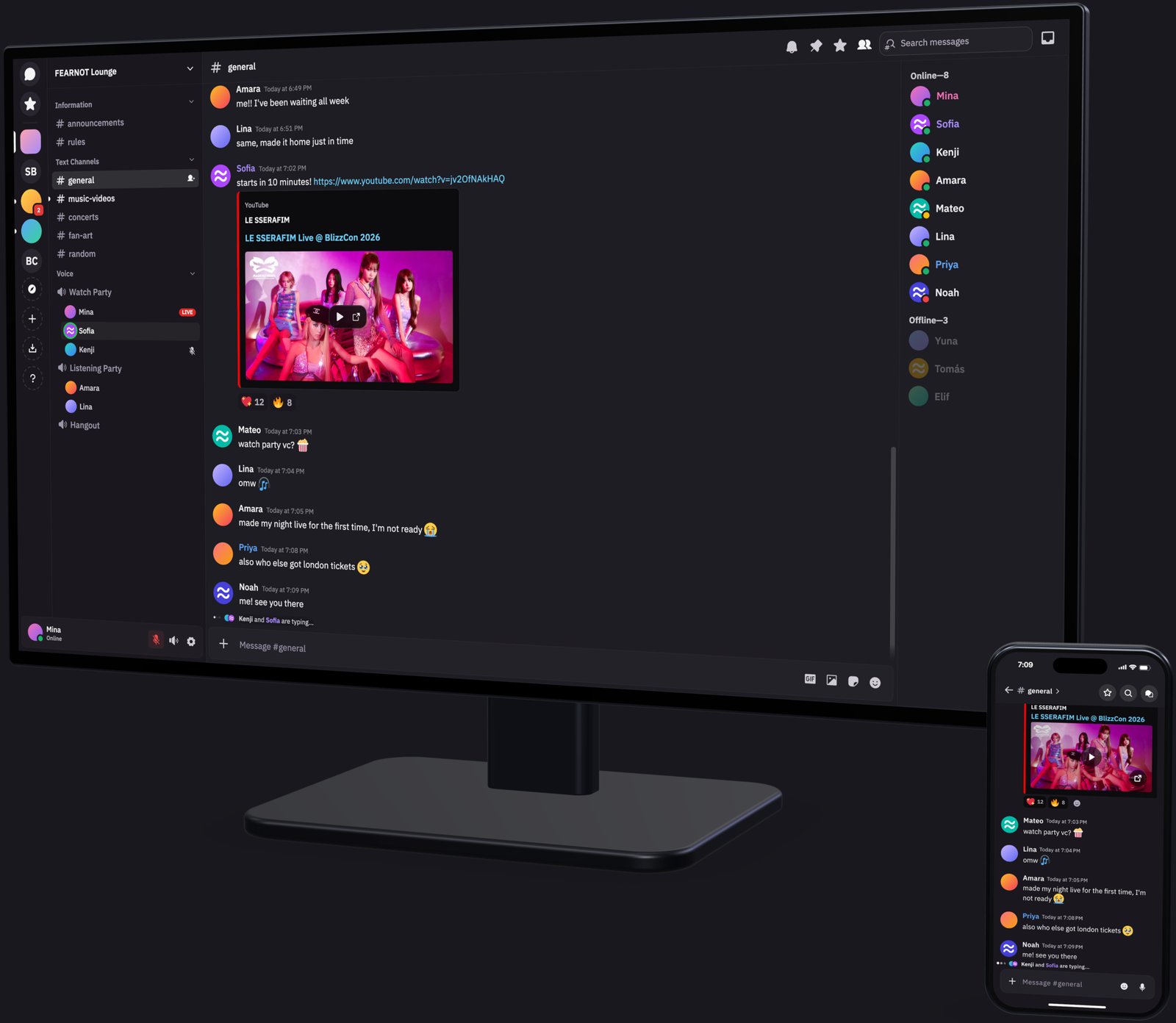
Fluxer is a free and open source instant messaging and VoIP chat app, Discord-style: communities, channels, direct messages, voice and video. This is Fluxer in a single container, with PostgreSQL, Valkey, NATS, Meilisearch, SeaweedFS file storage and LiveKit inside, one web port and one data folder. Every key and password is made for you on first start.
Features
- Communities with text and voice channels, roles and invites
- Direct messages and group chats, reactions, link previews and search
- File uploads, custom emoji and stickers
- Voice and video calls and screen sharing through LiveKit (needs HTTPS)
- Admin panel at
/admin, and the Fluxer desktop and mobile apps can connect to your server
How to use
- Set
PUBLIC_URLto your ZimaOS IP (or your HTTPS domain) before you install. - Open Fluxer from your dashboard.
- Enter the setup token from the app's logs to create the admin account.
- Make a community and invite your friends with an invite link.
- The admin panel is at
http://[ZIMAOS-IP-ADDRESS]:6692/admin.
Before you install
You must set PUBLIC_URL first. It starts as http://[ZIMAOS-IP-ADDRESS]:6692: replace [ZIMAOS-IP-ADDRESS] with your ZimaOS IP, like http://192.168.1.20:6692. Fluxer only works at the one address you give it; until you set it, it shows a "set PUBLIC_URL" page.
Over plain http, chat, uploads and the admin panel work, but browsers turn off the microphone, camera, screen sharing, passkeys and notifications. For those, use HTTPS: point a reverse proxy (Nginx Proxy Manager, Caddy, a Cloudflare tunnel) with your own domain at http://[ZIMAOS-IP-ADDRESS]:6692 and set PUBLIC_URL to the domain, like https://chat.example.com. Let the proxy accept uploads up to 512 MB and keep websockets open.
Calls connect straight to ports 6693 (TCP) and 6694 (UDP), not through the proxy. Keep those numbers, and forward both in your router to call from outside your home. Behind a tunnel, calls need a TURN server (FLUXER_LIVEKIT_TURN_SERVERS).
The first start takes about five minutes. The setup token is in the app's logs, in the box marked CREDENTIALS, printed again on every start. Fluxer runs about 20 services, so give it at least 4 GB of memory. More settings (email, GIF search, sign-in rules) are in the Variables tab; add them in the app settings. The keys in /data/state/secrets.env must never change once Fluxer has data, so back up the whole data folder.
The settings in the first table are already in the app settings. To use any other one, open the app settings, add the variable with your value, save, and the app restarts with it. A setting you leave out uses its default.
In the app settings
| Variable | Default value | Description |
|---|---|---|
TZ | $TZ | Your time zone. It is filled in from your ZimaOS time zone. Leave it unless you need another. |
PUBLIC_ | http://[ZIMAOS-IP-ADDRESS]:6692 | Required. Replace [ZIMAOS-IP-ADDRESS] with your ZimaOS IP, like http://192.168.1.20:6692. Fluxer only works at this one address. For voice, video, passkeys and notifications use HTTPS: put Fluxer behind a reverse proxy with your own domain (pointed at port 6692) and set this to it, like https://chat.example.com. |
Server
| Variable | Default value | Description |
|---|---|---|
FLUXER_ | — | The token the setup page asks for before it creates the first admin account. Leave it out to use the one made on first start (shown in the CREDENTIALS box in the logs). |
FLUXER_ | — | The name the apps show, like "Family Chat". Only used until you finish the setup page; after that, change it in the admin panel. |
Sign-up and accounts
| Variable | Default value | Description |
|---|---|---|
FLUXER_ | — | How people sign in on a new server: username or email. Read only on the first start; the setup page asks again. |
FLUXER_ | — | One or more invite codes, separated by commas. New accounts join those communities. |
FLUXER_ | false | Set to true to refuse passwords found in known data breaches (checks api.pwnedpasswords.com). |
Features
| Variable | Default value | Description |
|---|---|---|
FLUXER_ | true | Set to false to turn off community discovery. |
FLUXER_ | — | Your Klipy API key for GIF search. GIF search is off without it (or without a key saved in the admin panel). |
FLUXER_ | — | A YouTube Data API v3 key for YouTube link previews. |
Email (SMTP)
| Variable | Default value | Description |
|---|---|---|
FLUXER_ | off | Set to smtp to send email (sign-up checks, password resets). You can also set email up in the admin panel. |
FLUXER_ | — | Your mail server, like smtp.gmail.com. |
FLUXER_ | 587 | Your mail server's port. |
FLUXER_ | — | The user name for your mail server. |
FLUXER_ | — | The password for your mail server. |
FLUXER_ | — | implicit (usually port 465), starttls (usually 587), opportunistic or none. Left out, port 465 uses implicit and other ports starttls. |
FLUXER_ | — | The address email comes from. Left out, it is noreply@ and the host in PUBLIC_URL. |
FLUXER_ | — | The sender name on email. Left out, it is the server's name. |
Voice and video
| Variable | Default value | Description |
|---|---|---|
FLUXER_ | — | The public IP that calls connect to. Left out, it is the IP in PUBLIC_URL, or (with a domain) your public IP found through STUN. |
FLUXER_ | [] | TURN servers for calls behind a tunnel, as JSON, like [{"host":"turn.example.com","port":3478,"protocol":"udp","username":"fluxer","credential":"a-long-password"}]. |
Admin panel sign-in
| Variable | Default value | Description |
|---|---|---|
FLUXER_ | — | An OpenID Connect issuer URL for signing in to the admin panel with your own identity provider. |
FLUXER_ | — | The client ID from your identity provider. |
FLUXER_ | — | The client secret from your identity provider. |
Logs
| Variable | Default value | Description |
|---|---|---|
LOG_ | info | How much the API and worker log: trace, debug, info, warn, error or fatal. |
RUST_ | info | How much the Rust services (media, push, admin, ...) log, like debug or warn. |
name: fluxer

services:
  fluxer:
    image: ghcr.io/hsinghhira/fluxer:latest
    container_name: fluxer
    restart: unless-stopped
    stop_grace_period: 90s
    privileged: true
    environment:
      - TZ=$TZ
      - PUBLIC_URL=http://[ZIMAOS-IP-ADDRESS]:6692
    ports:
      - target: 8080
        published: "6692"
        protocol: tcp
      - target: 6693
        published: "6693"
        protocol: tcp
      - target: 6694
        published: "6694"
        protocol: udp
    volumes:
      - type: bind
        source: /DATA/AppData/$AppID/data
        target: /data
        bind:
          create_host_path: true
    healthcheck:
      test: ["CMD", "curl", "-fsS", "-o", "/dev/null", "http://127.0.0.1:8080/api/_health"]
      interval: 30s
      timeout: 10s
      retries: 5
      start_period: 300s
    deploy:
      resources:
        limits:
          cpus: "4.00"
          memory: 6144M
        reservations:
          cpus: "0.50"
          memory: 1536M
    labels:
      icon: https://cdn.jsdelivr.net/gh/HSinghHira/IceStore@main/Apps/fluxer/icon.png
    x-casaos:
      id: com.icestore.fluxer
      envs:
        - container: TZ
          description:
            en_US: >-
              Your time zone. It is filled in from your ZimaOS time zone.
              Leave it unless you need another.
        - container: PUBLIC_URL
          description:
            en_US: >-
              Required. Replace [ZIMAOS-IP-ADDRESS] with your ZimaOS IP, like
              http://192.168.1.20:6692. Fluxer only works at this one address.
              For voice, video, passkeys and notifications use HTTPS: put
              Fluxer behind a reverse proxy with your own domain (pointed at
              port 6692) and set this to it, like https://chat.example.com.
      ports:
        - container: "8080"
          description:
            en_US: Fluxer web app, API, websocket, media and admin panel, published on host as 6692
        - container: "6693"
          description:
            en_US: Voice and video (LiveKit) over TCP, published on host as 6693. Must stay 6693.
        - container: "6694"
          description:
            en_US: Voice and video (LiveKit) over UDP, published on host as 6694. Must stay 6694.
      volumes:
        - container: /data
          description:
            en_US: >-
              The database (postgres/), uploaded files (seaweedfs/), search
              (meilisearch/), the message bus (nats/), Valkey (valkey/) and
              the secret keys (state/). Back up the whole folder: the keys in
              state/secrets.env can't be changed once Fluxer has data.

x-casaos:
  id: com.icestore.fluxer
  architectures:
    - amd64
    - arm64
  main: fluxer
  author: HSinghHira
  category: Social
  developer: fluxerapp
  icon: https://cdn.jsdelivr.net/gh/HSinghHira/IceStore@main/Apps/fluxer/icon.png
  thumbnail: https://cdn.jsdelivr.net/gh/HSinghHira/IceStore@main/Apps/fluxer/screenshot-1.jpg
  screenshot_link:
    - https://cdn.jsdelivr.net/gh/HSinghHira/IceStore@main/Apps/fluxer/screenshot-1.jpg
  title:
    en_US: Fluxer
  tagline:
    en_US: Free and open source chat and voice for friends, groups and communities.
  description:
    en_US: >-
      Visit: [https://icestore.hsinghhira.me/app/fluxer/](https://icestore.hsinghhira.me/app/fluxer/) for full details


      Fluxer is a free and open source instant messaging and VoIP chat app,
      Discord-style: communities, channels, direct messages, voice and video.
      This is Fluxer in a single container, with PostgreSQL, Valkey, NATS,
      Meilisearch, SeaweedFS file storage and LiveKit inside, one web port and
      one data folder. Every key and password is made for you on first start.


      **Features**


      - Communities with text and voice channels, roles and invites

      - Direct messages and group chats, reactions, link previews and search

      - File uploads, custom emoji and stickers

      - Voice and video calls and screen sharing through LiveKit (needs HTTPS)

      - Admin panel at /admin, and the Fluxer desktop and mobile apps can
        connect to your server


      **How to use?**


      1. Set PUBLIC_URL to your ZimaOS IP (or your HTTPS domain) before you
         install.


      2. Open Fluxer from the Zima OS dashboard.


      3. Enter the setup token from the app's logs to create the admin
         account.


      4. Make a community and invite your friends with an invite link.


      5. The admin panel is at http://[ZIMAOS-IP-ADDRESS]:6692/admin.
  tips:
    before_install:
      en_US: >-
        1. Open the app configuration before you install.


        2. Find PUBLIC_URL. It starts as http://[ZIMAOS-IP-ADDRESS]:6692.
           Put your ZimaOS IP in place of [ZIMAOS-IP-ADDRESS], like
           http://192.168.1.20:6692. You must do this, or Fluxer only
           shows a "set PUBLIC_URL" page.


        3. Voice, video, screen sharing, passkeys and notifications only
           work over HTTPS. For them, use a reverse proxy (like Nginx Proxy
           Manager or a Cloudflare tunnel) with your own domain, point it at
           http://[ZIMAOS-IP-ADDRESS]:6692, and set PUBLIC_URL to your domain,
           like https://chat.example.com. Chat and uploads work without HTTPS.


        4. Keep ports 6693 and 6694 as they are. To call from outside your
           home, forward them in your router (6693 TCP, 6694 UDP).


        5. Fluxer needs a lot of memory. Give it at least 4 GB.


        6. More settings, like email and GIF search, are listed on the
           Fluxer page at https://icestore.hsinghhira.me/app/fluxer/
           (Variables tab). You can add them now or later in the app
           settings.


        7. Start the installation.


        8. Wait about five minutes. The first start sets up the database,
           search and file storage.


        9. Look in the app's logs for the box marked CREDENTIALS. It has
           the setup token. It is printed again on every start.


        10. Open your PUBLIC_URL, like http://192.168.1.20:6692, enter the
            setup token and create your admin account.
  index: /
  port_map: "6692"
  scheme: http
  is_uncontrolled: false
  version: "2026.1109.42841"
  update_at: "2026-11-09"
  release_notes:
    en_US: |-
      - First IceStore release: Fluxer's whole compose bundle in one container, with one web port (6692), voice on 6693 (TCP) and 6694 (UDP), and one data folder.
      - Every secret (database, search, storage, LiveKit, VAPID push keys, the ActivityPub key and the setup token) is made on first start, so each install gets its own.
      - nginx serves upstream's edge routes and the fluxer-static files in place of the Caddy edge and static-proxy.
      - fluxer-api 2026.1109.42841
      - fluxer-gateway 2026.1109.42842
      - fluxer-media-proxy 2026.1109.42917
      - fluxer-push 2026.1109.42836
      - fluxer-app-proxy-self-hosted 2026.1109.42903
      - fluxer-admin 2026.1109.42815
      - fluxer-snowflakes 2026.1109.42849
      - fluxer-users 2026.1109.42852
      - fluxer-gifs 2026.1109.42837
      - fluxer-messages 2026.1109.42854
      - fluxer-unfurl 2026.1109.42918
      - fluxer-static 2026.1109.42914
      - livekit-server v1.12.0
      - meilisearch v1.53
      - seaweedfs 4.52
      - nats 2.14.9-alpine
      - PostgreSQL 16 and Valkey inside
  repo: "https://github.com/fluxerapp/fluxer"
  support: "https://feedback.fluxer.com"
  docs: "https://docs.fluxer.com/operator/"
Install Fluxer
Something not working with Fluxer?
Report it so it gets fixed, or ask for an app that is not here yet.
 ZimaOS
Add the store link, then find Fluxer in the App Store and install it.
 CasaOS
Add the store link, then find Fluxer in the App Store and install it.
 ReCasaOS
Add the store link, then find Fluxer in the App Store and install it.
 Homeio
Add the store link, then find Fluxer in the App Store and install it.
 MOS
Add the repository in MOS Hub Settings, then find Fluxer in Docker → MOS Hub and install it.


