
Kasm Workspaces
Desktops, browsers and apps streamed to your browser from containers
- lscr.io/linuxserver/kasm:1.19.0-ls156
- v1.19.0-ls156
- Updated 8 Nov 2026
- port 6193
- port 6194
- amd64 · arm64
- Others
- 495 stars
Screenshots
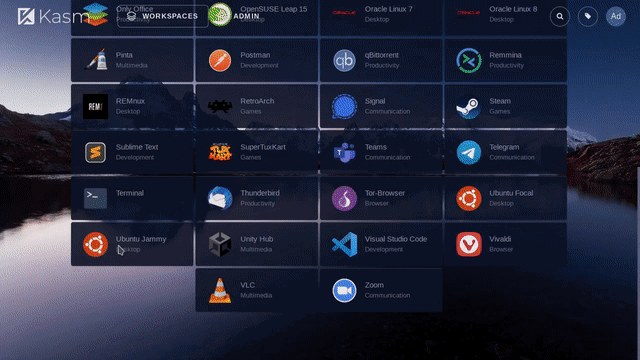
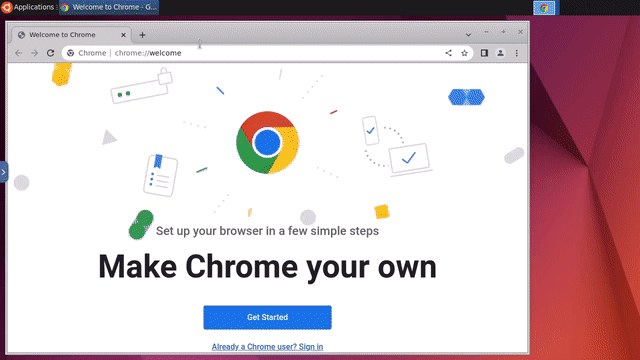
Open the app
About Kasm Workspaces
Kasm Workspaces streams full Linux desktops, web browsers and single apps to any web browser. Each session is a fresh, throw-away container, so you can open risky links or try software without touching your own computer. This is linuxserver's Kasm image: the whole Kasm platform runs inside one container, with its own Docker for the sessions.
Features
- Ubuntu, Debian, Kali, Fedora and other desktops in the browser
- Isolated Chrome, Firefox, Brave, Tor Browser and more
- Apps like VS Code, GIMP, LibreOffice, Steam, Signal and Telegram
- A fresh, disposable session every time, or saved profiles
- Users, groups and session limits in an admin panel
- Sound, clipboard, file upload and download, and gamepads
How to use
- Open
https://[ZIMAOS-IP-ADDRESS]:6194and finish the install wizard. Pick the passwords for[email protected]and[email protected]there. - Open Kasm Workspaces from your dashboard and sign in.
- Go to Workspaces, Registry, install a workspace, then launch it.
Before you install
Kasm needs at least 4 GB of memory and 30 GB of disk, more for many workspaces. There are no passwords to set first: the install wizard at https://[ZIMAOS-IP-ADDRESS]:6194 asks for them. Both ports use https with a self-signed certificate, so your browser warns once; click Advanced and continue. The wizard downloads Kasm and the workspaces you pick, which takes 10 minutes or more. To update Kasm later, update the app, then run the update in the wizard; a new image alone doesn't upgrade Kasm. The container runs privileged because Kasm starts its sessions with its own Docker. Docker Hub and GPU settings are in the Variables tab; add them in the app settings.
The settings in the first table are already in the app settings. To use any other one, open the app settings, add the variable with your value, save, and the app restarts with it. A setting you leave out uses its default.
In the app settings
| Variable | Default value | Description |
|---|---|---|
TZ | $TZ | Your time zone. It is filled in from your ZimaOS time zone. Leave it unless you need another. |
KASM_ | 6193 | The port of the Kasm web interface. It must be the same number inside and outside the container. Leave it at 6193. |
Docker inside Kasm
| Variable | Default value | Description |
|---|---|---|
DOCKER_ | — | Your Docker Hub user name, to pull private workspace images or avoid Docker Hub's download limits. |
DOCKER_ | — | Your Docker Hub password or access token. |
DOCKER_ | 1500 | The network packet size for workspaces. Lower it, like 1400, when sessions can't load web pages over a VPN. |
NVIDIA_ | — | Set to all to give workspaces your NVIDIA GPU. Needs the NVIDIA Container Toolkit on ZimaOS. |
name: kasm

services:
  kasm:
    image: lscr.io/linuxserver/kasm:1.19.0-ls156
    container_name: kasm
    restart: unless-stopped
    stop_grace_period: 90s
    network_mode: bridge
    privileged: true
    environment:
      - TZ=$TZ
      - KASM_PORT=6193
    ports:
      - target: 6193
        published: "6193"
        protocol: tcp
      - target: 3000
        published: "6194"
        protocol: tcp
    volumes:
      - type: bind
        source: /DATA/AppData/$AppID/opt
        target: /opt
        bind:
          create_host_path: true
      - type: bind
        source: /DATA/AppData/$AppID/profiles
        target: /profiles
        bind:
          create_host_path: true
    deploy:
      resources:
        limits:
          cpus: "4.00"
          memory: 8192M
        reservations:
          cpus: "0.50"
          memory: 2048M
    labels:
      icon: https://cdn.jsdelivr.net/gh/HSinghHira/IceStore@main/Apps/kasm/icon.png
    x-casaos:
      id: com.icestore.kasm
      envs:
        - container: TZ
          description:
            en_US: >-
              Your time zone. It is filled in from your ZimaOS time zone.
              Leave it unless you need another.
        - container: KASM_PORT
          description:
            en_US: >-
              The port of the Kasm web interface. It must be the same number
              inside and outside the container. Leave it at 6193.
      ports:
        - container: "6193"
          description:
            en_US: Kasm Workspaces web interface (https), published on host as 6193
        - container: "3000"
          description:
            en_US: Kasm install wizard (https, first setup and upgrades), published on host as 6194
      volumes:
        - container: /opt
          description:
            en_US: >-
              Kasm itself, its database and every downloaded workspace image
              (Docker inside the container). Plan for 30 GB or more. Keep it
              on a normal disk folder.
        - container: /profiles
          description:
            en_US: >-
              Saved home folders for workspaces with a persistent profile
              path, like /profiles/ubuntu-jammy/{username}/.

x-casaos:
  id: com.icestore.kasm
  architectures:
    - amd64
    - arm64
  main: kasm
  author: HSinghHira
  category: Others
  developer: kasmtech
  icon: https://cdn.jsdelivr.net/gh/HSinghHira/IceStore@main/Apps/kasm/icon.png
  thumbnail: https://cdn.jsdelivr.net/gh/HSinghHira/IceStore@main/Apps/kasm/screenshot-1.jpg
  screenshot_link:
    - https://cdn.jsdelivr.net/gh/HSinghHira/IceStore@main/Apps/kasm/screenshot-1.jpg
    - https://cdn.jsdelivr.net/gh/HSinghHira/IceStore@main/Apps/kasm/screenshot-2.jpg
  title:
    en_US: Kasm Workspaces
  tagline:
    en_US: Desktops, browsers and apps streamed to your browser from containers
  description:
    en_US: >-
      Visit: [https://icestore.hsinghhira.me/app/kasm/](https://icestore.hsinghhira.me/app/kasm/) for full details


      Kasm Workspaces streams full Linux desktops, web browsers and single
      apps to any web browser. Each session is a fresh, throw-away container,
      so you can open risky links or try software without touching your own
      computer. This is linuxserver's Kasm image: the whole Kasm platform
      runs inside one container, with its own Docker for the sessions.


      **Features**


      - Ubuntu, Debian, Kali, Fedora and other desktops in the browser

      - Isolated Chrome, Firefox, Brave, Tor Browser and more

      - Apps like VS Code, GIMP, LibreOffice, Steam, Signal and Telegram

      - A fresh, disposable session every time, or saved profiles

      - Users, groups and session limits in an admin panel

      - Sound, clipboard, file upload and download, and gamepads


      **How to use?**


      1. Open https://[ZIMAOS-IP-ADDRESS]:6194 and finish the install
         wizard. Pick the passwords for [email protected] and
         [email protected] there.


      2. Open Kasm Workspaces from the Zima OS dashboard and sign in.


      3. Go to Workspaces, Registry, install a workspace, then launch it.
  tips:
    before_install:
      en_US: >-
        1. Kasm needs a lot of room: at least 4 GB of memory and 30 GB of
           disk, more for many workspaces.


        2. Start the installation.


        3. Open https://[ZIMAOS-IP-ADDRESS]:6194, like
           https://192.168.1.20:6194. Your browser warns about the
           certificate. Click Advanced, then continue.


        4. Follow the install wizard. Pick the passwords for
           [email protected] and [email protected], and the workspaces to
           download. This takes 10 minutes or more.


        5. When the wizard is done, open Kasm Workspaces from the Zima OS
           dashboard (https://[ZIMAOS-IP-ADDRESS]:6193) and sign in as
           [email protected].


        6. To update Kasm later, update the app, then run the update in the
           wizard on port 6194.
  index: /
  port_map: "6193"
  scheme: https
  is_uncontrolled: false
  version: "1.19.0-ls156"
  update_at: "2026-11-08"
  release_notes:
    en_US: |-
      - First IceStore version: lscr.io/linuxserver/kasm 1.19.0-ls156 (Kasm Workspaces 1.19.0)
      - Web interface on 6193 (KASM_PORT, same inside and outside), install wizard on 6194
      - Kasm and its workspace images in /opt, persistent profiles in /profiles
  repo: "https://github.com/linuxserver/docker-kasm"
  support: "https://github.com/linuxserver/docker-kasm/issues"
  docs: "https://docs.linuxserver.io/images/docker-kasm/"
Install Kasm Workspaces
Something not working with Kasm Workspaces?
Report it so it gets fixed, or ask for an app that is not here yet.
 ZimaOS
Add the store link, then find Kasm Workspaces in the App Store and install it.
 CasaOS
Add the store link, then find Kasm Workspaces in the App Store and install it.
 ReCasaOS
Add the store link, then find Kasm Workspaces in the App Store and install it.
 Homeio
Add the store link, then find Kasm Workspaces in the App Store and install it.
 MOS
Add the repository in MOS Hub Settings, then find Kasm Workspaces in Docker → MOS Hub and install it.


