
Sniptide
Pastebin for code, configs and secrets, with an MCP server for your AI agents.
- ghcr.io/hsinghhira/sniptide:latest
- v0.78.1
- Updated 9 Nov 2026
- port 6716
- amd64 · arm64
- Developer
- 9 stars
Screenshots
Open the app
About Sniptide
Sniptide is a self-hostable pastebin for code snippets, configs and secrets. Share multi-file pastes with passwords, expiry or burn-after-read links, keep reusable snippets in collections, sync .env files, and connect coding agents through the CLI or the MCP server. PostgreSQL is inside this one container.
Features
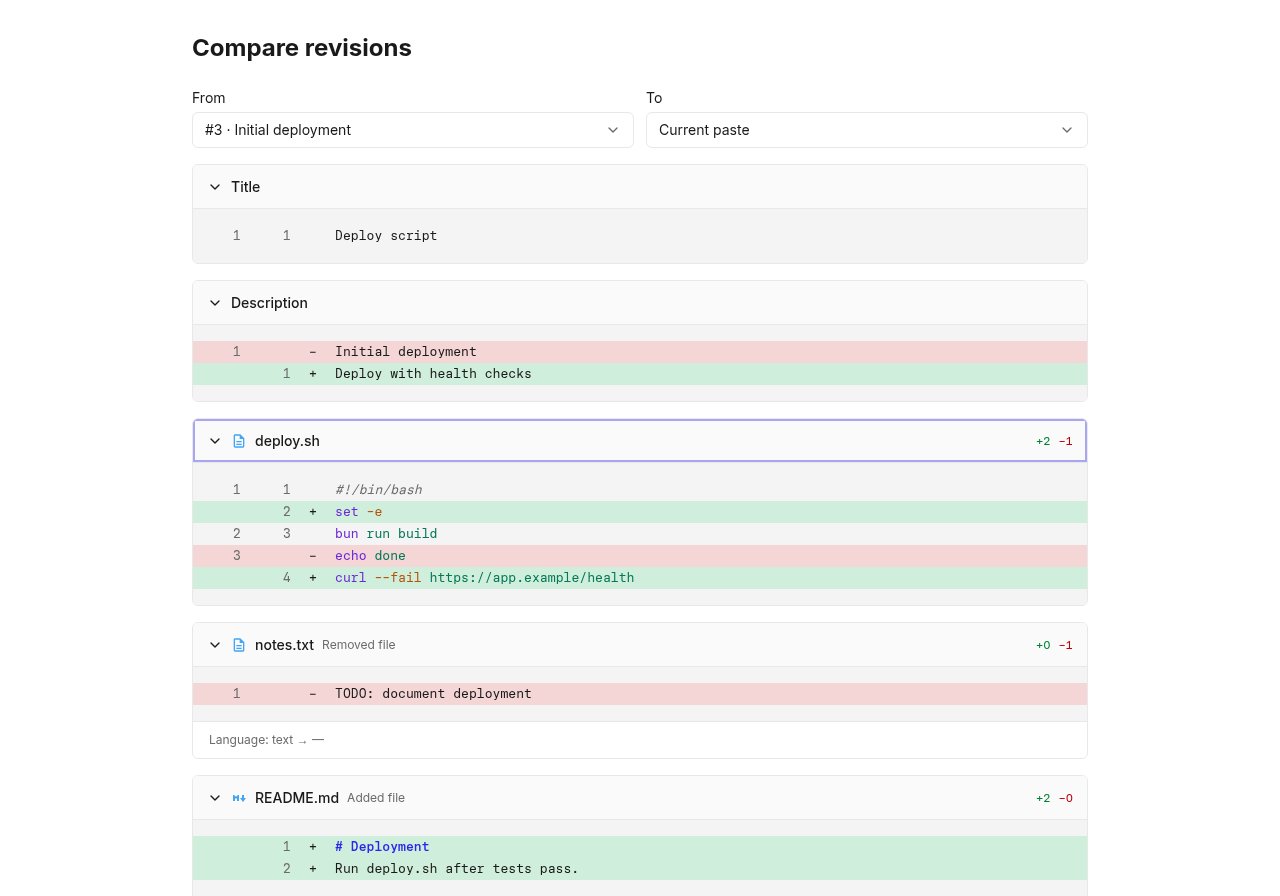
- Multi-file pastes with syntax highlighting and revisions you can compare
- Passwords, expiry and burn-after-read links
- Collections of reusable snippets and
.envfile sync - A CLI and an MCP server for coding agents
- GitHub and Google sign-in, email, Slack and Discord webhooks
How to use
- Set
PUBLIC_URLto your ZimaOS IP before you install. - Open Sniptide and sign up to make your account.
- Close sign-up with
ALLOW_SIGN_UP=falsein the app settings. - Create a paste, or connect your coding agent to the MCP server.
Before you install
You must set PUBLIC_URL first. It starts as http://[ZIMAOS-IP-ADDRESS]:6716: replace [ZIMAOS-IP-ADDRESS] with your ZimaOS IP, like http://192.168.1.20:6716. Sign-in only works on this address; until it is set, the app shows a "set PUBLIC_URL" page.
Sign-up is open at first so you can make your account; then add ALLOW_SIGN_UP=false in the app settings. Every secret is made on first start and kept in the data folder. More settings (OAuth sign-in, email, limits) are in the Variables tab.
The settings in the first table are already in the app settings. To use any other one, open the app settings, add the variable with your value, save, and the app restarts with it. A setting you leave out uses its default.
In the app settings
| Variable | Default value | Description |
|---|---|---|
TZ | $TZ | Your time zone. It is filled in from your ZimaOS time zone. |
PUBLIC_ | http://[ZIMAOS-IP-ADDRESS]:6716 | Required. Replace [ZIMAOS-IP-ADDRESS] with your ZimaOS IP, like http://192.168.1.20:6716, or use your https domain. Sign-in only works on this address, and share links use it. |
Sign-up and accounts
| Variable | Default value | Description |
|---|---|---|
ALLOW_ | true | Set to false once your account exists, so nobody else can sign up. |
ALLOWED_ | — | Only these email addresses may sign up, comma separated. |
Sign in with GitHub or Google
| Variable | Default value | Description |
|---|---|---|
GITHUB_ | — | A GitHub OAuth app's client ID, for "Sign in with GitHub". |
GITHUB_ | — | The GitHub OAuth app's client secret. |
GOOGLE_ | — | A Google OAuth client ID, for "Sign in with Google". |
GOOGLE_ | — | The Google OAuth client secret. |
BETTER_ | — | Extra addresses sign-in accepts, comma separated (for example a second domain). |
Email (SMTP)
| Variable | Default value | Description |
|---|---|---|
SMTP_ | — | Your mail server, for account email. |
SMTP_ | — | Your mail server's port. |
SMTP_ | — | The address email comes from. |
SMTP_ | — | The user name for your mail server. |
SMTP_ | — | The password for your mail server. |
Pastes
| Variable | Default value | Description |
|---|---|---|
SHARE_ | — | A separate address for share links. Left out, it is PUBLIC_URL. |
MAX_ | — | The largest paste, in bytes. |
ACCOUNT_ | — | Storage per account, in bytes. |
VIEW_ | 90 | How many days view history is kept. |
Notifications
| Variable | Default value | Description |
|---|---|---|
SLACK_ | — | A Slack webhook for notifications. |
DISCORD_ | — | A Discord webhook for notifications. |
name: sniptide

services:
  sniptide:
    image: ghcr.io/hsinghhira/sniptide:latest
    container_name: sniptide
    restart: unless-stopped
    stop_grace_period: 90s
    privileged: true
    environment:
      - TZ=$TZ
      - PUBLIC_URL=http://[ZIMAOS-IP-ADDRESS]:6716
    ports:
      - target: 8080
        published: "6716"
        protocol: tcp
    volumes:
      - type: bind
        source: /DATA/AppData/$AppID/data
        target: /data
        bind:
          create_host_path: true
    healthcheck:
      test: ["CMD", "curl", "-fsS", "-o", "/dev/null", "http://127.0.0.1:8080/api/health"]
      interval: 30s
      timeout: 10s
      retries: 5
      start_period: 120s
    deploy:
      resources:
        limits:
          cpus: "2.00"
          memory: 1024M
        reservations:
          cpus: "0.10"
          memory: 192M
    labels:
      icon: https://cdn.jsdelivr.net/gh/HSinghHira/IceStore@main/Apps/sniptide/icon.png
    x-casaos:
      id: com.icestore.sniptide
      envs:
        - container: TZ
          description:
            en_US: >-
              Your time zone. It is filled in from your ZimaOS time zone.
        - container: PUBLIC_URL
          description:
            en_US: >-
              Required. Replace [ZIMAOS-IP-ADDRESS] with your ZimaOS IP, like
              http://192.168.1.20:6716, or use your https domain. Sign-in only
              works on this address, and share links use it.
      ports:
        - container: "8080"
          description:
            en_US: Sniptide web app, API and MCP endpoint, published on host as 6716
      volumes:
        - container: /data
          description:
            en_US: >-
              The database (postgres/) with every paste, and the secret keys
              (state/). Back up the whole folder: without state/secrets.env,
              stored environment secrets can't be read.

x-casaos:
  id: com.icestore.sniptide
  architectures:
    - amd64
    - arm64
  main: sniptide
  author: HSinghHira
  category: Developer
  developer: Dino-Kupinic
  icon: https://cdn.jsdelivr.net/gh/HSinghHira/IceStore@main/Apps/sniptide/icon.png
  thumbnail: https://cdn.jsdelivr.net/gh/HSinghHira/IceStore@main/Apps/sniptide/screenshot-1.jpg
  screenshot_link:
    - https://cdn.jsdelivr.net/gh/HSinghHira/IceStore@main/Apps/sniptide/screenshot-1.jpg
  title:
    en_US: Sniptide
  tagline:
    en_US: Pastebin for code, configs and secrets, with an MCP server for your AI agents.
  description:
    en_US: >-
      Visit: [https://icestore.hsinghhira.me/app/sniptide/](https://icestore.hsinghhira.me/app/sniptide/) for full details


      Sniptide is a self-hostable pastebin for code snippets, configs and
      secrets. Share multi-file pastes with passwords, expiry or
      burn-after-read links, keep reusable snippets in collections, sync .env
      files, and connect coding agents through the CLI or the MCP server.
      PostgreSQL is inside this one container.


      **Features**


      - Multi-file pastes with syntax highlighting and revisions you can
        compare

      - Passwords, expiry and burn-after-read links

      - Collections of reusable snippets and .env file sync

      - A CLI and an MCP server for coding agents

      - GitHub and Google sign-in, email, Slack and Discord webhooks


      **How to use?**


      1. Set PUBLIC_URL to your ZimaOS IP before you install.


      2. Open Sniptide and sign up to make your account.


      3. Close sign-up with ALLOW_SIGN_UP=false in the app settings.


      4. Create a paste, or connect your coding agent to the MCP server.
  tips:
    before_install:
      en_US: >-
        1. Open the app configuration before you install.


        2. Find PUBLIC_URL. It starts as http://[ZIMAOS-IP-ADDRESS]:6716 and
           needs your ZimaOS IP in place of [ZIMAOS-IP-ADDRESS], like
           http://192.168.1.20:6716 for the IP 192.168.1.20 (use yours). You
           must do this, or sign-in won't work.


        3. Start the installation.


        4. Wait about a minute. The first start sets up the database.


        5. Open your PUBLIC_URL and sign up to make your account.


        6. Then add ALLOW_SIGN_UP with the value false in the app settings,
           so nobody else can sign up. More settings are listed on the
           Sniptide page at https://icestore.hsinghhira.me/app/sniptide/
           (Variables tab).
  index: /
  port_map: "6716"
  scheme: http
  is_uncontrolled: false
  version: "0.78.1"
  update_at: "2026-11-09"
  release_notes:
    en_US: |-
      - First IceStore release: Sniptide in one container with PostgreSQL 17, on port 6716 with one data folder; nginx takes the place of upstream's optional Caddy proxy.
      - BETTER_AUTH_SECRET, the environment-secrets key and the database password are made on first start.
      - ghcr.io/dino-kupinic/sniptide 0.78.1
  repo: "https://github.com/Dino-Kupinic/sniptide"
  support: "https://github.com/Dino-Kupinic/sniptide/issues"
  docs: "https://docs.sniptide.com"
Install Sniptide
Something not working with Sniptide?
Report it so it gets fixed, or ask for an app that is not here yet.
 ZimaOS
Add the store link, then find Sniptide in the App Store and install it.
 CasaOS
Add the store link, then find Sniptide in the App Store and install it.
 ReCasaOS
Add the store link, then find Sniptide in the App Store and install it.
 Homeio
Add the store link, then find Sniptide in the App Store and install it.
 MOS
Add the repository in MOS Hub Settings, then find Sniptide in Docker → MOS Hub and install it.


