
TryPost
Social media scheduler built for AI agents and the teams behind them
- ghcr.io/hsinghhira/trypost:latest
- v2.0.1
- Updated 8 Nov 2026
- port 6190
- amd64 · arm64
- Social
- 1.5k stars
Screenshots
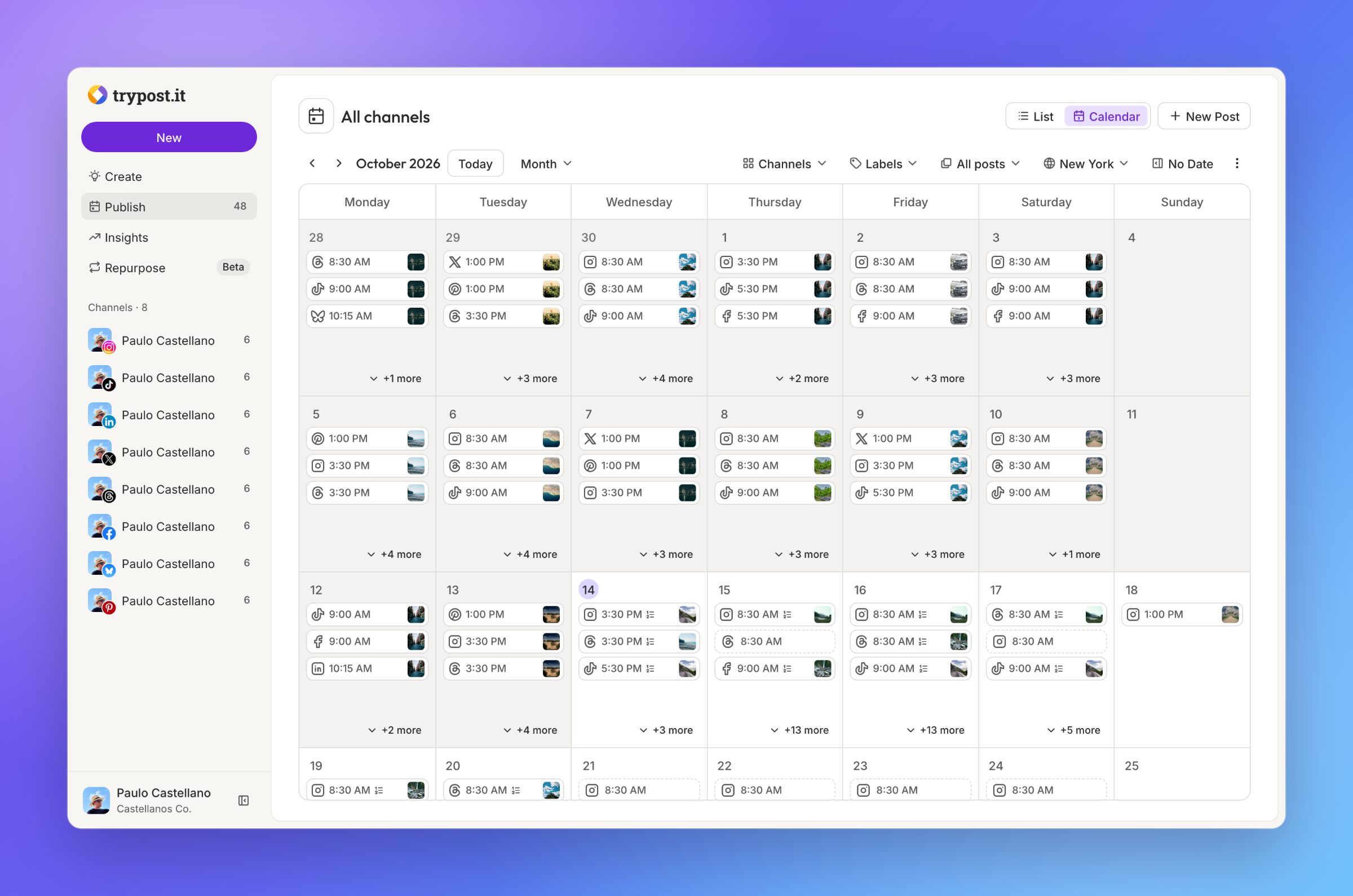
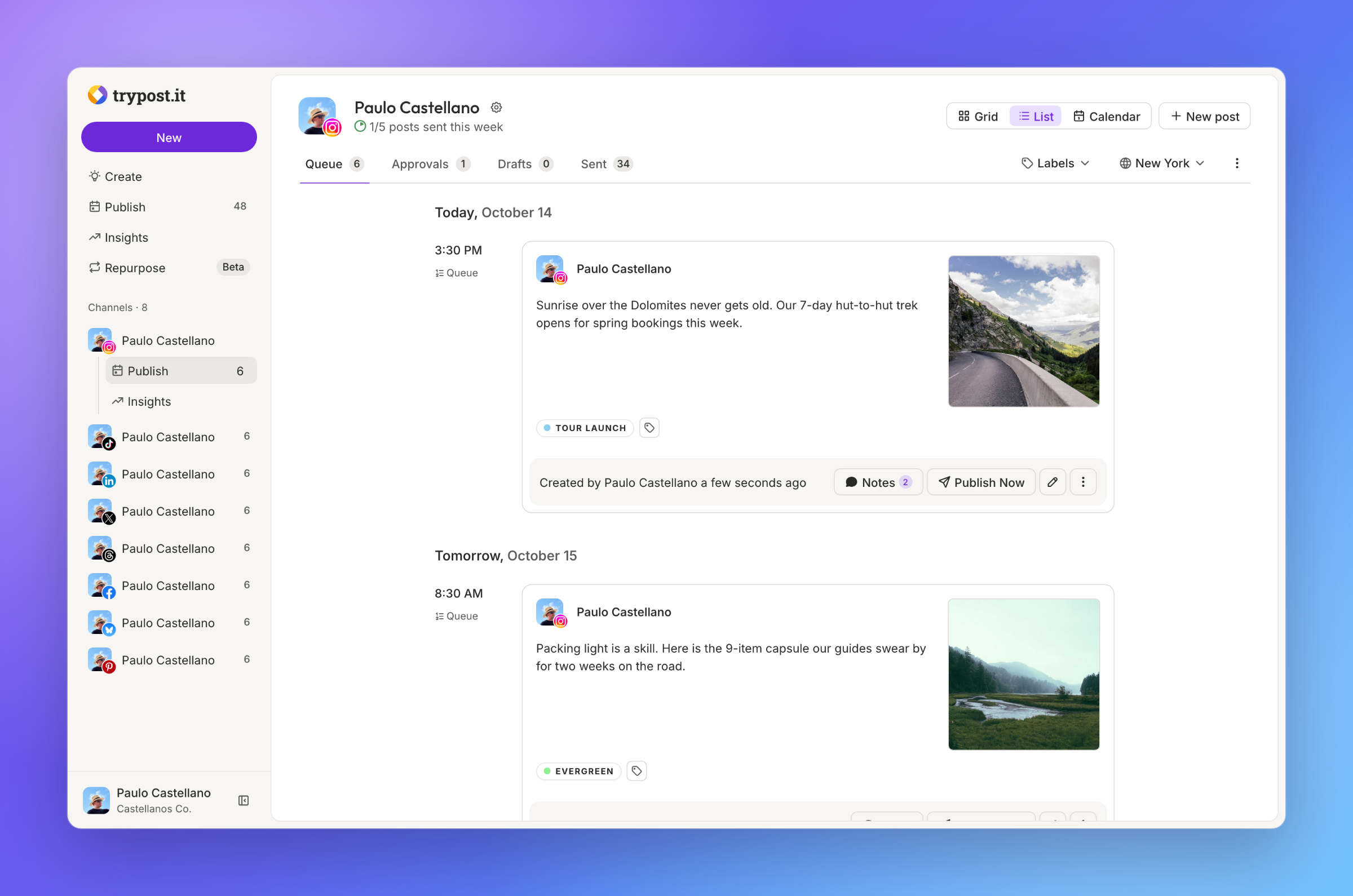
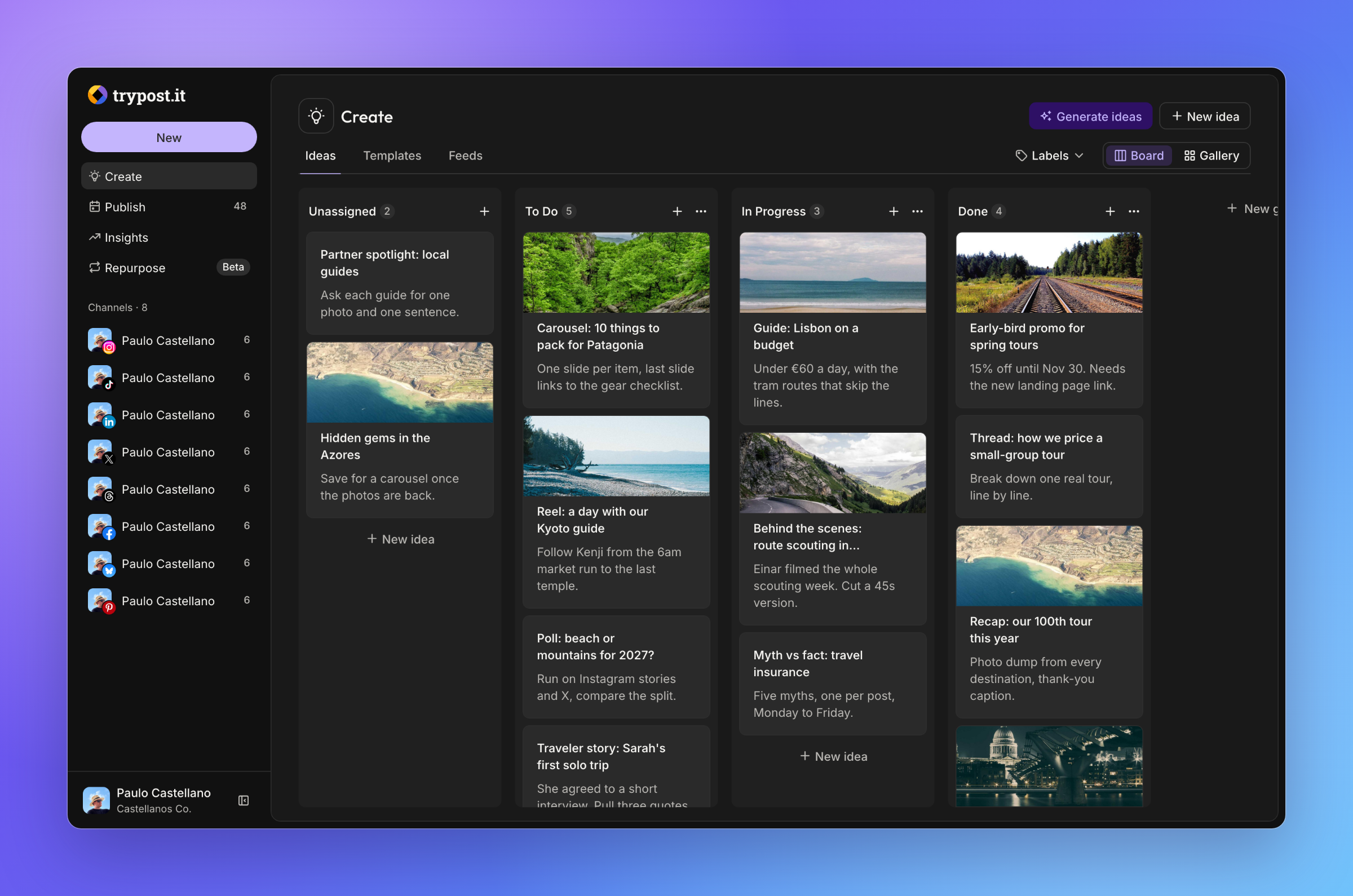
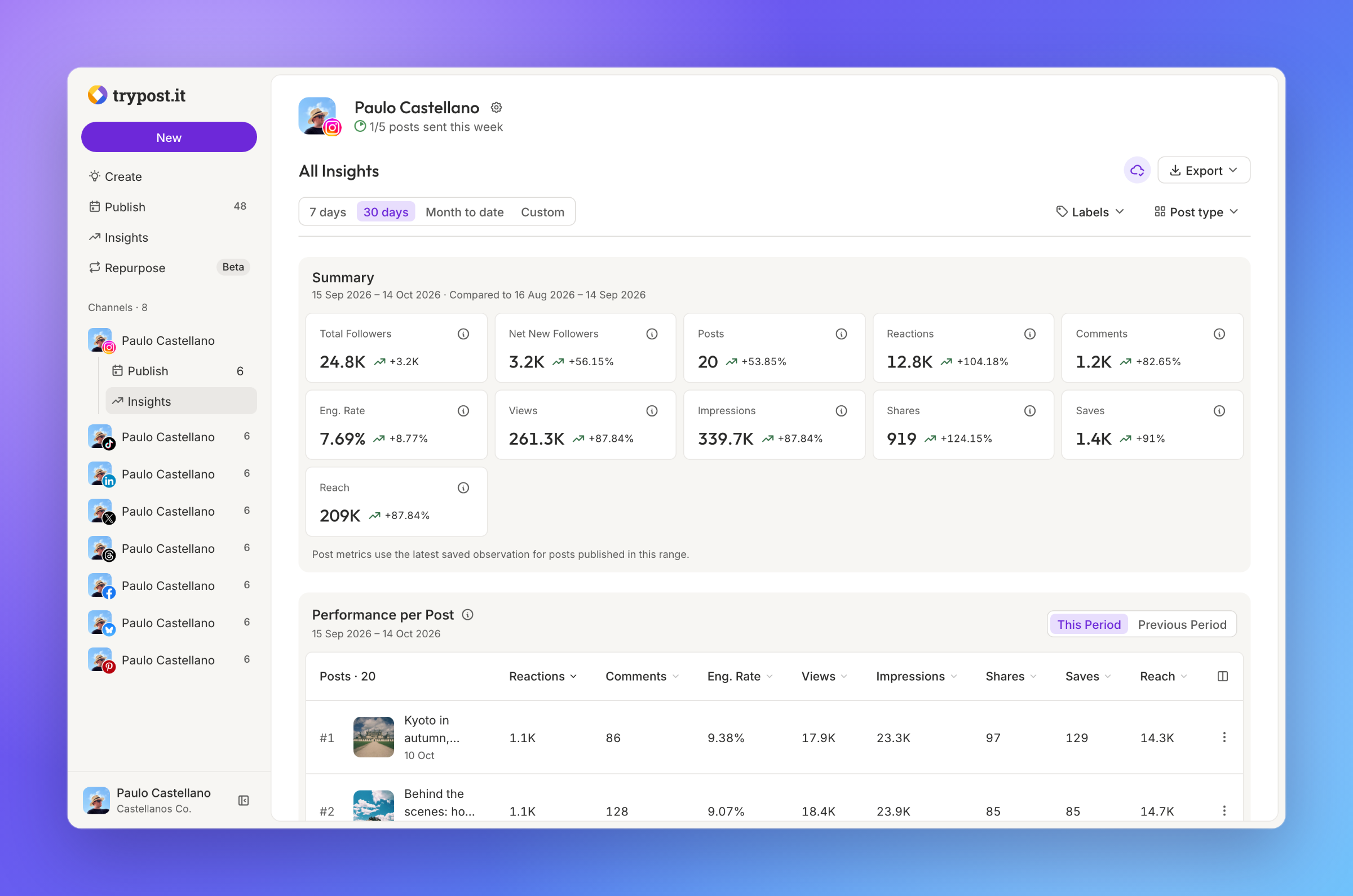
Open the app
About TryPost
TryPost plans, schedules and publishes posts to every social network. Write them in a composer with a live preview, or let AI agents do it through MCP and the REST API. This is TryPost in a single container, with PostgreSQL and Redis inside, one port and one data folder. Secret keys and the first account are made for you on first start.
Features
- Instagram, TikTok, LinkedIn, X, YouTube, Facebook, Threads, Bluesky, Pinterest, Mastodon, Google Business, Telegram and Discord
- Composer that adapts each post per network, with a live preview
- Calendar and per-channel queues with posting times
- Approvals, workspaces for each brand or client, and team members
- MCP server with 80+ tools and a REST API with webhooks
- Ideas board, labels, signatures and insights per channel
- Every feature of TryPost Cloud, no paid tiers
- PostgreSQL and Redis inside
How to use
- Open TryPost from your dashboard.
- Sign in with
ADMIN_EMAILand the password from the app log. - Connect a channel, then write your first post and schedule it.
Before you install
You must set PUBLIC_URL first. It starts as http://[ZIMAOS-IP-ADDRESS]:6190: replace [ZIMAOS-IP-ADDRESS] with your ZimaOS IP, like http://192.168.1.20:6190, or use your https address. Images, videos and every social network's sign-in are linked from it. Until it is set, TryPost only opens on the server itself and shows a note everywhere else.
Set ADMIN_EMAIL to your own email. Leave ADMIN_PASSWORD blank to get a random one, shown in the app log in the box marked CREDENTIALS. Self-hosted TryPost has no open sign-up: invite your team from Settings, Members.
To post to a network, make a developer app with that network and add its keys from the Variables tab (Bluesky, Mastodon and Telegram need none). The callback address for each is http://[ZIMAOS-IP-ADDRESS]:6190/accounts/<network>/callback. Some networks only accept https callbacks and public image addresses, so Instagram, TikTok and a few others need TryPost on a public https address. Email (SMTP), AI and the other settings are in the Variables tab too; add them in the app settings. The first start takes about 3 minutes.
The settings in the first table are already in the app settings. To use any other one, open the app settings, add the variable with your value, save, and the app restarts with it. A setting you leave out uses its default.
In the app settings
| Variable | Default value | Description |
|---|---|---|
TZ | $TZ | Your time zone. It is filled in from your ZimaOS time zone. Leave it unless you need another. |
PUBLIC_ | http://[ZIMAOS-IP-ADDRESS]:6190 | Required. Replace [ZIMAOS-IP-ADDRESS] with your ZimaOS IP, like http://192.168.1.20:6190, or use your https address. Images, videos and social network sign-ins are linked from it. Keep the port at 6190. |
ADMIN_ | [email protected] | Your email. It is the sign-in of the first account, made on the first start. |
ADMIN_ | — | The password of the first account, used only on the first start. Leave it blank and the app makes a random one, shown in the app log in the box marked CREDENTIALS. Change it later in TryPost's profile settings. |
Sign-up and accounts
| Variable | Default value | Description |
|---|---|---|
ADMIN_ | Admin | The name of the first account, made on the first start. |
GOOGLE_ | false | Set to true to show "Sign in with Google". Uses GOOGLE_CLIENT_ID and GOOGLE_CLIENT_SECRET. |
GITHUB_ | false | Set to true to show "Sign in with GitHub". Uses GITHUB_CLIENT_ID and GITHUB_CLIENT_SECRET. |
GITHUB_ | — | Client ID of your GitHub OAuth app. Its callback is PUBLIC_URL/auth/github/callback. |
GITHUB_ | — | Client secret of your GitHub OAuth app. |
Email (SMTP)
| Variable | Default value | Description |
|---|---|---|
MAIL_ | log | Set to smtp to send emails (invites, password resets, notes). With log, emails only go to the app's log file. |
MAIL_ | — | Your email server, like smtp.gmail.com. |
MAIL_ | 2525 | Your email server port, usually 587 or 465. |
MAIL_ | — | The user name for your email server. |
MAIL_ | — | The password for your email server. |
MAIL_ | — | smtps for port 465. Leave it out for port 587 (STARTTLS is used when the server offers it). |
MAIL_ | [email protected] | The address emails are sent from. |
MAIL_ | TryPost | The sender name on emails. |
Social networks
| Variable | Default value | Description |
|---|---|---|
LINKEDIN_ | — | LinkedIn app client ID. Every network's callback is PUBLIC_URL/accounts/<network>/callback, like http://192.168.1.20:6190/accounts/linkedin/callback. Bluesky, Mastodon and Telegram need no app keys. |
LINKEDIN_ | — | LinkedIn app client secret. |
X_ | — | X (Twitter) app client ID. Callback: PUBLIC_URL/accounts/x/callback. |
X_ | — | X (Twitter) app client secret. |
FACEBOOK_ | — | Meta app ID for Facebook pages. |
FACEBOOK_ | — | Meta app secret for Facebook pages. |
INSTAGRAM_ | — | Instagram app ID. |
INSTAGRAM_ | — | Instagram app secret. |
THREADS_ | — | Threads app ID. |
THREADS_ | — | Threads app secret. |
TIKTOK_ | — | TikTok app client key. |
TIKTOK_ | — | TikTok app client secret. |
GOOGLE_ | — | Google OAuth client ID, for YouTube and Sign in with Google. Callbacks: PUBLIC_URL/accounts/youtube/callback and PUBLIC_URL/auth/google/callback. |
GOOGLE_ | — | Google OAuth client secret. |
GOOGLE_ | — | Google OAuth client ID for Google Business Profile. |
GOOGLE_ | — | Google OAuth client secret for Google Business Profile. |
PINTEREST_ | — | Pinterest app ID. |
PINTEREST_ | — | Pinterest app secret. |
DISCORD_ | — | Discord application ID. |
DISCORD_ | — | Discord application secret. |
DISCORD_ | — | The token of your Discord bot, which posts to your channels. |
TELEGRAM_ | — | The token of your Telegram bot, from BotFather. |
TELEGRAM_ | — | Your Telegram bot's user name, without the @. |
AI
| Variable | Default value | Description |
|---|---|---|
AI_ | openai | Which AI writes and rewrites posts: openai, anthropic, gemini or openrouter. Add that provider's API key too. Leave every key out to turn the AI assistant off. |
OPENAI_ | — | Your OpenAI API key. |
ANTHROPIC_ | — | Your Anthropic API key. |
GEMINI_ | — | Your Google Gemini API key. |
OPENROUTER_ | — | Your OpenRouter API key. |
ELEVENLABS_ | — | Your ElevenLabs API key, for AI voice-overs. |
Media sources
| Variable | Default value | Description |
|---|---|---|
UNSPLASH_ | — | Your Unsplash access key, to pick photos from Unsplash. |
UNSPLASH_ | — | Your Unsplash secret key. |
CANVA_ | — | Canva Connect app client ID, to bring in Canva designs. |
CANVA_ | — | Canva Connect app client secret. |
Server
| Variable | Default value | Description |
|---|---|---|
APP_ | en | The default language, like en, pt, es, fr or de. Each person can change their own in their profile. |
POST_ | 730 | How many days to keep the edit history of posts. |
Logs
| Variable | Default value | Description |
|---|---|---|
LOG_ | debug | How much TryPost writes to its log: debug, info, warning or error. |
name: trypost

services:
  trypost:
    image: ghcr.io/hsinghhira/trypost:latest
    container_name: trypost
    restart: unless-stopped
    stop_grace_period: 90s
    privileged: true
    environment:
      - TZ=$TZ
      - PUBLIC_URL=http://[ZIMAOS-IP-ADDRESS]:6190
      - [email protected]
      - ADMIN_PASSWORD=
    ports:
      - target: 8080
        published: "6190"
        protocol: tcp
    volumes:
      - type: bind
        source: /DATA/AppData/$AppID/data
        target: /data
        bind:
          create_host_path: true
    healthcheck:
      test: ["CMD", "curl", "-fsS", "-o", "/dev/null", "http://127.0.0.1:8080/up"]
      interval: 30s
      timeout: 10s
      retries: 5
      start_period: 240s
    deploy:
      resources:
        limits:
          cpus: "2.00"
          memory: 2048M
        reservations:
          cpus: "0.10"
          memory: 384M
    labels:
      icon: https://cdn.jsdelivr.net/gh/HSinghHira/IceStore@main/Apps/trypost/icon.png
    x-casaos:
      id: com.icestore.trypost
      envs:
        - container: TZ
          description:
            en_US: >-
              Your time zone. It is filled in from your ZimaOS time zone.
              Leave it unless you need another.
        - container: PUBLIC_URL
          description:
            en_US: >-
              Required. Replace [ZIMAOS-IP-ADDRESS] with your ZimaOS IP, like
              http://192.168.1.20:6190, or use your https address. Images,
              videos and social network sign-ins are linked from it. Keep the
              port at 6190.
        - container: ADMIN_EMAIL
          description:
            en_US: >-
              Your email. It is the sign-in of the first account, made on the
              first start.
        - container: ADMIN_PASSWORD
          description:
            en_US: >-
              The password of the first account, used only on the first
              start. Leave it blank and the app makes a random one, shown in
              the app log in the box marked CREDENTIALS. Change it later in
              TryPost's profile settings.
      ports:
        - container: "8080"
          description:
            en_US: TryPost web app, API, MCP and live updates, published on host as 6190
      volumes:
        - container: /data
          description:
            en_US: >-
              The database, uploaded images and videos, and this install's
              secret keys (state/secrets.env and the Passport keys). Back up
              the whole folder.

x-casaos:
  id: com.icestore.trypost
  architectures:
    - amd64
    - arm64
  main: trypost
  author: HSinghHira
  category: Social
  developer: trypostit
  icon: https://cdn.jsdelivr.net/gh/HSinghHira/IceStore@main/Apps/trypost/icon.png
  thumbnail: https://cdn.jsdelivr.net/gh/HSinghHira/IceStore@main/Apps/trypost/screenshot-1.png
  screenshot_link:
    - https://cdn.jsdelivr.net/gh/HSinghHira/IceStore@main/Apps/trypost/screenshot-1.png
    - https://cdn.jsdelivr.net/gh/HSinghHira/IceStore@main/Apps/trypost/screenshot-2.png
    - https://cdn.jsdelivr.net/gh/HSinghHira/IceStore@main/Apps/trypost/screenshot-3.png
    - https://cdn.jsdelivr.net/gh/HSinghHira/IceStore@main/Apps/trypost/screenshot-4.png
  title:
    en_US: TryPost
  tagline:
    en_US: Social media scheduler built for AI agents and the teams behind them
  description:
    en_US: >-
      Visit: [https://icestore.hsinghhira.me/app/trypost/](https://icestore.hsinghhira.me/app/trypost/) for full details


      TryPost plans, schedules and publishes posts to every social network.
      Write them in a composer with a live preview, or let AI agents do it
      through MCP and the REST API. This is TryPost in a single container,
      with PostgreSQL and Redis inside, one port and one data folder. Secret
      keys and the first account are made for you on first start.


      **Features**


      - Instagram, TikTok, LinkedIn, X, YouTube, Facebook, Threads, Bluesky,
        Pinterest, Mastodon, Google Business, Telegram and Discord

      - Composer that adapts each post per network, with a live preview

      - Calendar and per-channel queues with posting times

      - Approvals, workspaces for each brand or client, and team members

      - MCP server with 80+ tools and a REST API with webhooks

      - Ideas board, labels, signatures and insights per channel

      - Every feature of TryPost Cloud, no paid tiers


      **How to use?**


      1. Open TryPost from the Zima OS dashboard.


      2. Sign in with ADMIN_EMAIL and the password from the app log.


      3. Connect a channel, then write your first post and schedule it.
  tips:
    before_install:
      en_US: >-
        1. Set PUBLIC_URL first. You must do this, or images and social
           sign-ins won't work. Replace [ZIMAOS-IP-ADDRESS] with your ZimaOS
           IP, like http://192.168.1.20:6190.


        2. Set ADMIN_EMAIL to your own email.


        3. Leave ADMIN_PASSWORD blank to get a random one. Or type your own.


        4. More settings, like email (SMTP), the app keys for each social
           network and AI, are listed on the TryPost page at
           https://icestore.hsinghhira.me/app/trypost/ (Variables tab). You
           can add them now or later in the app settings.


        5. Start the installation.


        6. Wait about 3 minutes for TryPost to start the first time.


        7. Open the app log. Find the box marked CREDENTIALS. It has your
           email and password.


        8. Open TryPost from the Zima OS dashboard and sign in.


        9. To add your team, go to Settings, Members and invite them.
  index: /
  port_map: "6190"
  scheme: http
  is_uncontrolled: false
  version: "2.0.1"
  update_at: "2026-11-08"
  release_notes:
    en_US: |-
      - Single-container TryPost with one port (6190) and one data folder
      - PostgreSQL 16 and Redis inside; Reverb, Horizon and the scheduler run as upstream ships them
      - APP_KEY, Passport keys, database and Reverb secrets and the first account are made on first start, so each install gets its own
      - Live updates follow the address you open, so they work from every device
      - ghcr.io/trypostit/trypost 2.0.1
  repo: "https://github.com/trypostit/trypost"
  support: "https://github.com/trypostit/trypost/issues"
  docs: "https://docs.trypost.it"
Install TryPost
Something not working with TryPost?
Report it so it gets fixed, or ask for an app that is not here yet.
 ZimaOS
Add the store link, then find TryPost in the App Store and install it.
 CasaOS
Add the store link, then find TryPost in the App Store and install it.
 ReCasaOS
Add the store link, then find TryPost in the App Store and install it.
 Homeio
Add the store link, then find TryPost in the App Store and install it.
 MOS
Add the repository in MOS Hub Settings, then find TryPost in Docker → MOS Hub and install it.


