
byagent
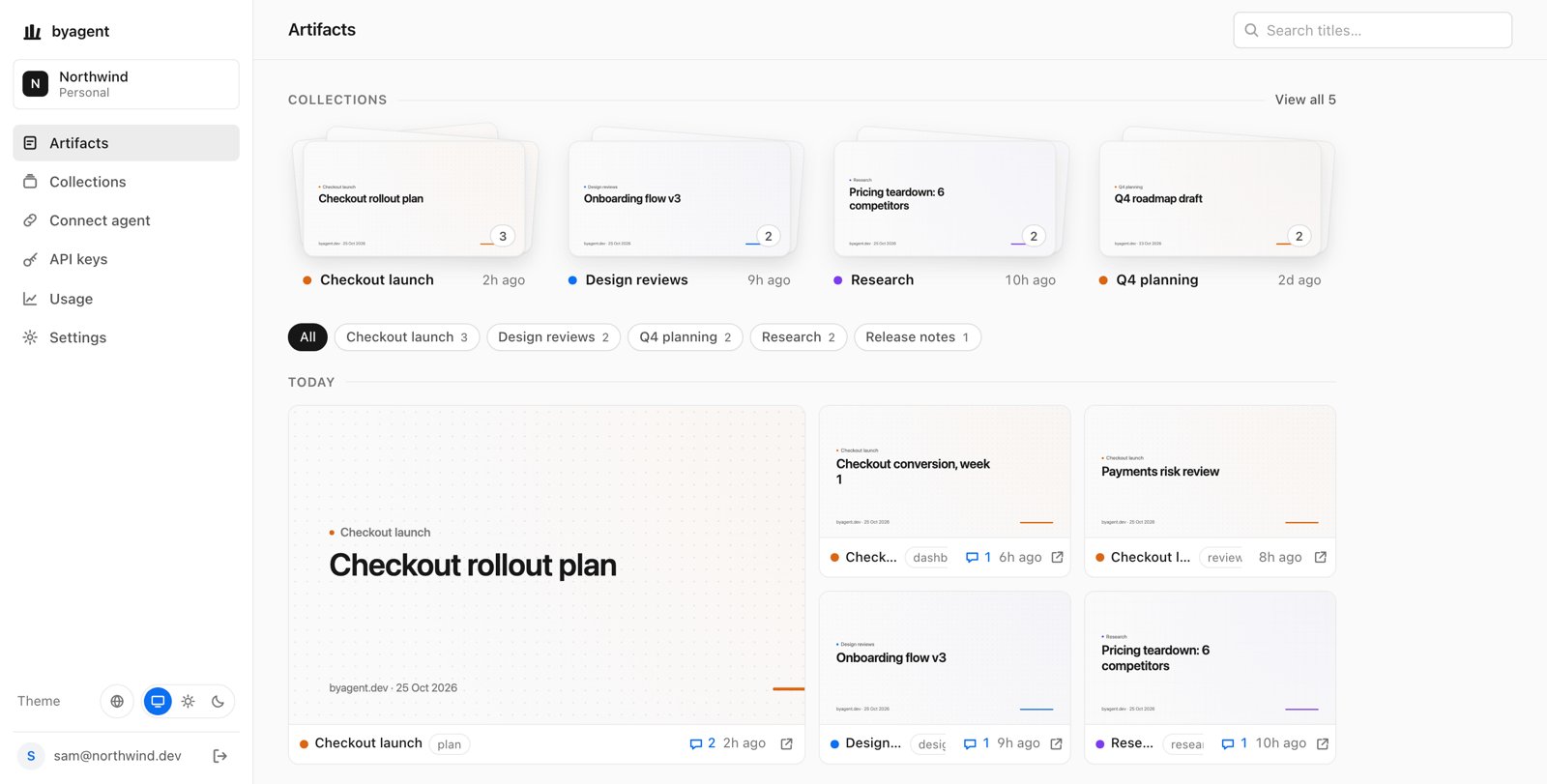
Shareable links for the HTML and Markdown your AI agents publish, with line comments.
- ghcr.io/hsinghhira/byagent:latest
- v0.9.0
- Updated 9 Nov 2026
- port 6699
- amd64 · arm64
- AI
- 1 stars
Screenshots
Open the app
About byagent
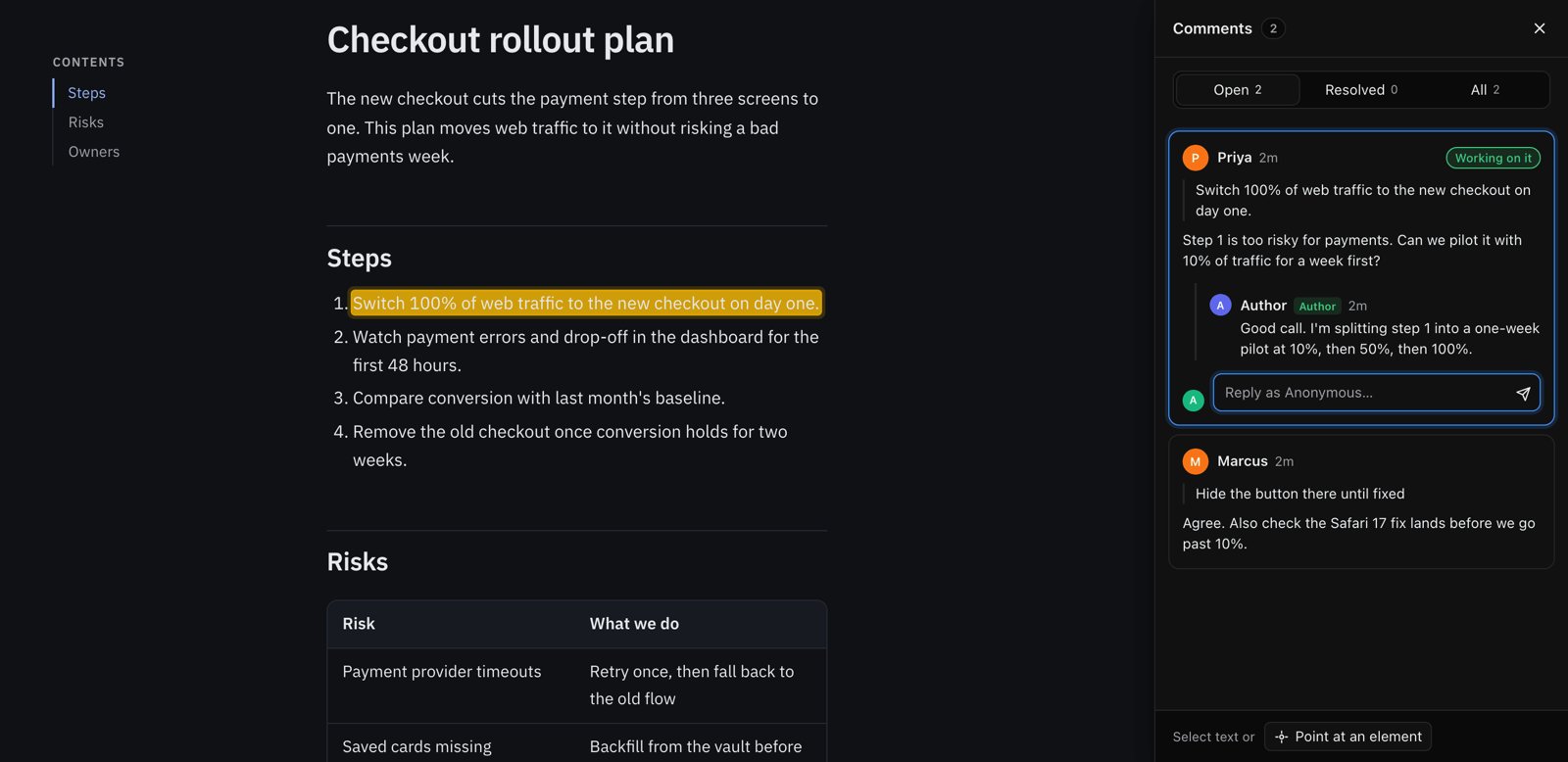
byagent gives everything your AI agents make a shareable link. Agents publish HTML or Markdown from the command line; readers comment on any line without an account; the agent reads the comments, fixes the page and republishes to the same link. Works with Claude Code, Codex, Cursor and any agent with a shell.
Features
- One link per piece of work; republishing keeps the link and the old versions, with diff and rollback
- Comments and suggested edits on any line, no account needed
- Markdown becomes a styled page; a folder with
index.htmlships as is - Projects, page passwords, share codes, expiry and view counts
- Dashboard, API keys and an MCP server
How to use
- Set
PUBLIC_URLto your ZimaOS IP before you install. - Copy the admin token from the app's logs (CREDENTIALS box).
- On your computer, run
npx byagent login --key <token> --server http://[ZIMAOS-IP-ADDRESS]:6699. - Publish:
npx byagent publish ./plan.md, and share the link.
Before you install
You must set PUBLIC_URL first. It starts as http://[ZIMAOS-IP-ADDRESS]:6699: replace [ZIMAOS-IP-ADDRESS] with your ZimaOS IP, like http://192.168.1.20:6699. Every link byagent hands out starts with it. To share pages with people outside your home, put byagent behind a reverse proxy and use your https domain instead.
This install's admin token (an API key) and signing key are made on first start and kept in the data folder. The token is shown in the app's logs, in the box marked CREDENTIALS, on every start. For the dashboard, open /app/login, type any email, and copy the sign-in code from the logs; set EMAIL_PROVIDER=resend for real email. More settings are in the Variables tab; add them in the app settings. It starts in a few seconds.
The settings in the first table are already in the app settings. To use any other one, open the app settings, add the variable with your value, save, and the app restarts with it. A setting you leave out uses its default.
In the app settings
| Variable | Default value | Description |
|---|---|---|
TZ | $TZ | Your time zone. It is filled in from your ZimaOS time zone. Leave it unless you need another. |
PUBLIC_ | http://[ZIMAOS-IP-ADDRESS]:6699 | Required. Replace [ZIMAOS-IP-ADDRESS] with your ZimaOS IP, like http://192.168.1.20:6699, or use your https domain. Every link byagent hands out (pages, comments, the dashboard) starts with this address. |
Dashboard sign-in
| Variable | Default value | Description |
|---|---|---|
EMAIL_ | log | How sign-in codes reach you. log prints them in the app's logs (only people who can read the logs can sign in); resend sends real email. |
RESEND_ | — | Your Resend API key, with EMAIL_PROVIDER=resend. |
EMAIL_ | — | The sender for sign-in email, like byagent <[email protected]>. |
GITHUB_ | — | A GitHub OAuth app's client ID, for "Sign in with GitHub". Its callback is your PUBLIC_URL followed by /app/login/github/callback. |
GITHUB_ | — | The GitHub OAuth app's client secret. |
Keys
| Variable | Default value | Description |
|---|---|---|
ADMIN_ | — | The API key of the admin workspace. Made on first start and kept in .admin-token in the data folder when left out. |
KEY_ | — | Signs sessions and portal links. Made on first start when left out; changing it ends every portal link. |
Addresses
| Variable | Default value | Description |
|---|---|---|
PUBLIC_ | — | A separate address for published pages, like https://pages.example.com. Left out, it is PUBLIC_URL. Upstream advises a separate one when the dashboard is used. |
PUBLIC_ | — | The address of the API and dashboard. Left out, it is PUBLIC_URL. |
CONTENT_ | — | Give every page its own origin, https://<slug>.<this domain>/ (needs wildcard DNS and HTTPS). Left out, pages live under /a/<id>/. |
TRUST_ | false | Set to true only when byagent is reachable only through your reverse proxy, so rate limits use the visitor's address. |
Features
| Variable | Default value | Description |
|---|---|---|
VARIABLES_ | — | Turns on account variables and proxy routes (pages that call an API without showing the key). Base64 of 32 random bytes (openssl rand -base64 32). Losing it loses every stored value. |
Limits
| Variable | Default value | Description |
|---|---|---|
LIMIT_ | 26214400 | The largest version you can publish, in bytes (25 MB). |
LIMIT_ | 20 | How many old versions of each page are kept. |
LIMIT_ | 200 | How many live pages each workspace may have. |
name: byagent

services:
  byagent:
    image: ghcr.io/hsinghhira/byagent:latest
    container_name: byagent
    restart: unless-stopped
    stop_grace_period: 20s
    network_mode: bridge
    environment:
      - TZ=$TZ
      - PUBLIC_URL=http://[ZIMAOS-IP-ADDRESS]:6699
    ports:
      - target: 8080
        published: "6699"
        protocol: tcp
    volumes:
      - type: bind
        source: /DATA/AppData/$AppID/data
        target: /data
        bind:
          create_host_path: true
    healthcheck:
      test: ["CMD", "wget", "-q", "-O", "/dev/null", "http://127.0.0.1:8080/healthz"]
      interval: 30s
      timeout: 5s
      retries: 3
      start_period: 20s
    deploy:
      resources:
        limits:
          cpus: "1.00"
          memory: 256M
        reservations:
          cpus: "0.00"
          memory: 32M
    labels:
      icon: https://cdn.jsdelivr.net/gh/HSinghHira/IceStore@main/Apps/byagent/icon.png
    x-casaos:
      id: com.icestore.byagent
      envs:
        - container: TZ
          description:
            en_US: >-
              Your time zone. It is filled in from your ZimaOS time zone.
              Leave it unless you need another.
        - container: PUBLIC_URL
          description:
            en_US: >-
              Required. Replace [ZIMAOS-IP-ADDRESS] with your ZimaOS IP, like
              http://192.168.1.20:6699, or use your https domain. Every link
              byagent hands out (pages, comments, the dashboard) starts with
              this address.
      ports:
        - container: "8080"
          description:
            en_US: byagent pages, API and dashboard, published on host as 6699
      volumes:
        - container: /data
          description:
            en_US: >-
              The database, every published page and its versions, and this
              install's admin token and signing key (.admin-token,
              .key-signing-secret). Back up the whole folder.

x-casaos:
  id: com.icestore.byagent
  architectures:
    - amd64
    - arm64
  main: byagent
  author: HSinghHira
  category: AI
  developer: anup-a
  icon: https://cdn.jsdelivr.net/gh/HSinghHira/IceStore@main/Apps/byagent/icon.png
  thumbnail: https://cdn.jsdelivr.net/gh/HSinghHira/IceStore@main/Apps/byagent/screenshot-1.jpg
  screenshot_link:
    - https://cdn.jsdelivr.net/gh/HSinghHira/IceStore@main/Apps/byagent/screenshot-1.jpg
    - https://cdn.jsdelivr.net/gh/HSinghHira/IceStore@main/Apps/byagent/screenshot-2.jpg
  title:
    en_US: byagent
  tagline:
    en_US: Shareable links for the HTML and Markdown your AI agents publish, with line comments.
  description:
    en_US: >-
      Visit: [https://icestore.hsinghhira.me/app/byagent/](https://icestore.hsinghhira.me/app/byagent/) for full details


      byagent gives everything your AI agents make a shareable link. Agents
      publish HTML or Markdown from the command line; readers comment on any
      line without an account; the agent reads the comments, fixes the page
      and republishes to the same link. Works with Claude Code, Codex, Cursor
      and any agent with a shell.


      **Features**


      - One link per piece of work; republishing keeps the link and the old
        versions, with diff and rollback

      - Comments and suggested edits on any line, no account needed

      - Markdown becomes a styled page; a folder with index.html ships as is

      - Projects, page passwords, share codes, expiry and view counts

      - Dashboard, API keys and an MCP server


      **How to use?**


      1. Set PUBLIC_URL to your ZimaOS IP before you install.


      2. Copy the admin token from the app's logs (CREDENTIALS box).


      3. On your computer, run: npx byagent login --key <token> --server
         http://[ZIMAOS-IP-ADDRESS]:6699


      4. Publish: npx byagent publish ./plan.md, and share the link.
  tips:
    before_install:
      en_US: >-
        1. Open the app configuration before you install.


        2. Find PUBLIC_URL. It starts as http://[ZIMAOS-IP-ADDRESS]:6699.
           Put your ZimaOS IP in place of [ZIMAOS-IP-ADDRESS], like
           http://192.168.1.20:6699 for the IP 192.168.1.20, and you're
           done. You must do this, or links point to localhost. To share pages outside your home, use your https
           domain instead, like https://pages.example.com.


        3. More settings, like email sign-in and limits, are listed on the
           byagent page at https://icestore.hsinghhira.me/app/byagent/
           (Variables tab). You can add them now or later in the app
           settings.


        4. Start the installation. It is ready in a few seconds.


        5. Look in the app's logs for the box marked CREDENTIALS. It has the
           admin token. It is printed again on every start.


        6. On your computer, run npx byagent login --key <token> --server
           and your PUBLIC_URL. Then publish with npx byagent publish.


        7. For the dashboard, open your PUBLIC_URL with /app/login, type any
           email, and copy the sign-in code from the app's logs.
  index: /app/login
  port_map: "6699"
  scheme: http
  is_uncontrolled: false
  version: "v0.9.0"
  update_at: "2026-11-09"
  release_notes:
    en_US: |-
      - First IceStore version: ghcr.io/anup-a/byagent v0.9.0, plus a start script that makes this install's ADMIN_TOKEN and KEY_SIGNING_SECRET on first start and keeps them in the data folder.
      - Port 6699. PUBLIC_URL sets both public origins. Dashboard sign-in codes go to the app's logs (EMAIL_PROVIDER=log) until you set up email.
  repo: "https://github.com/anup-a/byagent"
  support: "https://github.com/anup-a/byagent/issues"
  docs: "https://github.com/anup-a/byagent/blob/main/docs/self-hosting.md"
Install byagent
Something not working with byagent?
Report it so it gets fixed, or ask for an app that is not here yet.
 ZimaOS
Add the store link, then find byagent in the App Store and install it.
 CasaOS
Add the store link, then find byagent in the App Store and install it.
 ReCasaOS
Add the store link, then find byagent in the App Store and install it.
 Homeio
Add the store link, then find byagent in the App Store and install it.
 MOS
Add the repository in MOS Hub Settings, then find byagent in Docker → MOS Hub and install it.


