
Odysseus
Self-hosted AI workspace with chat, agents and deep research
- ghcr.io/hsinghhira/odysseus:latest
- v1.0.3
- Updated 20 Nov 2026
- port 6753
- amd64 · arm64
- AI
- 95.9k stars
Screenshots
Open the app
About Odysseus
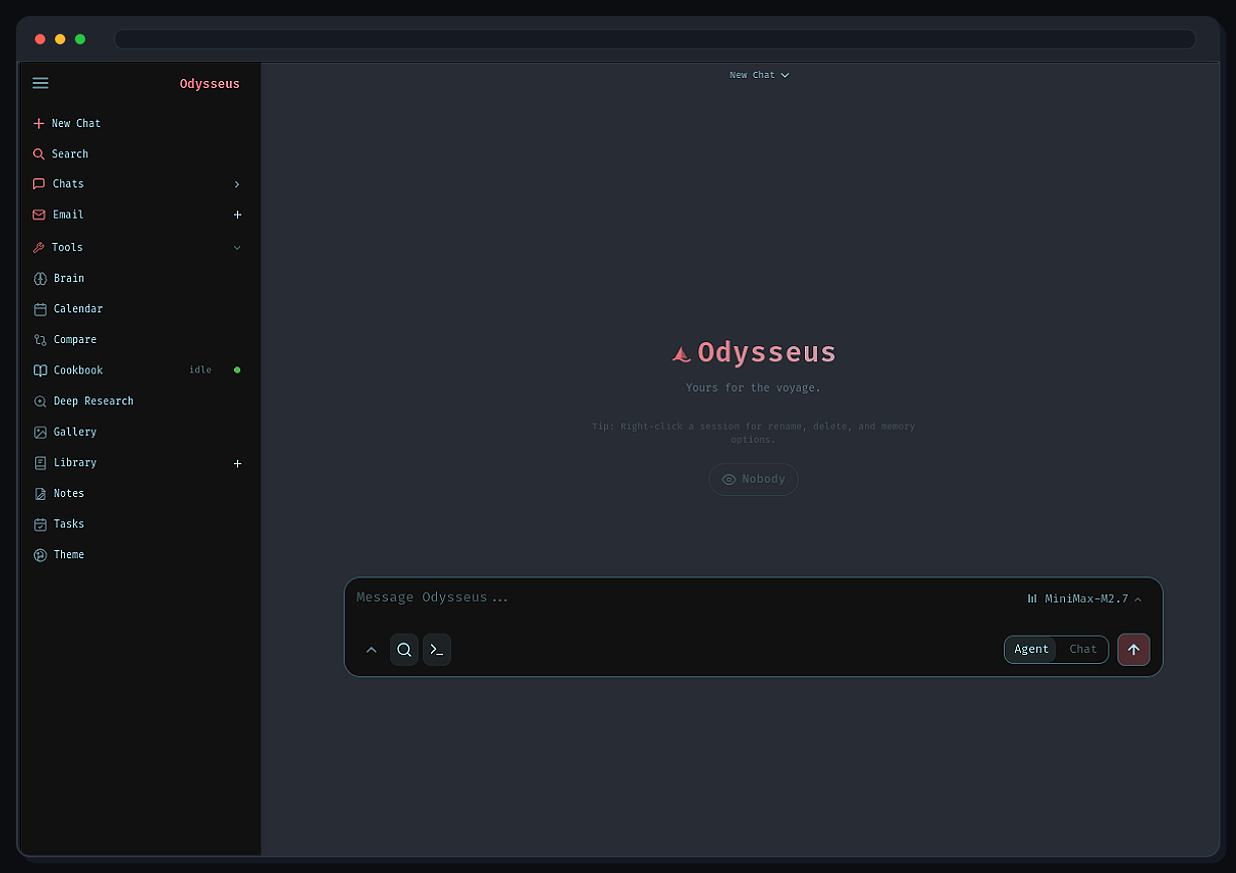
Odysseus is a self-hosted AI workspace. Chat with local or online models, let agents use tools, run deep web research, and keep your documents, email, notes and calendar in one place. ChromaDB memory and SearXNG private web search are built in, so it is one container.
Features
- Chat and agents with local models (Ollama, LM Studio, vLLM) or API models (OpenAI and compatible)
- Deep Research: multi-step web research with source reading and a written report
- Compare models side by side, blind
- Documents editor with AI edits and suggestions
- Email inbox (IMAP/SMTP), notes, tasks and a calendar with CalDAV sync
- Memory, file uploads, MCP tools, skills and two-factor sign-in
How to use
- Open Odysseus from your dashboard.
- Sign in as
adminwith the password from the app's logs (the box marked CREDENTIALS). - Go to Settings and add a model provider: your Ollama address, like
http://192.168.1.20:11434, or an OpenAI API key. - Start a chat, or open Research and ask a question.
This app has no AI model inside. Use Ollama or another model server, or an online API. Left out: ntfy and the GPU overlays.
Before you install
You can leave ODYSSEUS_ADMIN_PASSWORD empty: a password is made on first start and shown in the app's logs in the box marked CREDENTIALS. Open it from other devices at http://[ZIMAOS-IP-ADDRESS]:6753. You need a model: install Ollama (set it to listen on all addresses) or have an API key ready. More settings (model servers, search API keys, Google account) are in the Variables tab; add them in the app settings. The first start takes about 3 minutes; the first chat downloads a small embedding model.
The settings in the first table are already in the app settings. To use any other one, open the app settings, add the variable with your value, save, and the app restarts with it. A setting you leave out uses its default.
In the app settings
| Variable | Default value | Description |
|---|---|---|
TZ | $TZ | Your time zone. It is filled in from your ZimaOS time zone. Leave it unless you need another. |
PUID | $PUID | The user that owns the app's files. It is filled in by ZimaOS. Leave it. |
PGID | $PGID | The group that owns the app's files. It is filled in by ZimaOS. Leave it. |
ODYSSEUS_ | — | The admin's password, at least 8 characters. Leave it empty and one is made for you: it is shown in the app's logs, in the box marked CREDENTIALS. Only used to make the admin on first start. |
Models
| Variable | Default value | Description |
|---|---|---|
OLLAMA_ | — | The address of your Ollama server, like http://192.168.1.20:11434/v1. You can also add it later in Settings. |
LM_ | — | The address of your LM Studio server, like http://192.168.1.20:1234. |
LLM_ | localhost | The main computer to look for model servers on, like 192.168.1.20. |
LLM_ | — | More computers to look for model servers on, separated by commas. |
OPENAI_ | — | Your OpenAI API key, for OpenAI models. |
RESEARCH_ | — | A chat completions address used only for Deep Research, like http://192.168.1.20:8000/v1/chat/completions. |
HF_ | — | Your Hugging Face token, for downloading gated models in Cookbook. |
Memory
| Variable | Default value | Description |
|---|---|---|
EMBEDDING_ | — | An OpenAI-compatible embeddings address. Leave it out to use the small built-in embedding model. |
EMBEDDING_ | — | The embeddings model name on that server. |
EMBEDDING_ | — | The API key for that embeddings server. |
FASTEMBED_ | sentence-transformers/all-MiniLM-L6-v2 | The built-in embedding model to use. |
Web search
| Variable | Default value | Description |
|---|---|---|
TAVILY_ | — | Your Tavily key, to search with Tavily as well as the built-in SearXNG. |
DATA_ | — | Your Brave Search API key. |
SERPER_ | — | Your Serper (Google results) API key. |
GOOGLE_ | — | Your Google Programmable Search API key (with GOOGLE_PSE_CX). |
GOOGLE_ | — | Your Google Programmable Search engine ID. |
YDC_ | — | Your You.com API key. |
Google account (email, calendar)
| Variable | Default value | Description |
|---|---|---|
GOOGLE_ | — | Your Google OAuth client ID, to connect Gmail and Google Calendar. |
GOOGLE_ | — | Your Google OAuth client secret. |
OAUTH_ | — | The address Google sends you back to, like http://192.168.1.20:6753. Add it to your Google OAuth client too. |
GOOGLE_ | — | The full redirect address, if it differs from the one Odysseus builds from OAUTH_REDIRECT_BASE_URL. |
Sign-in
| Variable | Default value | Description |
|---|---|---|
ODYSSEUS_ | admin | The name of the admin made on first start. |
ALLOWED_ | http://localhost,http://127.0.0.1 | Other websites allowed to call the Odysseus API from a browser, separated by commas. Not needed to use Odysseus itself. |
SECURE_ | — | Set to true when Odysseus is only reached over https. |
COMPANION_ | — | The address the phone companion app uses, like http://192.168.1.20:6753. |
Server
| Variable | Default value | Description |
|---|---|---|
CLEANUP_ | 24 | How often old temporary files are cleaned up, in hours. |
ODYSSEUS_ | 10485760 | The largest file you can attach to a chat, in bytes. |
ODYSSEUS_ | — | How many seconds to wait for a slow model's first word before giving up. |
name: odysseus

services:
  odysseus:
    image: ghcr.io/hsinghhira/odysseus:latest
    container_name: odysseus
    restart: unless-stopped
    stop_grace_period: 60s
    privileged: true
    environment:
      - TZ=$TZ
      - PUID=$PUID
      - PGID=$PGID
      - ODYSSEUS_ADMIN_PASSWORD=
    ports:
      - target: 8080
        published: "6753"
        protocol: tcp
    volumes:
      - type: bind
        source: /DATA/AppData/$AppID/data
        target: /data
        bind:
          create_host_path: true
    healthcheck:
      test: ["CMD", "curl", "-fsS", "-o", "/dev/null", "http://127.0.0.1:8080/api/health"]
      interval: 30s
      timeout: 10s
      retries: 5
      start_period: 240s
    deploy:
      resources:
        limits:
          cpus: "4.00"
          memory: 4096M
        reservations:
          cpus: "0.25"
          memory: 768M
    labels:
      icon: https://cdn.jsdelivr.net/gh/HSinghHira/IceStore@main/Apps/odysseus/icon.png
    x-casaos:
      id: com.icestore.odysseus
      envs:
        - container: TZ
          description:
            en_US: >-
              Your time zone. It is filled in from your ZimaOS time zone.
              Leave it unless you need another.
        - container: PUID
          description:
            en_US: >-
              The user that owns the app's files. It is filled in by ZimaOS.
              Leave it.
        - container: PGID
          description:
            en_US: >-
              The group that owns the app's files. It is filled in by ZimaOS.
              Leave it.
        - container: ODYSSEUS_ADMIN_PASSWORD
          description:
            en_US: >-
              The admin's password, at least 8 characters. Leave it empty and
              one is made for you: it is shown in the app's logs, in the box
              marked CREDENTIALS. Only used to make the admin on first start.
      ports:
        - container: "8080"
          description:
            en_US: Odysseus web UI and API, published on host as 6753
      volumes:
        - container: /data
          description:
            en_US: >-
              odysseus/ (chats, documents, settings, model downloads),
              chromadb/ (memory vectors), searxng/ (search settings) and
              state/secrets.env. Back it up.

x-casaos:
  id: com.icestore.odysseus
  architectures:
    - amd64
    - arm64
  main: odysseus
  author: HSinghHira
  category: AI
  developer: Odysseus
  icon: https://cdn.jsdelivr.net/gh/HSinghHira/IceStore@main/Apps/odysseus/icon.png
  thumbnail: https://cdn.jsdelivr.net/gh/HSinghHira/IceStore@main/Apps/odysseus/screenshot-1.jpg
  screenshot_link:
    - https://cdn.jsdelivr.net/gh/HSinghHira/IceStore@main/Apps/odysseus/screenshot-1.jpg
  title:
    en_US: Odysseus
  tagline:
    en_US: Self-hosted AI workspace with chat, agents and deep research
  description:
    en_US: >-
      Odysseus is a self-hosted AI workspace. Chat with local or online
      models, let agents use tools, run deep web research, and keep your
      documents, email, notes and calendar in one place. ChromaDB memory and
      SearXNG private web search are built in, so it is one container.


      **Features**


      - Chat and agents with local models (Ollama, LM Studio, vLLM) or API
        models (OpenAI and compatible)

      - Deep Research: multi-step web research with source reading and a
        written report

      - Compare models side by side, blind

      - Documents editor with AI edits and suggestions

      - Email inbox (IMAP/SMTP), notes, tasks and a calendar with CalDAV
        sync

      - Memory, file uploads, MCP tools, skills and two-factor sign-in


      **How to use?**


      1. Open Odysseus from the ZimaOS dashboard.

      2. Sign in as admin with the password from the app's logs (the box
         marked CREDENTIALS).

      3. Go to Settings and add a model provider: your Ollama address, like
         http://192.168.1.20:11434, or an OpenAI API key.

      4. Start a chat, or open Research and ask a question.


      This app has no AI model inside. Use Ollama or another model server,
      or an online API. Left out: ntfy and the GPU overlays.
  tips:
    before_install:
      en_US: >-
        1. You can leave ODYSSEUS_ADMIN_PASSWORD empty. A password is made
           for you.


        2. You need a model. Install Ollama, or have an OpenAI API key ready.


        3. More settings, like OLLAMA_BASE_URL and search API keys, are
           listed on the Odysseus page at
           https://icestore.hsinghhira.me/app/odysseus/ (Variables tab). You
           can add them now or later in the app settings.


        4. Start the installation. The first start takes about 3 minutes.


        5. Open the app's logs. Find the box marked CREDENTIALS. It has the
           admin password.


        6. Open http://[ZIMAOS-IP-ADDRESS]:6753 and sign in as admin.
  index: /
  port_map: "6753"
  scheme: http
  is_uncontrolled: false
  version: "1.0.3"
  update_at: "2026-11-20"
  release_notes:
    en_US: |-
      - First IceStore release, on port 6753
      - All in one container: ghcr.io/odysseus-dev/odysseus 1.0.3, chromadb/chroma 1.5.9, searxng/searxng 2026.10.24-ef0ec03da and an nginx gateway
      - The admin password is made on first start and shown in the CREDENTIALS box in the logs
      - ntfy and the GPU and host-Docker overlays are left out
  repo: "https://github.com/odysseus-dev/odysseus"
  support: "https://github.com/odysseus-dev/odysseus/issues"
  docs: "https://github.com/odysseus-dev/odysseus/blob/dev/website/setup.md"
Install Odysseus
Something not working with Odysseus?
Report it so it gets fixed, or ask for an app that is not here yet.
 ZimaOS
Add the store link, then find Odysseus in the App Store and install it.
 CasaOS
Add the store link, then find Odysseus in the App Store and install it.
 ReCasaOS
Add the store link, then find Odysseus in the App Store and install it.
 Homeio
Add the store link, then find Odysseus in the App Store and install it.
 MOS
Add the repository in MOS Hub Settings, then find Odysseus in Docker → MOS Hub and install it.


