
Firefly III
Personal finance manager for budgets, accounts and transactions
- ghcr.io/hsinghhira/firefly-iii:1.0.2
- version-6.7.9
- Updated 21 Nov 2026
- port 6771
- amd64 · arm64
- Finance
- 25.3k stars
Screenshots
Open the app
About Firefly III
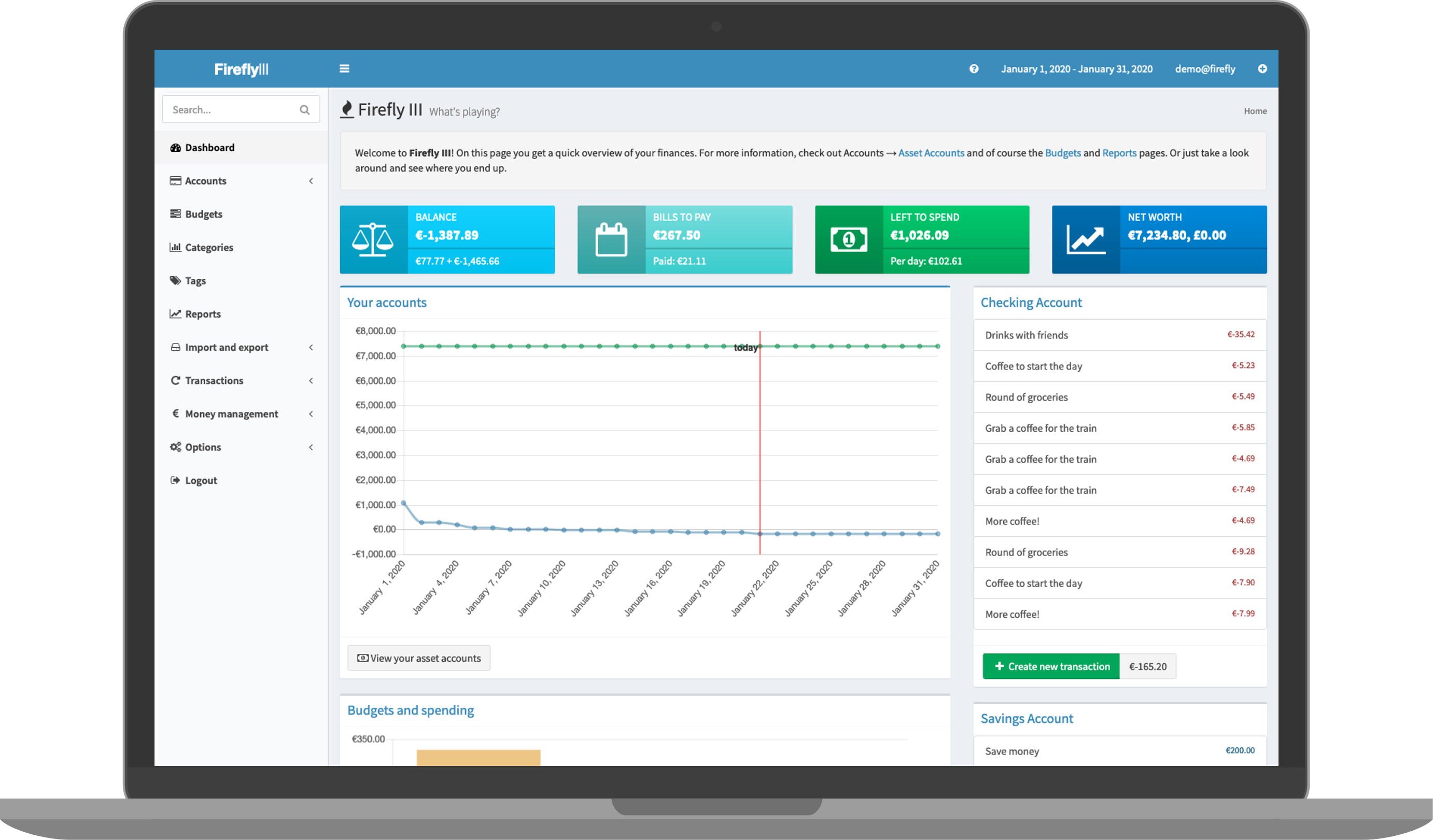
Firefly III helps you keep track of your money. Add your bank accounts, credit cards and cash, record what you spend and earn, and see where your money goes. Budgets, bills and piggy banks help you plan ahead. It uses a built-in SQLite database, so it is one container with nothing else to set up.
Features
- Accounts, transactions, transfers and split transactions
- Budgets, categories, tags and bills
- Piggy banks to save for something
- Rules that sort new transactions for you
- Recurring transactions, run every day by the built-in job
- Reports and charts, in many currencies
- Import from your bank with the Data Importer, and a full API
How to use
- Open Firefly III from your dashboard.
- Click Register and make your account. The first account is the admin.
- Follow the first steps: add your main bank account and its balance.
- Add transactions, or import them from your bank.
- Make budgets and look at the reports.
Before you install
You can install it as it is and open it at http://[ZIMAOS-IP-ADDRESS]:6771. There is no account yet: click Register, and the first account you make is the admin. Set DEFAULT_LANGUAGE if you want another language. The app key and the cron token are made for you on first start and kept in /DATA/AppData/firefly-iii/database, and the daily jobs (recurring transactions, bill reminders) run inside the container. Email, proxy sign-in and the other settings are in the Variables tab and are added in the app settings. It is ready in about a minute.
The settings in the first table are already in the app settings. To use any other one, open the app settings, add the variable with your value, save, and the app restarts with it. A setting you leave out uses its default.
In the app settings
| Variable | Default value | Description |
|---|---|---|
TZ | $TZ | Your time zone. It is filled in from your ZimaOS time zone and used for dates and the daily jobs. |
SITE_ | [email protected] | Your email. Firefly III shows it on error pages and sends errors to it when email is set up. |
DEFAULT_ | en_US | The language for new users, like en_US, en_GB, de_DE, fr_FR, nl_NL or es_ES. Each user can change it later. |
Server
| Variable | Default value | Description |
|---|---|---|
APP_ | http://localhost:6771 | The address you open Firefly III at, like http://192.168.1.20:6771. Used in email links. |
TRUSTED_ | — | Set to ** when a reverse proxy is in front of Firefly III, so it sees https and the real visitor address. |
DEFAULT_ | equal | How numbers and dates look, like en_US or de_DE. equal follows DEFAULT_LANGUAGE. |
APP_ | notice | How much goes in the log: debug, info, notice, warning or error. |
AUDIT_ | emergency | Set to info to log every change to your data. |
APP_ | — | The key your data is encrypted with, exactly 32 characters. It is made on first start and kept in the database folder. Only set it to move an old install. |
STATIC_ | — | The 32-character token for the daily job URL. It is made on first start; only set it to call the job from outside. |
COOKIE_ | false | Set to true when you only open Firefly III over https. |
PHP_ | 512M | Memory PHP may use. Raise it for big imports. |
Sign-in
| Variable | Default value | Description |
|---|---|---|
AUTHENTICATION_ | web | Set to remote_user_guard to sign in through a proxy like Authelia. |
AUTHENTICATION_ | REMOTE_USER | The header that proxy puts the user in. |
AUTHENTICATION_ | — | The header that proxy puts the email in. |
CUSTOM_ | — | Where to go after signing out, for proxy sign-in. |
| Variable | Default value | Description |
|---|---|---|
MAIL_ | log | Set to smtp to send email (password resets, bill reminders). |
MAIL_ | — | Your email server, like smtp.gmail.com. |
MAIL_ | 2525 | Your email server port, usually 587 or 465. |
MAIL_ | [email protected] | The address emails are sent from. |
MAIL_ | — | The user name for your email server. |
MAIL_ | — | The password for your email server. |
MAIL_ | — | tls for STARTTLS (587) or ssl (465). |
SEND_ | true | Send errors to SITE_OWNER by email. |
Maps
| Variable | Default value | Description |
|---|---|---|
MAP_ | 51.983333 | Where maps start, latitude. |
MAP_ | 5.916667 | Where maps start, longitude. |
MAP_ | 6 | How far maps are zoomed in at the start. |
name: firefly-iii

services:
  firefly-iii:
    image: ghcr.io/hsinghhira/firefly-iii:1.0.2
    container_name: firefly-iii
    restart: unless-stopped
    stop_grace_period: 30s
    stop_signal: SIGINT
    network_mode: bridge
    environment:
      - TZ=$TZ
      - [email protected]
      - DEFAULT_LANGUAGE=en_US
    ports:
      - target: 8080
        published: "6771"
        protocol: tcp
    volumes:
      - type: bind
        source: /DATA/AppData/$AppID/database
        target: /var/www/html/storage/database
        bind:
          create_host_path: true
      - type: bind
        source: /DATA/AppData/$AppID/upload
        target: /var/www/html/storage/upload
        bind:
          create_host_path: true
    healthcheck:
      test: ["CMD", "curl", "-fsS", "-o", "/dev/null", "http://127.0.0.1:8080/health"]
      interval: 30s
      timeout: 10s
      retries: 5
      start_period: 180s
    deploy:
      resources:
        limits:
          cpus: "1.00"
          memory: 1024M
        reservations:
          cpus: "0.05"
          memory: 128M
    labels:
      icon: https://cdn.jsdelivr.net/gh/HSinghHira/IceStore@main/Apps/firefly-iii/icon.png
    x-casaos:
      id: com.icestore.firefly-iii
      envs:
        - container: TZ
          description:
            en_US: >-
              Your time zone. It is filled in from your ZimaOS time zone and
              used for dates and the daily jobs.
        - container: SITE_OWNER
          description:
            en_US: >-
              Your email. Firefly III shows it on error pages and sends
              errors to it when email is set up.
        - container: DEFAULT_LANGUAGE
          description:
            en_US: >-
              The language for new users, like en_US, en_GB, de_DE, fr_FR,
              nl_NL or es_ES. Each user can change it later.
      ports:
        - container: "8080"
          description:
            en_US: Firefly III web UI and API, published on host as 6771
      volumes:
        - container: /var/www/html/storage/database
          description:
            en_US: >-
              The SQLite database with all your accounts and transactions,
              and this install's own keys (secrets.env). Back it up.
        - container: /var/www/html/storage/upload
          description:
            en_US: >-
              Files you attach to transactions, like receipts.

x-casaos:
  id: com.icestore.firefly-iii
  architectures:
    - amd64
    - arm64
  main: firefly-iii
  author: HSinghHira
  category: Finance
  developer: James Cole
  icon: https://cdn.jsdelivr.net/gh/HSinghHira/IceStore@main/Apps/firefly-iii/icon.png
  thumbnail: https://cdn.jsdelivr.net/gh/HSinghHira/IceStore@main/Apps/firefly-iii/screenshot-1.png
  screenshot_link:
    - https://cdn.jsdelivr.net/gh/HSinghHira/IceStore@main/Apps/firefly-iii/screenshot-1.png
  title:
    en_US: Firefly III
  tagline:
    en_US: Personal finance manager for budgets, accounts and transactions
  description:
    en_US: >-
      Firefly III helps you keep track of your money. Add your bank
      accounts, credit cards and cash, record what you spend and earn, and
      see where your money goes. Budgets, bills and piggy banks help you
      plan ahead. It uses a built-in SQLite database, so it is one container
      with nothing else to set up.


      **Features**


      - Accounts, transactions, transfers and split transactions

      - Budgets, categories, tags and bills

      - Piggy banks to save for something

      - Rules that sort new transactions for you

      - Recurring transactions, run every day by the built-in job

      - Reports and charts, in many currencies

      - Import from your bank with the Data Importer, and a full API


      **How to use?**


      1. Open Firefly III from the ZimaOS dashboard.

      2. Click Register and make your account. The first account is the
         admin.

      3. Follow the first steps: add your main bank account and its
         balance.

      4. Add transactions, or import them from your bank.

      5. Make budgets and look at the reports.
  tips:
    before_install:
      en_US: >-
        1. Set DEFAULT_LANGUAGE to your language if it is not en_US.


        2. More settings, like email and the address used in email links,
           are listed on the Firefly III page at
           https://icestore.hsinghhira.me/app/firefly-iii/ (Variables tab).
           You can add them now or later in the app settings.


        3. Start the installation. It is ready in about a minute.


        4. Open http://[ZIMAOS-IP-ADDRESS]:6771 and click Register. The
           first account you make is the admin.
  index: /
  port_map: "6771"
  scheme: http
  is_uncontrolled: false
  version: "version-6.7.9"
  update_at: "2026-11-21"
  release_notes:
    en_US: |-
      - First IceStore release, on port 6771
      - Built on fireflyiii/core version-6.7.9, with SQLite as the database
      - Each install makes its own APP_KEY and cron token on first start, and the daily jobs run inside the container
      - Fixed: Firefly III stopped at start with "failed to open error_log (/proc/self/fd/2): Permission denied".
      - 1.0.1 did not fix it; 1.0.2 does (the log pipes are now given to www-data correctly).
      - The store names the exact image version (1.0.2), so a new install downloads the fixed image instead of reusing an older one ZimaOS kept.
  repo: "https://github.com/firefly-iii/firefly-iii"
  support: "https://github.com/firefly-iii/firefly-iii/issues"
  docs: "https://docs.firefly-iii.org/"
Install Firefly III
Something not working with Firefly III?
Report it so it gets fixed, or ask for an app that is not here yet.
 ZimaOS
Add the store link, then find Firefly III in the App Store and install it.
 CasaOS
Add the store link, then find Firefly III in the App Store and install it.
 ReCasaOS
Add the store link, then find Firefly III in the App Store and install it.
 Homeio
Add the store link, then find Firefly III in the App Store and install it.
 MOS
Add the repository in MOS Hub Settings, then find Firefly III in Docker → MOS Hub and install it.


