
Semaphore UI
Web UI to run Ansible, Terraform, OpenTofu and scripts
- ghcr.io/hsinghhira/semaphore:latest
- v2.20.24
- Updated 21 Nov 2026
- port 6778
- amd64 · arm64
- Developer
- 14.4k stars
Screenshots
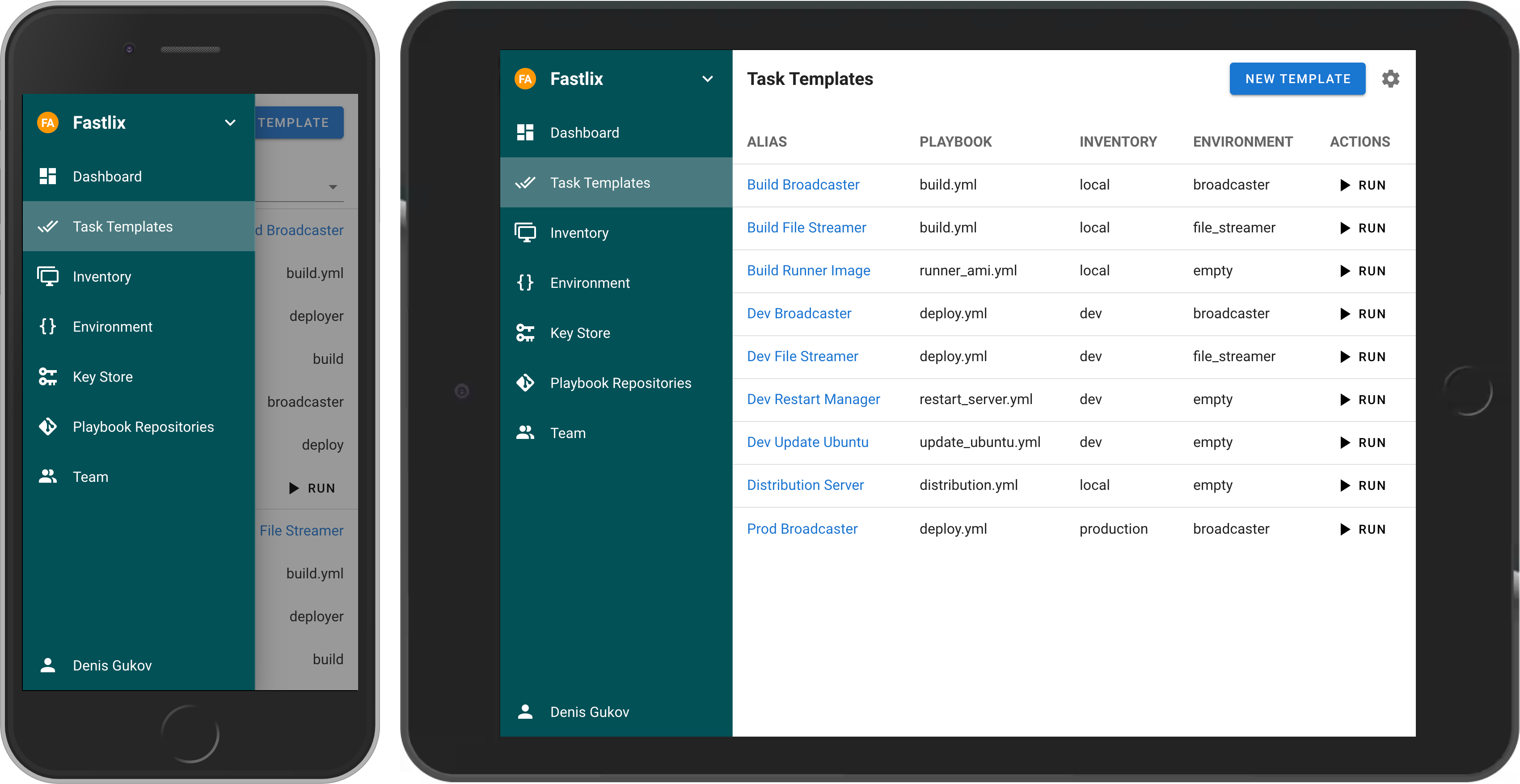
Open the app
About Semaphore UI
Semaphore UI runs your Ansible playbooks, Terraform and OpenTofu plans, and Bash, PowerShell and Python scripts from a web page. Keep your inventories, keys and repositories in one place, run tasks with a click or on a schedule, and see every run's log. It uses a built-in SQLite database, so it is one container with nothing else to set up.
Features
- Ansible, Terraform, OpenTofu, Bash, PowerShell and Python tasks
- Projects with inventories, keys, repositories and variables
- Schedules, and a history with the log of every run
- Alerts by email, Telegram, Slack, Teams and more
- Teams with roles, LDAP and OIDC sign-in
- An API to start tasks from anywhere
How to use
- Open Semaphore UI from your dashboard.
- Sign in with the user name and password from the app's logs (the box marked CREDENTIALS).
- Make a project, then add a key, a repository and an inventory.
- Add a task template for your playbook or script.
- Click Run, and watch its log.
Before you install
You can install it as it is and open it at http://[ZIMAOS-IP-ADDRESS]:6778. The admin is SEMAPHORE_ADMIN (admin unless you change it) with a password made on first start, shown in the app's logs in the box marked CREDENTIALS and saved in /DATA/AppData/semaphore/data/.admin_password. The key that encrypts your saved keys is made for you too. Email and chat alerts, LDAP and the other settings are in the Variables tab and are added in the app settings. It is ready in about a minute.
The settings in the first table are already in the app settings. To use any other one, open the app settings, add the variable with your value, save, and the app restarts with it. A setting you leave out uses its default.
In the app settings
| Variable | Default value | Description |
|---|---|---|
TZ | $TZ | Your time zone. It is filled in from your ZimaOS time zone and used for schedules. |
SEMAPHORE_ | admin | The admin's user name. Only used on the first start. |
SEMAPHORE_ | admin@localhost | The admin's email. Only used on the first start. |
SEMAPHORE_ | — | The admin's password. Leave it empty and one is made for you: it is shown in the app's logs, in the box marked CREDENTIALS. Only used on the first start. |
First admin
| Variable | Default value | Description |
|---|---|---|
SEMAPHORE_ | Semaphore Admin | The admin's full name. Only used on the first start. |
Server
| Variable | Default value | Description |
|---|---|---|
SEMAPHORE_ | — | The address you open Semaphore at, like http://192.168.1.20:6778. Used in links in alerts. Only read on the first start. |
SEMAPHORE_ | — | The key saved keys and passwords are encrypted with. It is made on first start and kept in /data/secrets.env. Only set it to move an old install. |
SEMAPHORE_ | 0 | How many tasks may run at once. 0 means no limit. |
Email alerts
| Variable | Default value | Description |
|---|---|---|
SEMAPHORE_ | false | Set to true to send alerts by email. |
SEMAPHORE_ | — | The address alerts are sent from. |
SEMAPHORE_ | — | Your email server, like smtp.gmail.com. |
SEMAPHORE_ | — | Your email server port, usually 587 or 465. |
SEMAPHORE_ | — | The user name for your email server. |
SEMAPHORE_ | — | The password for your email server. |
SEMAPHORE_ | false | Set to true to use TLS. |
Other alerts
| Variable | Default value | Description |
|---|---|---|
SEMAPHORE_ | false | Set to true to send alerts to Telegram. |
SEMAPHORE_ | — | The Telegram chat ID. |
SEMAPHORE_ | — | Your Telegram bot's token. |
SEMAPHORE_ | false | Set to true to send alerts to Slack. |
SEMAPHORE_ | — | Your Slack webhook address. |
LDAP
| Variable | Default value | Description |
|---|---|---|
SEMAPHORE_ | no | Set to yes to sign in with LDAP. Only read on the first start. |
SEMAPHORE_ | — | Your LDAP server. |
SEMAPHORE_ | — | Its port, usually 389 or 636. |
SEMAPHORE_ | — | The account Semaphore searches with. |
SEMAPHORE_ | — | Its password. |
SEMAPHORE_ | — | Where to look for users, like dc=example,dc=com. |
name: semaphore

services:
  semaphore:
    image: ghcr.io/hsinghhira/semaphore:latest
    container_name: semaphore
    restart: unless-stopped
    stop_grace_period: 30s
    network_mode: bridge
    environment:
      - TZ=$TZ
      - SEMAPHORE_ADMIN=admin
      - SEMAPHORE_ADMIN_EMAIL=admin@localhost
      - SEMAPHORE_ADMIN_PASSWORD=
    ports:
      - target: 3000
        published: "6778"
        protocol: tcp
    volumes:
      - type: bind
        source: /DATA/AppData/$AppID/data
        target: /data
        bind:
          create_host_path: true
    healthcheck:
      test: ["CMD", "wget", "-q", "-O", "/dev/null", "http://127.0.0.1:3000/api/ping"]
      interval: 30s
      timeout: 10s
      retries: 5
      start_period: 120s
    deploy:
      resources:
        limits:
          cpus: "2.00"
          memory: 2048M
        reservations:
          cpus: "0.05"
          memory: 128M
    labels:
      icon: https://cdn.jsdelivr.net/gh/HSinghHira/IceStore@main/Apps/semaphore/icon.png
    x-casaos:
      id: com.icestore.semaphore
      envs:
        - container: TZ
          description:
            en_US: >-
              Your time zone. It is filled in from your ZimaOS time zone and
              used for schedules.
        - container: SEMAPHORE_ADMIN
          description:
            en_US: >-
              The admin's user name. Only used on the first start.
        - container: SEMAPHORE_ADMIN_EMAIL
          description:
            en_US: >-
              The admin's email. Only used on the first start.
        - container: SEMAPHORE_ADMIN_PASSWORD
          description:
            en_US: >-
              The admin's password. Leave it empty and one is made for you:
              it is shown in the app's logs, in the box marked CREDENTIALS.
              Only used on the first start.
      ports:
        - container: "3000"
          description:
            en_US: Semaphore UI web UI and API, published on host as 6778
      volumes:
        - container: /data
          description:
            en_US: >-
              Everything Semaphore keeps: its config (config), the SQLite
              database (db), cloned repositories (tmp) and this install's
              own keys (secrets.env, .admin_password). Back it up.

x-casaos:
  id: com.icestore.semaphore
  architectures:
    - amd64
    - arm64
  main: semaphore
  author: HSinghHira
  category: Developer
  developer: Semaphore UI
  icon: https://cdn.jsdelivr.net/gh/HSinghHira/IceStore@main/Apps/semaphore/icon.png
  thumbnail: https://cdn.jsdelivr.net/gh/HSinghHira/IceStore@main/Apps/semaphore/screenshot-1.png
  screenshot_link:
    - https://cdn.jsdelivr.net/gh/HSinghHira/IceStore@main/Apps/semaphore/screenshot-1.png
  title:
    en_US: Semaphore UI
  tagline:
    en_US: Web UI to run Ansible, Terraform, OpenTofu and scripts
  description:
    en_US: >-
      Semaphore UI runs your Ansible playbooks, Terraform and OpenTofu
      plans, and Bash, PowerShell and Python scripts from a web page. Keep
      your inventories, keys and repositories in one place, run tasks with
      a click or on a schedule, and see every run's log. It uses a built-in
      SQLite database, so it is one container with nothing else to set up.


      **Features**


      - Ansible, Terraform, OpenTofu, Bash, PowerShell and Python tasks

      - Projects with inventories, keys, repositories and variables

      - Schedules, and a history with the log of every run

      - Alerts by email, Telegram, Slack, Teams and more

      - Teams with roles, LDAP and OIDC sign-in

      - An API to start tasks from anywhere


      **How to use?**


      1. Open Semaphore UI from the ZimaOS dashboard.

      2. Sign in with the user name and password from the app's logs (the
         box marked CREDENTIALS).

      3. Make a project, then add a key, a repository and an inventory.

      4. Add a task template for your playbook or script.

      5. Click Run, and watch its log.
  tips:
    before_install:
      en_US: >-
        1. More settings, like email alerts and LDAP or OIDC sign-in, are
           listed on the Semaphore UI page at
           https://icestore.hsinghhira.me/app/semaphore/ (Variables tab).
           You can add them now or later in the app settings.


        2. Start the installation. It is ready in about a minute.


        3. Open the app's logs. Find the box marked CREDENTIALS. It has the
           user name and password.


        4. Open http://[ZIMAOS-IP-ADDRESS]:6778 and sign in.
  index: /
  port_map: "6778"
  scheme: http
  is_uncontrolled: false
  version: "v2.20.24"
  update_at: "2026-11-21"
  release_notes:
    en_US: |-
      - First IceStore release, on port 6778
      - Built on semaphoreui/semaphore v2.20.24, with SQLite as the database
      - Each install makes its own access key encryption secret and admin password on first start; the login is in the CREDENTIALS box in the logs
  repo: "https://github.com/semaphoreui/semaphore"
  support: "https://github.com/semaphoreui/semaphore/issues"
  docs: "https://docs.semaphoreui.com/"
Install Semaphore UI
Something not working with Semaphore UI?
Report it so it gets fixed, or ask for an app that is not here yet.
 ZimaOS
Add the store link, then find Semaphore UI in the App Store and install it.
 CasaOS
Add the store link, then find Semaphore UI in the App Store and install it.
 ReCasaOS
Add the store link, then find Semaphore UI in the App Store and install it.
 Homeio
Add the store link, then find Semaphore UI in the App Store and install it.
 MOS
Add the repository in MOS Hub Settings, then find Semaphore UI in Docker → MOS Hub and install it.


