
Traccar
GPS tracking for phones, cars and over 200 kinds of trackers.
- traccar/traccar:6.17.0
- v6.17.0
- Updated 16 Nov 2026
- port 6742
- port 6743
- port 6744
- port 6745
- amd64 · arm64
- Home
- 8.2k stars
Screenshots
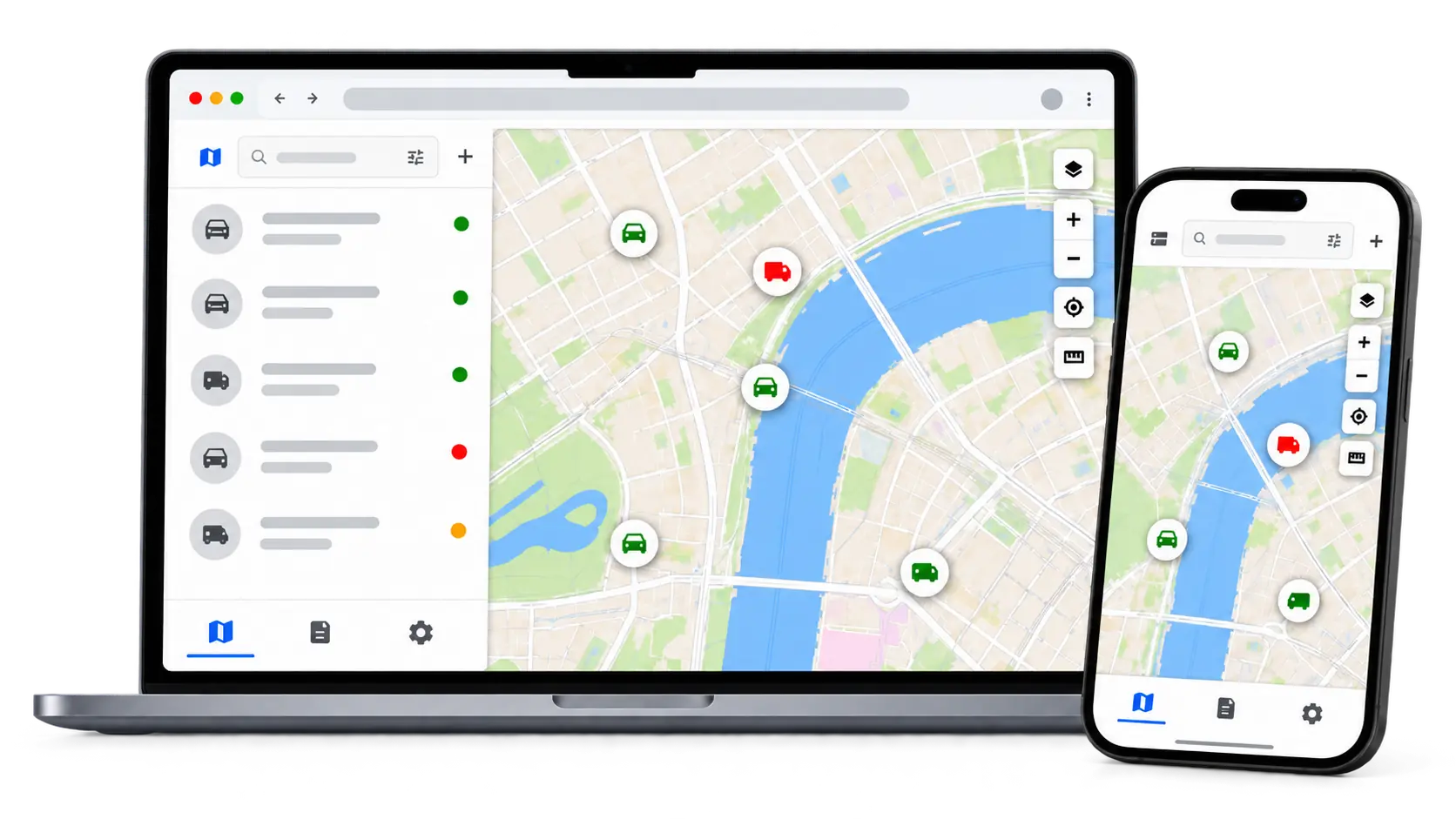
Open the app
About Traccar
Traccar is your own GPS tracking server. See where your phones, cars, bikes and pets are on a live map, look back at past trips, and get alerts when a device enters an area, speeds or goes offline.
Features
- Live map of all your devices, and trip history
- Works with the free Traccar Client phone app and over 200 GPS tracker types
- Geofences, with alerts when a device enters or leaves
- Reports: trips, stops, summaries and charts
- Alerts by email, the web page or push
- Users and groups, with who can see what
How to use
- Open
http://[ZIMAOS-IP-ADDRESS]:6742and register. The first account is the admin. - Install Traccar Client on your phone. Set its server to
http://[ZIMAOS-IP-ADDRESS]:6743and note its device ID. - In Traccar, add a device with that ID. It shows up on the map.
Before you install
Nothing needs to be set first. Register right after installing: the first account becomes the admin. Phones with Traccar Client send to port 6743, GT06 trackers to 6744 and Teltonika trackers to 6745. Other tracker types use other ports (see Traccar's device list); add them to the app's ports in ZimaOS. To track devices away from home, forward the tracker port on your router or use a VPN. Email alerts and the other settings are in the Variables tab; add them in the app settings.
The settings in the first table are already in the app settings. To use any other one, open the app settings, add the variable with your value, save, and the app restarts with it. A setting you leave out uses its default.
In the app settings
| Variable | Default value | Description |
|---|---|---|
TZ | $TZ | Your time zone. It is filled in from your ZimaOS time zone. Leave it unless you need another. |
CONFIG_ | true | Lets the settings in the Variables tab work. Leave it as true. |
Server
| Variable | Default value | Description |
|---|---|---|
WEB_ | — | The address people open Traccar at, like http://192.168.1.20:6742. Used for links in emails. |
GEOCODER_ | true | Set to false to stop turning positions into street addresses. |
Email (SMTP)
| Variable | Default value | Description |
|---|---|---|
MAIL_ | — | Your mail server, for email alerts and password resets. |
MAIL_ | 25 | The mail server's port. |
MAIL_ | false | Set to true to use STARTTLS. |
MAIL_ | false | Set to true to use SSL/TLS from the start (usually port 465). |
MAIL_ | — | The mail server user name. |
MAIL_ | — | The mail server password. |
MAIL_ | — | The sender address, like [email protected]. |
name: traccar

services:
  traccar:
    image: traccar/traccar:6.17.0
    container_name: traccar
    restart: unless-stopped
    stop_grace_period: 30s
    network_mode: bridge
    environment:
      - TZ=$TZ
      - CONFIG_USE_ENVIRONMENT_VARIABLES=true
    ports:
      - target: 8082
        published: "6742"
        protocol: tcp
      - target: 5055
        published: "6743"
        protocol: tcp
      - target: 5023
        published: "6744"
        protocol: tcp
      - target: 5027
        published: "6745"
        protocol: tcp
    volumes:
      - type: bind
        source: /DATA/AppData/$AppID/data
        target: /opt/traccar/data
        bind:
          create_host_path: true
      - type: bind
        source: /DATA/AppData/$AppID/logs
        target: /opt/traccar/logs
        bind:
          create_host_path: true
    healthcheck:
      test: ["CMD", "wget", "-q", "--spider", "http://127.0.0.1:8082/"]
      interval: 30s
      timeout: 5s
      retries: 3
      start_period: 60s
    deploy:
      resources:
        limits:
          cpus: "1.00"
          memory: 1024M
        reservations:
          cpus: "0.00"
          memory: 128M
    labels:
      icon: https://cdn.jsdelivr.net/gh/HSinghHira/IceStore@main/Apps/traccar/icon.png
    x-casaos:
      id: com.icestore.traccar
      envs:
        - container: TZ
          description:
            en_US: >-
              Your time zone. It is filled in from your ZimaOS time zone.
              Leave it unless you need another.
        - container: CONFIG_USE_ENVIRONMENT_VARIABLES
          description:
            en_US: >-
              Lets the settings in the Variables tab work. Leave it as true.
      ports:
        - container: "8082"
          description:
            en_US: Traccar web page and API, published on host as 6742
        - container: "5055"
          description:
            en_US: >-
              Traccar Client phone app and OsmAnd protocol, published on host
              as 6743
        - container: "5023"
          description:
            en_US: GT06 trackers (many cheap GPS trackers), published on host as 6744
        - container: "5027"
          description:
            en_US: Teltonika trackers, published on host as 6745
      volumes:
        - container: /opt/traccar/data
          description:
            en_US: >-
              Traccar's database: users, devices, positions and settings.
              Back this folder up.
        - container: /opt/traccar/logs
          description:
            en_US: Traccar's log files.

x-casaos:
  id: com.icestore.traccar
  architectures:
    - amd64
    - arm64
  main: traccar
  author: HSinghHira
  category: Home
  developer: Traccar
  icon: https://cdn.jsdelivr.net/gh/HSinghHira/IceStore@main/Apps/traccar/icon.png
  screenshot_link:
    - https://cdn.jsdelivr.net/gh/HSinghHira/IceStore@main/Apps/traccar/screenshot-1.webp
  thumbnail: https://cdn.jsdelivr.net/gh/HSinghHira/IceStore@main/Apps/traccar/screenshot-1.webp
  title:
    en_US: Traccar
  tagline:
    en_US: GPS tracking for phones, cars and over 200 kinds of trackers.
  description:
    en_US: >-
      Visit: [https://icestore.hsinghhira.me/app/traccar/](https://icestore.hsinghhira.me/app/traccar/) for full details


      Traccar is your own GPS tracking server. See where your phones, cars,
      bikes and pets are on a live map, look back at past trips, and get
      alerts when a device enters an area, speeds or goes offline.


      **Features**


      - Live map of all your devices, and trip history

      - Works with the free Traccar Client phone app and over 200 GPS
        tracker types

      - Geofences, with alerts when a device enters or leaves

      - Reports: trips, stops, summaries and charts

      - Alerts by email, the web page or push

      - Users and groups, with who can see what


      **How to use?**


      1. Open http://[ZIMAOS-IP-ADDRESS]:6742 and register. The first
         account is the admin.


      2. Install Traccar Client on your phone. Set its server to
         http://[ZIMAOS-IP-ADDRESS]:6743 and note its device ID.


      3. In Traccar, add a device with that ID. It shows up on the map.
  tips:
    before_install:
      en_US: >-
        1. Nothing needs to be set first.


        2. Start the installation. The first start takes about a minute.


        3. Open http://[ZIMAOS-IP-ADDRESS]:6742 in your browser and register
           right away. The first account is the admin.


        4. Phones with Traccar Client use port 6743. GT06 trackers use port
           6744 and Teltonika trackers use port 6745.


        5. To track devices away from home, forward the tracker port on your
           router or use a VPN.


        6. More settings, like email alerts, are listed on the Traccar page
           at https://icestore.hsinghhira.me/app/traccar/ (Variables tab).
           You can add them now or later in the app settings.
  index: /
  port_map: "6742"
  scheme: http
  is_uncontrolled: false
  version: "6.17.0"
  update_at: "2026-11-16"
  release_notes:
    en_US: |-
      - First IceStore version: traccar/traccar 6.17.0
      - Web page on port 6742; Traccar Client on 6743, GT06 on 6744 and Teltonika on 6745
  repo: "https://github.com/traccar/traccar"
  support: "https://github.com/traccar/traccar/issues"
  docs: "https://www.traccar.org/documentation/"
Install Traccar
Something not working with Traccar?
Report it so it gets fixed, or ask for an app that is not here yet.
 ZimaOS
Add the store link, then find Traccar in the App Store and install it.
 CasaOS
Add the store link, then find Traccar in the App Store and install it.
 ReCasaOS
Add the store link, then find Traccar in the App Store and install it.
 Homeio
Add the store link, then find Traccar in the App Store and install it.
 MOS
Add the repository in MOS Hub Settings, then find Traccar in Docker → MOS Hub and install it.


