
AI Gude
Your own morning podcast from the news sources you follow, narrated by AI.
- ghcr.io/hsinghhira/aigude:latest
- v0.1.0
- Updated 10 Nov 2026
- port 6724
- amd64 · arm64
- AI
- 7 stars
Screenshots
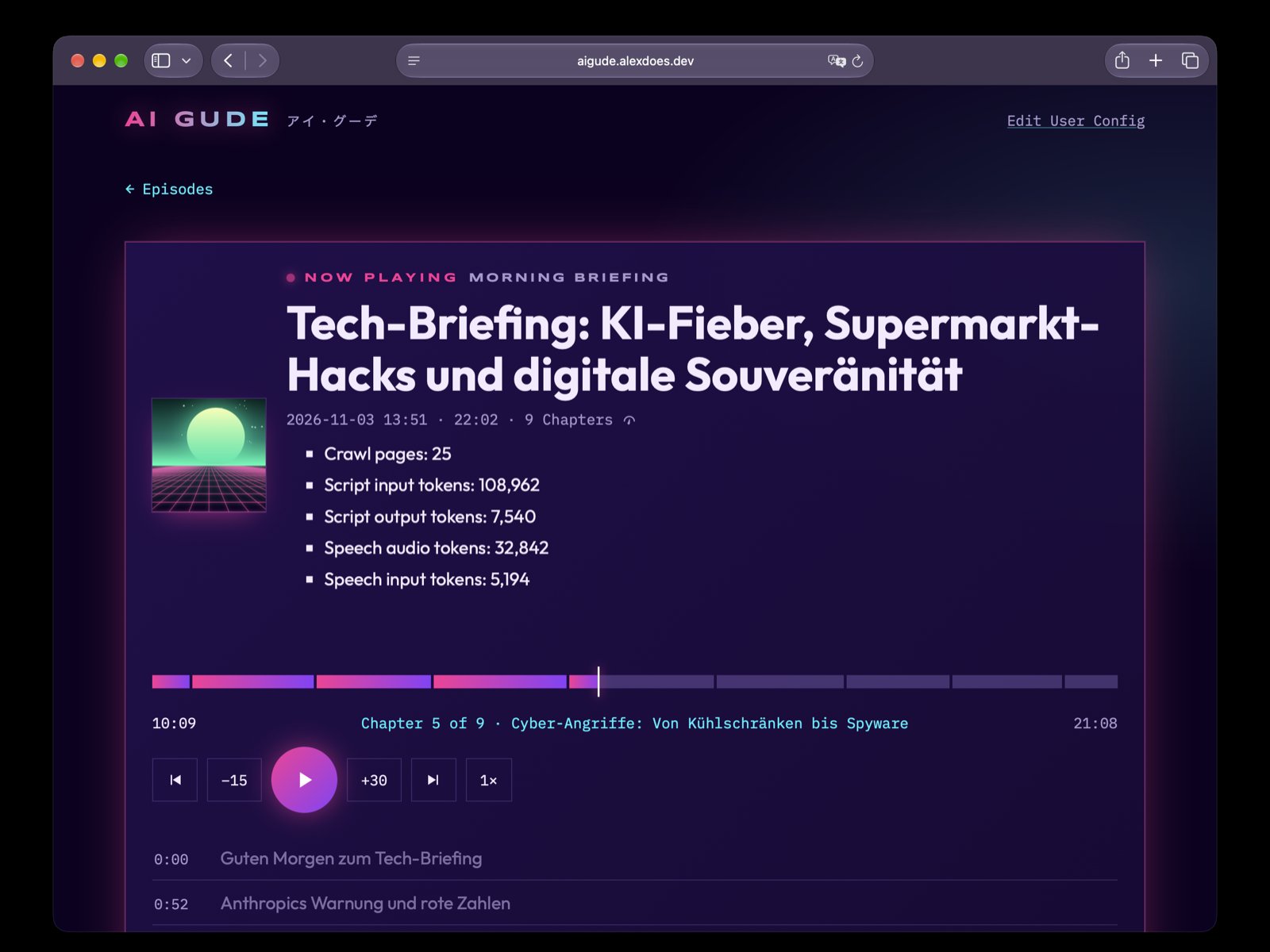
Open the app
About AI Gude
AI Gude is your own morning podcast. You choose the news sources you follow and how the show should sound; at the times you pick, it reads what is new, writes a script in your style, speaks it with an AI voice and delivers one audio Episode with chapters, made for your phone.
Features
- Shows built from your RSS feeds, with their own language, voice and style
- Schedules: an Episode every morning, or whenever you like
- Episodes with chapters and a list of what each one used
- Gemini writes and speaks; Firecrawl reads the articles
- Several users, each with their own shows
How to use
- Add your
GEMINI_API_KEYandFIRECRAWL_API_KEYbefore you install. - Open AI Gude, pick the sample show and press Generate now.
- Edit your shows and feeds on the config page (or in
me.toml).
Before you install
AI Gude needs a Google AI Studio key in GEMINI_API_KEY (script and voice) and a Firecrawl key in FIRECRAWL_API_KEY (reading articles), unless you run your own Firecrawl. It has no sign-in: keep it on your home network, or behind a proxy that sets the X-Aigude-User header, and never open its port to the internet.
On the first start upstream's sample show is put in /DATA/AppData/aigude/users/me.toml; change it on the config page or in that file (changes are picked up at once). Every service setting is AIGUDE_ plus the key from upstream's hack/aigude.toml; the common ones are in the Variables tab.
The settings in the first table are already in the app settings. To use any other one, open the app settings, add the variable with your value, save, and the app restarts with it. A setting you leave out uses its default.
In the app settings
| Variable | Default value | Description |
|---|---|---|
TZ | $TZ | Your time zone. It is filled in from your ZimaOS time zone. |
GEMINI_ | — | Required for Episodes. A Google AI Studio key (aistudio.google.com/apikey), for writing the script and the voice. |
FIRECRAWL_ | — | A Firecrawl key (firecrawl.dev) for reading the articles. Not needed with a Firecrawl of your own (AIGUDE_FIRECRAWL_URL). |
Service
| Variable | Default value | Description |
|---|---|---|
AIGUDE_ | https://api.firecrawl.dev | A Firecrawl of your own, like http://192.168.1.20:3002; the key is then optional. |
AIGUDE_ | 1400 | Words per Episode when a show sets none; 1400 words are about ten minutes. |
AIGUDE_ | gemini-flash-latest | The Gemini model that writes the script. |
AIGUDE_ | gemini-3.8-flash-tts | The Gemini model that speaks it. |
AIGUDE_ | 240h | How long a read article is kept before it is read again. |
name: aigude

services:
  aigude:
    image: ghcr.io/hsinghhira/aigude:latest
    container_name: aigude
    restart: unless-stopped
    stop_grace_period: 30s
    network_mode: bridge
    environment:
      - TZ=$TZ
      - GEMINI_API_KEY=
      - FIRECRAWL_API_KEY=
    ports:
      - target: 8080
        published: "6724"
        protocol: tcp
    volumes:
      - type: bind
        source: /DATA/AppData/$AppID/users
        target: /etc/aigude/users
        bind:
          create_host_path: true
      - type: bind
        source: /DATA/AppData/$AppID/data
        target: /var/lib/aigude/data
        bind:
          create_host_path: true
    healthcheck:
      test: ["CMD", "wget", "-q", "-O", "/dev/null", "http://127.0.0.1:8080/healthz"]
      interval: 30s
      timeout: 5s
      retries: 3
      start_period: 20s
    deploy:
      resources:
        limits:
          cpus: "1.00"
          memory: 512M
        reservations:
          cpus: "0.00"
          memory: 32M
    labels:
      icon: https://cdn.jsdelivr.net/gh/HSinghHira/IceStore@main/Apps/aigude/icon.png
    x-casaos:
      id: com.icestore.aigude
      envs:
        - container: TZ
          description:
            en_US: >-
              Your time zone. It is filled in from your ZimaOS time zone.
        - container: GEMINI_API_KEY
          description:
            en_US: >-
              Required for Episodes. A Google AI Studio key
              (aistudio.google.com/apikey), for writing the script and the
              voice.
        - container: FIRECRAWL_API_KEY
          description:
            en_US: >-
              A Firecrawl key (firecrawl.dev) for reading the articles. Not
              needed with a Firecrawl of your own (AIGUDE_FIRECRAWL_URL).
      ports:
        - container: "8080"
          description:
            en_US: AI Gude web app, published on host as 6724
      volumes:
        - container: /etc/aigude/users
          description:
            en_US: >-
              One .toml file per user with their shows, feeds and schedules. A
              sample (me.toml) is put here on the first start.
        - container: /var/lib/aigude/data
          description:
            en_US: The database, the Episodes' audio and the article cache.

x-casaos:
  id: com.icestore.aigude
  architectures:
    - amd64
    - arm64
  main: aigude
  author: HSinghHira
  category: AI
  developer: alex0ptr
  icon: https://cdn.jsdelivr.net/gh/HSinghHira/IceStore@main/Apps/aigude/icon.png
  thumbnail: https://cdn.jsdelivr.net/gh/HSinghHira/IceStore@main/Apps/aigude/screenshot-1.jpg
  screenshot_link:
    - https://cdn.jsdelivr.net/gh/HSinghHira/IceStore@main/Apps/aigude/screenshot-1.jpg
  title:
    en_US: AI Gude
  tagline:
    en_US: Your own morning podcast from the news sources you follow, narrated by AI.
  description:
    en_US: >-
      Visit: [https://icestore.hsinghhira.me/app/aigude/](https://icestore.hsinghhira.me/app/aigude/) for full details


      AI Gude is your own morning podcast. You choose the news sources you
      follow and how the show should sound; at the times you pick, it reads
      what is new, writes a script in your style, speaks it with an AI voice
      and delivers one audio Episode with chapters, made for your phone.


      **Features**


      - Shows built from your RSS feeds, with their own language, voice and
        style

      - Schedules: an Episode every morning, or whenever you like

      - Episodes with chapters and a list of what each one used

      - Gemini writes and speaks; Firecrawl reads the articles

      - Several users, each with their own shows


      **How to use?**


      1. Add your GEMINI_API_KEY and FIRECRAWL_API_KEY before you install.


      2. Open AI Gude, pick the sample show and press Generate now.


      3. Edit your shows and feeds on the config page (or in me.toml).
  tips:
    before_install:
      en_US: >-
        1. Get a key at Google AI Studio (aistudio.google.com/apikey) and one
           at Firecrawl (firecrawl.dev). Put them in GEMINI_API_KEY and
           FIRECRAWL_API_KEY.


        2. AI Gude has no sign-in. Keep it on your home network, and never
           open its port to the internet.


        3. Start the installation. It is ready in a few seconds.


        4. Open AI Gude and press Generate now. The first Episode takes a few
           minutes.


        5. A sample show is put in place on the first start. Change it on
           the config page, or in AppData, aigude, users, me.toml.
  index: /
  port_map: "6724"
  scheme: http
  is_uncontrolled: false
  version: "0.1.0"
  update_at: "2026-11-10"
  release_notes:
    en_US: |-
      - First IceStore version: AI Gude 0.1.0 (the release binary; upstream publishes no image) with ffmpeg 9.0.2, built the way upstream's Dockerfile is.
      - Port 6724. Upstream's sample show is put in the users folder on the first start.
  repo: "https://github.com/alex0ptr/aigude"
  support: "https://github.com/alex0ptr/aigude/issues"
  docs: "https://github.com/alex0ptr/aigude#readme"
Install AI Gude
Something not working with AI Gude?
Report it so it gets fixed, or ask for an app that is not here yet.
 ZimaOS
Add the store link, then find AI Gude in the App Store and install it.
 CasaOS
Add the store link, then find AI Gude in the App Store and install it.
 ReCasaOS
Add the store link, then find AI Gude in the App Store and install it.
 Homeio
Add the store link, then find AI Gude in the App Store and install it.
 MOS
Add the repository in MOS Hub Settings, then find AI Gude in Docker → MOS Hub and install it.


