
AsoBeast
App Store and Google Play keyword rank tracker and ASO tool.
- ghcr.io/hsinghhira/asobeast:latest
- v1.16.0
- Updated 10 Nov 2026
- port 6700
- amd64 · arm64
- Developer
- 151 stars
Screenshots
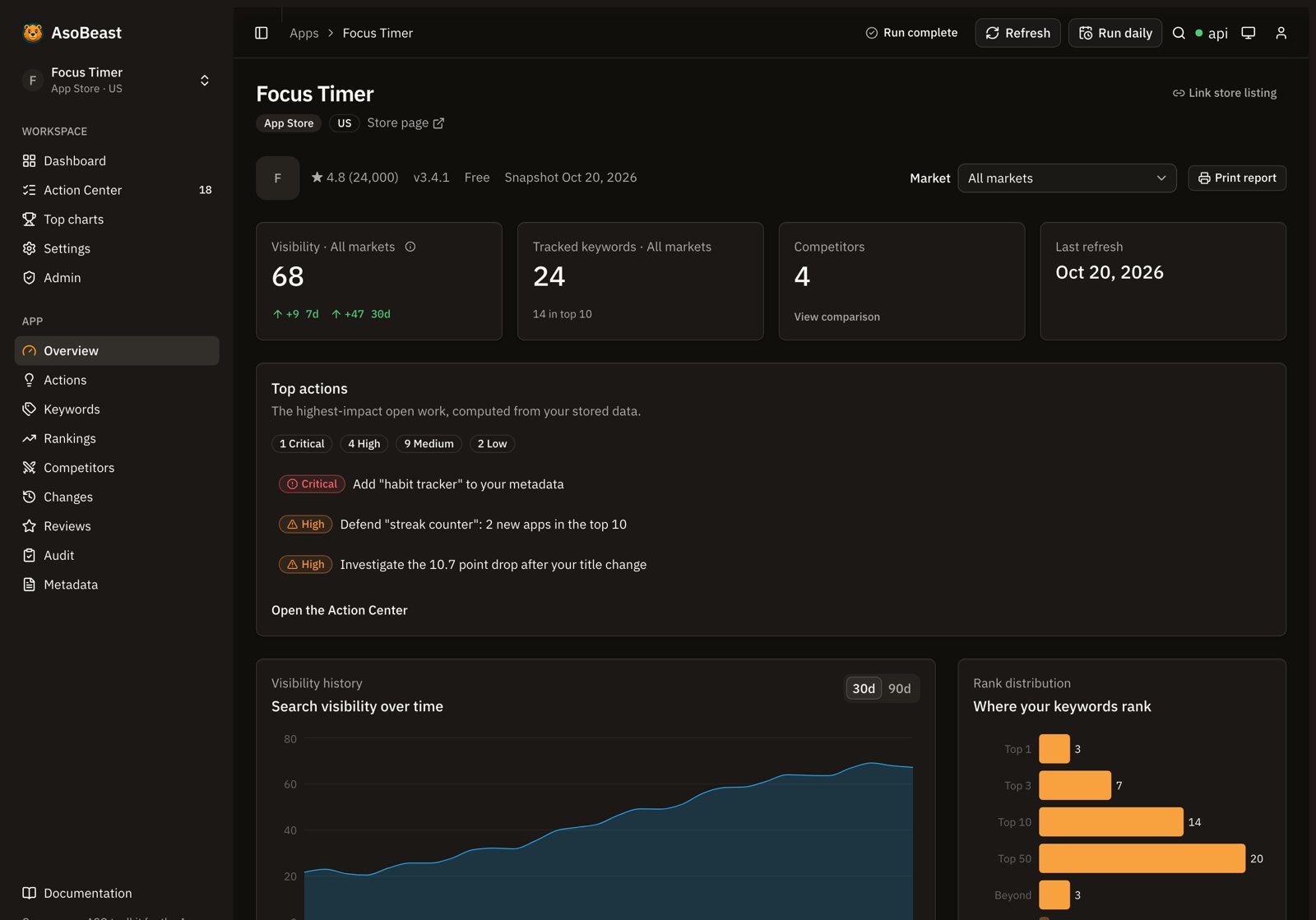
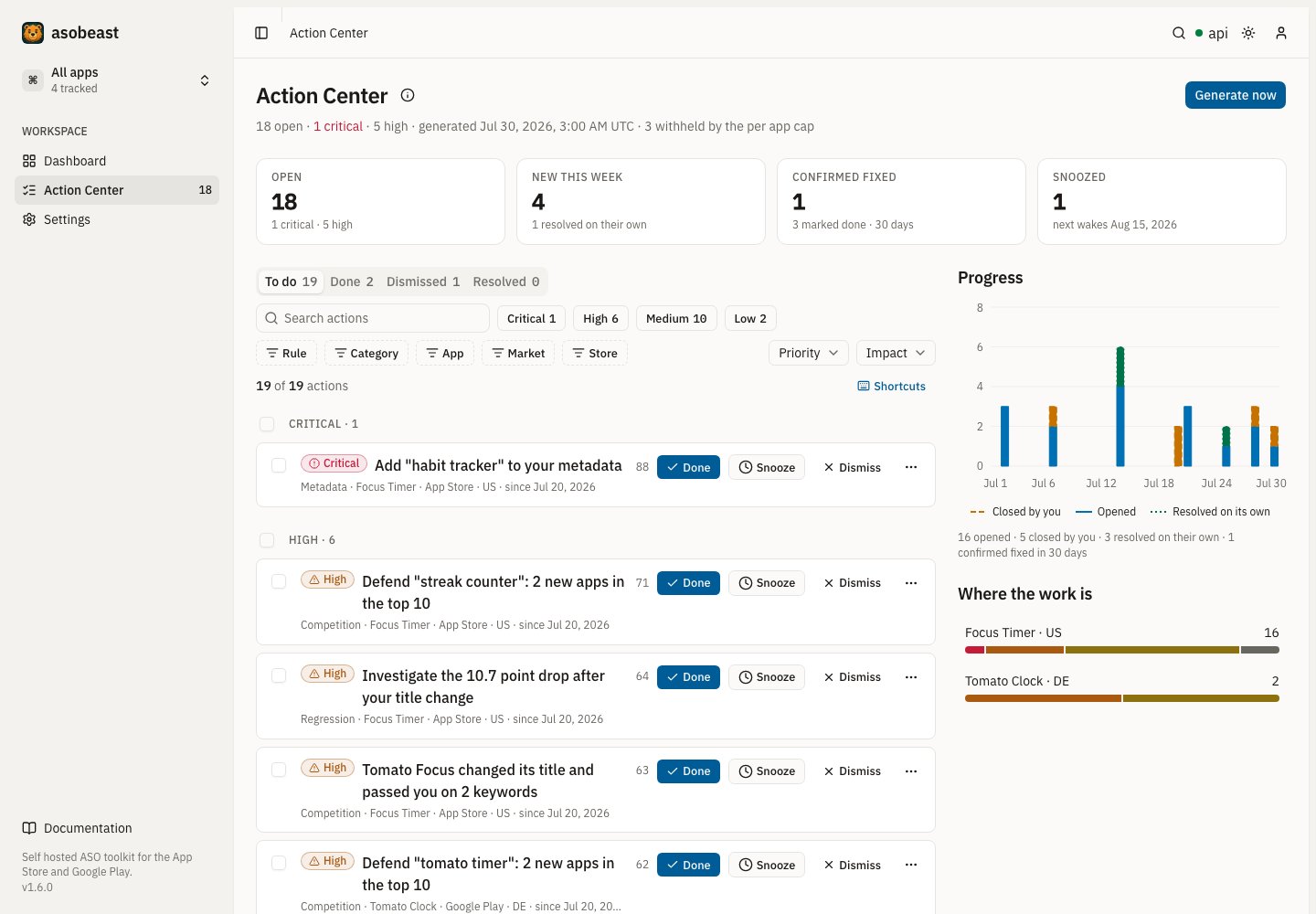
Open the app
About AsoBeast
AsoBeast is an open source App Store Optimization (ASO) tool and keyword rank tracker for the Apple App Store and Google Play. It tracks your keyword rankings daily, watches competitors, reviews and listing changes, and turns the history into a list of ASO work to do. Your keyword list never leaves your server. PostgreSQL and Redis are inside this one container.
Features
- Import an App Store or Google Play listing and track keywords in any storefront, ranked to depth 200 every day
- Popularity and difficulty scores that show their evidence
- Competitor discovery, keyword gaps, top charts and review mining
- Action Center: a ranked queue of ASO work with the evidence for each
- Alerts by webhook or email, an API and an MCP server for AI agents
How to use
- Open AsoBeast from your dashboard.
- Create the owner account. Sign-up closes after that.
- Paste an App Store or Google Play link to import your app.
- Add keywords and markets; rankings start right away.
Before you install
Set PUBLIC_URL to the address you open AsoBeast at, like http://192.168.1.20:6700. It works from any address, but links in emails and alerts use this one. Open http://[ZIMAOS-IP-ADDRESS]:6700 and create the owner account; sign-up then closes. Over plain http use Chrome or Firefox: Safari only keeps you signed in over https.
The first start takes about two minutes. Every secret is made for you and kept in the data folder. More settings (email, AI, schedules, retention) are in the Variables tab; add them in the app settings.
The settings in the first table are already in the app settings. To use any other one, open the app settings, add the variable with your value, save, and the app restarts with it. A setting you leave out uses its default.
In the app settings
| Variable | Default value | Description |
|---|---|---|
TZ | $TZ | Your time zone. It is filled in from your ZimaOS time zone. Leave it unless you need another. |
PUBLIC_ | http://localhost:6700 | The address you open AsoBeast at, like http://192.168.1.20:6700 or https://aso.example.com. AsoBeast works from any address; this one is used for links in emails and alerts. With https, the sign-in cookie is marked secure. |
Sign-up and accounts
| Variable | Default value | Description |
|---|---|---|
AUTH_ | false | Set to true to keep sign-up open after the owner account exists. |
AUTH_ | own | Where a new sign-up lands: own (their own workspace) or shared (your workspace, as members). |
AUTH_ | 7 | How many days a sign-in lasts. |
Email (SMTP)
| Variable | Default value | Description |
|---|---|---|
SMTP_ | — | Your mail server, like smtp.gmail.com, for email alerts, password resets and invitations. |
SMTP_ | 587 | Your mail server's port (465 with SMTP_SECURE=true). |
SMTP_ | false | Set to true for TLS from the start (port 465). |
SMTP_ | — | The user name for your mail server. |
SMTP_ | — | The password for your mail server. |
SMTP_ | — | The address email comes from. |
AI
| Variable | Default value | Description |
|---|---|---|
OPENAI_ | — | An OpenAI (or compatible) API key for optional AI summaries and review replies. Leave it out and AsoBeast works without AI. |
OPENAI_ | — | An OpenAI-compatible server, like your own Ollama at http://192.168.1.20:11434/v1. |
AI_ | gpt-5.6-luna | The model name as your provider spells it (needs vision and structured output). |
AI_ | — | A monthly cap on AI calls. Left out, there is none. |
Store collection
| Variable | Default value | Description |
|---|---|---|
SCRAPE_ | 15 | App Store requests per minute. |
SCRAPE_ | 10 | Google Play jobs per minute. Halve it if you see BlockedError. |
SCREENSHOT_ | true | Set to false to stop reading the text on store screenshots. |
Schedules
| Variable | Default value | Description |
|---|---|---|
CRON_ | 0 3 * * * | When the daily ranking run starts, as a cron pattern in UTC. |
Alerts
| Variable | Default value | Description |
|---|---|---|
ALERT_ | batched | batched sends up to two reports a day after the daily run; instant sends each event at once. |
ALERT_ | 5 | How many places a keyword must move before it alerts. |
WEBHOOK_ | false | Set to true to send webhook alerts to addresses on your home network. |
Data retention
| Variable | Default value | Description |
|---|---|---|
RETENTION_ | 365 | Delete keyword rankings older than this many days; 0 keeps them forever. |
RETENTION_ | 90 | Delete search result snapshots older than this many days; 0 keeps them forever. |
Store consoles
| Variable | Default value | Description |
|---|---|---|
GOOGLE_ | — | A Google OAuth web client ID, so owners connect Google Play by signing in with Google. Its redirect is your PUBLIC_URL followed by /integrations/google-play. |
GOOGLE_ | — | The secret of that Google OAuth client. |
Reverse proxy
| Variable | Default value | Description |
|---|---|---|
ASOBEAST_ | 2 | How many proxies sit in front of the API, counting the two inside this container. Set 3 behind your own reverse proxy, so rate limits see each visitor's address. |
Logs
| Variable | Default value | Description |
|---|---|---|
LOG_ | log | How much the API logs: error, warn, log, debug or verbose. |
name: asobeast

services:
  asobeast:
    image: ghcr.io/hsinghhira/asobeast:latest
    container_name: asobeast
    restart: unless-stopped
    stop_grace_period: 90s
    privileged: true
    environment:
      - TZ=$TZ
      - PUBLIC_URL=http://localhost:6700
    ports:
      - target: 8080
        published: "6700"
        protocol: tcp
    volumes:
      - type: bind
        source: /DATA/AppData/$AppID/data
        target: /data
        bind:
          create_host_path: true
    healthcheck:
      test: ["CMD", "curl", "-fsS", "-o", "/dev/null", "http://127.0.0.1:8080/api/health"]
      interval: 30s
      timeout: 10s
      retries: 5
      start_period: 180s
    deploy:
      resources:
        limits:
          cpus: "2.00"
          memory: 2048M
        reservations:
          cpus: "0.25"
          memory: 384M
    labels:
      icon: https://cdn.jsdelivr.net/gh/HSinghHira/IceStore@main/Apps/asobeast/icon.png
    x-casaos:
      id: com.icestore.asobeast
      envs:
        - container: TZ
          description:
            en_US: >-
              Your time zone. It is filled in from your ZimaOS time zone.
              Leave it unless you need another.
        - container: PUBLIC_URL
          description:
            en_US: >-
              The address you open AsoBeast at, like http://192.168.1.20:6700
              or https://aso.example.com. AsoBeast works from any address;
              this one is used for links in emails and alerts. With https,
              the sign-in cookie is marked secure.
      ports:
        - container: "8080"
          description:
            en_US: AsoBeast web app and API, published on host as 6700
      volumes:
        - container: /data
          description:
            en_US: >-
              The database (postgres/), the job queues (redis/) and the
              secret keys (state/). Back up the whole folder: without
              state/secrets.env, connected store credentials can't be read.

x-casaos:
  id: com.icestore.asobeast
  architectures:
    - amd64
    - arm64
  main: asobeast
  author: HSinghHira
  category: Developer
  developer: AsoBeast
  icon: https://cdn.jsdelivr.net/gh/HSinghHira/IceStore@main/Apps/asobeast/icon.png
  thumbnail: https://cdn.jsdelivr.net/gh/HSinghHira/IceStore@main/Apps/asobeast/screenshot-1.jpg
  screenshot_link:
    - https://cdn.jsdelivr.net/gh/HSinghHira/IceStore@main/Apps/asobeast/screenshot-1.jpg
    - https://cdn.jsdelivr.net/gh/HSinghHira/IceStore@main/Apps/asobeast/screenshot-2.jpg
  title:
    en_US: AsoBeast
  tagline:
    en_US: App Store and Google Play keyword rank tracker and ASO tool.
  description:
    en_US: >-
      Visit: [https://icestore.hsinghhira.me/app/asobeast/](https://icestore.hsinghhira.me/app/asobeast/) for full details


      AsoBeast is an open source App Store Optimization (ASO) tool and keyword
      rank tracker for the Apple App Store and Google Play. It tracks your
      keyword rankings daily, watches competitors, reviews and listing
      changes, and turns the history into a list of ASO work to do. Your
      keyword list never leaves your server. PostgreSQL and Redis are inside
      this one container.


      **Features**


      - Import an App Store or Google Play listing and track keywords in any
        storefront, ranked to depth 200 every day

      - Popularity and difficulty scores that show their evidence

      - Competitor discovery, keyword gaps, top charts and review mining

      - Action Center: a ranked queue of ASO work with the evidence for each

      - Alerts by webhook or email, an API and an MCP server for AI agents


      **How to use?**


      1. Open AsoBeast from the Zima OS dashboard.


      2. Create the owner account. Sign-up closes after that.


      3. Paste an App Store or Google Play link to import your app.


      4. Add keywords and markets; rankings start right away.
  tips:
    before_install:
      en_US: >-
        1. Open the app configuration before you install.


        2. Find PUBLIC_URL. It starts as http://localhost:6700. Change
           localhost to your ZimaOS IP, like http://192.168.1.20:6700, so
           links in emails work. AsoBeast opens from any address either way.


        3. More settings, like email alerts, OpenAI help and data retention,
           are listed on the AsoBeast page at
           https://icestore.hsinghhira.me/app/asobeast/ (Variables tab). You
           can add them now or later in the app settings.


        4. Start the installation.


        5. Wait about two minutes. The first start sets up the database.


        6. Open http://[ZIMAOS-IP-ADDRESS]:6700 and create the owner
           account. The app's logs show the address in the box marked
           CREDENTIALS.


        7. Use Chrome or Firefox over plain http. Safari only keeps you
           signed in over https.
  index: /
  port_map: "6700"
  scheme: http
  is_uncontrolled: false
  version: "1.16.0"
  update_at: "2026-11-10"
  release_notes:
    en_US: |-
      - First IceStore release: upstream's published stack in one container, on port 6700 with one data folder.
      - AUTH_SECRET, the store-credential encryption key and the database password are made on first start.
      - With an http PUBLIC_URL the sign-in cookie is sent without the secure flag, so it works on your home network.
      - asobeast-api 1.16.0
      - asobeast-web 1.16.0
      - PostgreSQL 18 and Redis inside
      - Fixed: the API stopped at the database migration add_application_role ("permission denied to create role"). The database user now has the same rights as in upstream's setup; an install that already hit this repairs itself on the next start.
  repo: "https://github.com/AsoBeast/asobeast"
  support: "https://github.com/AsoBeast/asobeast/issues"
  docs: "https://docs.asobeast.com"
Install AsoBeast
Something not working with AsoBeast?
Report it so it gets fixed, or ask for an app that is not here yet.
 ZimaOS
Add the store link, then find AsoBeast in the App Store and install it.
 CasaOS
Add the store link, then find AsoBeast in the App Store and install it.
 ReCasaOS
Add the store link, then find AsoBeast in the App Store and install it.
 Homeio
Add the store link, then find AsoBeast in the App Store and install it.
 MOS
Add the repository in MOS Hub Settings, then find AsoBeast in Docker → MOS Hub and install it.


