
MeTube
Download videos from YouTube and hundreds of other sites.
- ghcr.io/alexta69/metube:2026.11.14
- v2026.11.14
- Updated 16 Nov 2026
- port 6731
- amd64 · arm64
- Media
- 15.3k stars
Screenshots
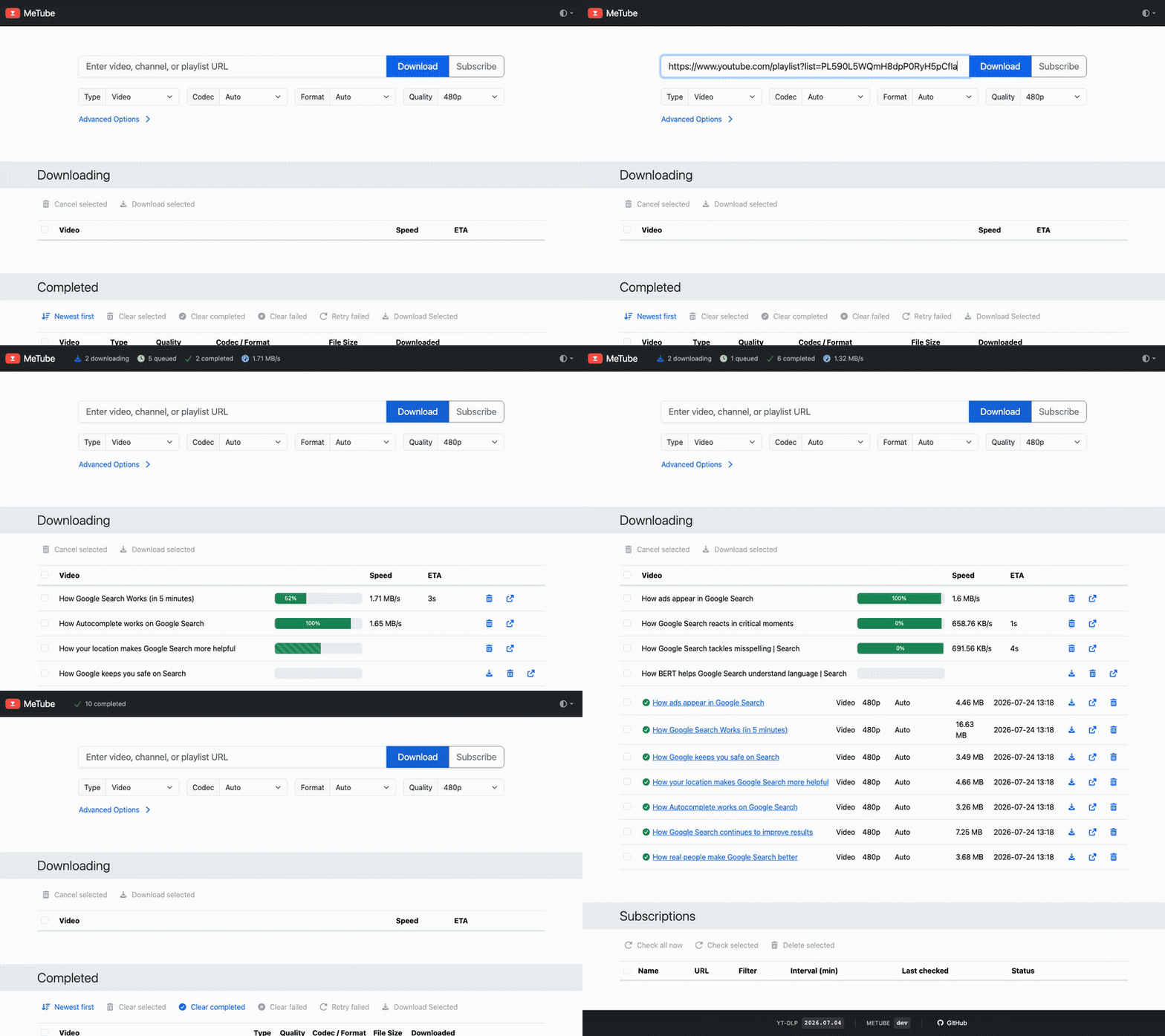
Open the app
About MeTube
MeTube is a web page for yt-dlp. Paste a link from YouTube or one of hundreds of other sites, and it downloads the video, the audio, or a whole playlist or channel to your server.
Features
- Videos, audio only, subtitles and thumbnails
- Single videos, whole playlists or entire channels
- Subscriptions that download new uploads by themselves
- Pick the quality, format and folder for each download
- Several downloads at once, with a queue
- Browser extensions and bookmarklets to send links from any page
How to use
- Open
http://[ZIMAOS-IP-ADDRESS]:6731in your browser. - Paste a video, playlist or channel link and press Download.
- Find the files in the Files app, under Downloads, metube.
Before you install
Nothing needs to be set first, and it starts in a few seconds. Downloads go to /DATA/Downloads/metube; the queue, history and subscriptions are kept in the app folder. MeTube has no login, so keep port 6731 on your home network. File names, folders, yt-dlp options and the other settings are in the Variables tab; add them in the app settings.
The settings in the first table are already in the app settings. To use any other one, open the app settings, add the variable with your value, save, and the app restarts with it. A setting you leave out uses its default.
In the app settings
| Variable | Default value | Description |
|---|---|---|
TZ | $TZ | Your time zone. It is filled in from your ZimaOS time zone. Leave it unless you need another. |
PUID | $PUID | The user MeTube saves files as. ZimaOS fills this in. |
PGID | $PGID | The group MeTube saves files as. ZimaOS fills this in. |
STATE_ | /state | Where MeTube keeps its queue, history and subscriptions. Leave it as /state, the app folder below. |
Downloads
| Variable | Default value | Description |
|---|---|---|
MAX_ | 3 | How many downloads run at once. The rest wait their turn. |
DEFAULT_ | 0 | How many items of a playlist or channel to download by default. 0 means all. |
CLEAR_ | 0 | Seconds before finished downloads leave the Completed list. 0 keeps them. |
DELETE_ | false | Set to true to also delete the file when you remove it from Completed, or ask to be asked each time. |
SUBSCRIPTION_ | 60 | Minutes between checks of a channel or playlist you subscribed to. |
Folders
| Variable | Default value | Description |
|---|---|---|
AUDIO_ | /downloads | Where audio-only downloads go, like /downloads/audio, to keep them apart from videos. |
CUSTOM_ | true | Set to false to hide the Download Folder field. |
DEFAULT_ | — | The folder the Download Folder field starts with, inside the downloads folder. |
File names
| Variable | Default value | Description |
|---|---|---|
OUTPUT_ | %(title)s.%(ext)s | The file name for downloads, in yt-dlp's output template format. |
OUTPUT_ | %(playlist_title)s/%(title)s.%(ext)s | The file name for items from a playlist. |
OUTPUT_ | %(channel)s/%(title)s.%(ext)s | The file name for items from a channel. |
yt-dlp
| Variable | Default value | Description |
|---|---|---|
YTDL_ | {} | yt-dlp options for every download, as JSON, like {"writesubtitles": true, "subtitleslangs": ["en"]}. |
YTDL_ | {} | Named sets of yt-dlp options, as JSON, that you can pick for each download. |
YTDL_ | — | Use the nightly yt-dlp and update it every day at this time, like 04:00. Helps when a site changes. |
Web page
| Variable | Default value | Description |
|---|---|---|
DEFAULT_ | auto | light, dark, or auto to follow your device. |
CORS_ | — | Other sites allowed to send links to MeTube, comma separated, for browser extensions and bookmarklets. |
Files
| Variable | Default value | Description |
|---|---|---|
UMASK | 022 | The umask for files MeTube makes. 002 lets your group write them too. |
Logs
| Variable | Default value | Description |
|---|---|---|
LOGLEVEL | INFO | DEBUG, INFO, WARNING, ERROR, CRITICAL or NONE. |
name: metube

services:
  metube:
    image: ghcr.io/alexta69/metube:2026.11.14
    container_name: metube
    restart: unless-stopped
    stop_grace_period: 30s
    network_mode: bridge
    environment:
      - TZ=$TZ
      - PUID=$PUID
      - PGID=$PGID
      - STATE_DIR=/state
    ports:
      - target: 8081
        published: "6731"
        protocol: tcp
    volumes:
      - type: bind
        source: /DATA/Downloads/metube
        target: /downloads
        bind:
          create_host_path: true
      - type: bind
        source: /DATA/AppData/$AppID/state
        target: /state
        bind:
          create_host_path: true
    healthcheck:
      test: ["CMD", "curl", "-fsS", "http://127.0.0.1:8081/"]
      interval: 30s
      timeout: 5s
      retries: 3
      start_period: 20s
    deploy:
      resources:
        limits:
          cpus: "2.00"
          memory: 1024M
        reservations:
          cpus: "0.00"
          memory: 64M
    labels:
      icon: https://cdn.jsdelivr.net/gh/HSinghHira/IceStore@main/Apps/metube/icon.png
    x-casaos:
      id: com.icestore.metube
      envs:
        - container: TZ
          description:
            en_US: >-
              Your time zone. It is filled in from your ZimaOS time zone.
              Leave it unless you need another.
        - container: PUID
          description:
            en_US: The user MeTube saves files as. ZimaOS fills this in.
        - container: PGID
          description:
            en_US: The group MeTube saves files as. ZimaOS fills this in.
        - container: STATE_DIR
          description:
            en_US: >-
              Where MeTube keeps its queue, history and subscriptions. Leave
              it as /state, the app folder below.
      ports:
        - container: "8081"
          description:
            en_US: MeTube web page, published on host as 6731
      volumes:
        - container: /downloads
          description:
            en_US: >-
              Your downloaded videos and audio. Open them in the Files app
              under Downloads, metube.
        - container: /state
          description:
            en_US: >-
              MeTube's queue, history, subscriptions and uploaded cookies.

x-casaos:
  id: com.icestore.metube
  architectures:
    - amd64
    - arm64
  main: metube
  author: HSinghHira
  category: Media
  developer: alexta69
  icon: https://cdn.jsdelivr.net/gh/HSinghHira/IceStore@main/Apps/metube/icon.png
  screenshot_link:
    - https://cdn.jsdelivr.net/gh/HSinghHira/IceStore@main/Apps/metube/screenshot-1.gif
  thumbnail: https://cdn.jsdelivr.net/gh/HSinghHira/IceStore@main/Apps/metube/screenshot-1.gif
  title:
    en_US: MeTube
  tagline:
    en_US: Download videos from YouTube and hundreds of other sites.
  description:
    en_US: >-
      Visit: [https://icestore.hsinghhira.me/app/metube/](https://icestore.hsinghhira.me/app/metube/) for full details


      MeTube is a web page for yt-dlp. Paste a link from YouTube or one of
      hundreds of other sites, and it downloads the video, the audio, or a
      whole playlist or channel to your ZimaOS box.


      **Features**


      - Videos, audio only, subtitles and thumbnails

      - Single videos, whole playlists or entire channels

      - Subscriptions that download new uploads by themselves

      - Pick the quality, format and folder for each download

      - Several downloads at once, with a queue

      - Browser extensions and bookmarklets to send links from any page


      **How to use?**


      1. Open http://[ZIMAOS-IP-ADDRESS]:6731 in your browser.


      2. Paste a video, playlist or channel link and press Download.


      3. Find the files in the Files app, under Downloads, metube.
  tips:
    before_install:
      en_US: >-
        1. Nothing needs to be set first.


        2. Start the installation. It is ready in a few seconds.


        3. Open http://[ZIMAOS-IP-ADDRESS]:6731 in your browser, like
           http://192.168.1.20:6731 on your laptop.


        4. Downloads go to Downloads, metube in the Files app.


        5. There is no login. Keep the port on your home network.


        6. More settings, like file names, folders and yt-dlp options, are
           listed on the MeTube page at
           https://icestore.hsinghhira.me/app/metube/ (Variables tab). You
           can add them now or later in the app settings.
  index: /
  port_map: "6731"
  scheme: http
  is_uncontrolled: false
  version: "2026.11.14"
  update_at: "2026-11-16"
  release_notes:
    en_US: |-
      - First IceStore version: ghcr.io/alexta69/metube 2026.11.14
      - Web page on port 6731; downloads in /DATA/Downloads/metube, queue and history in the app folder
  repo: "https://github.com/alexta69/metube"
  support: "https://github.com/alexta69/metube/issues"
  docs: "https://github.com/alexta69/metube/wiki"
Install MeTube
Something not working with MeTube?
Report it so it gets fixed, or ask for an app that is not here yet.
 ZimaOS
Add the store link, then find MeTube in the App Store and install it.
 CasaOS
Add the store link, then find MeTube in the App Store and install it.
 ReCasaOS
Add the store link, then find MeTube in the App Store and install it.
 Homeio
Add the store link, then find MeTube in the App Store and install it.
 MOS
Add the repository in MOS Hub Settings, then find MeTube in Docker → MOS Hub and install it.


