
Readeck
Save web pages, articles and videos to read later, with highlights.
- codeberg.org/readeck/readeck:0.23.5
- v0.23.5
- Updated 16 Nov 2026
- port 6741
- amd64 · arm64
- Productivity
Screenshots
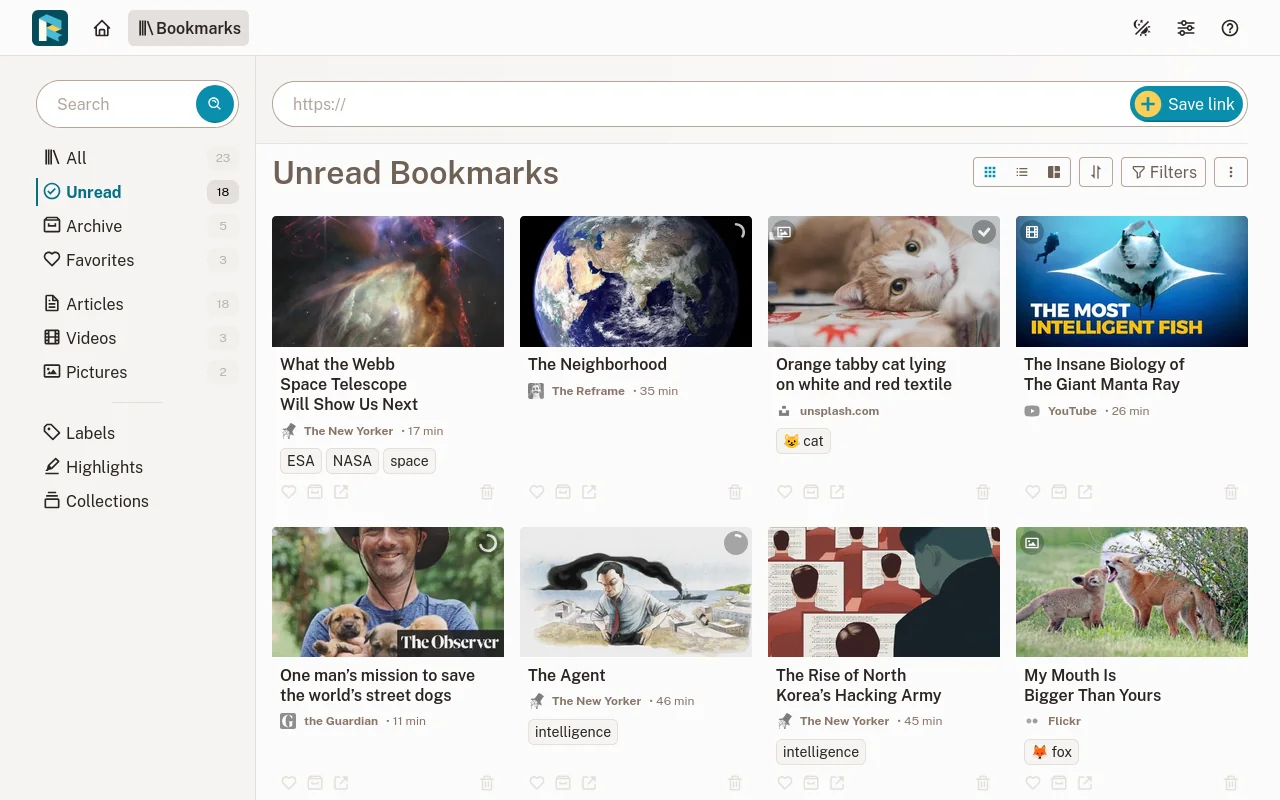
Open the app
About Readeck
Readeck saves the web pages you want to keep. It stores a clean copy of each article, with its pictures, so you can read it later, even after the original is gone. Highlight what matters, add labels and collections, and export to an e-book.
Features
- A clean, readable copy of every article, kept forever
- Pictures and videos saved with the page
- Highlights, labels, favourites and collections
- Full-text search
- Export to EPUB for your e-reader, and an OPDS feed
- Browser extensions and mobile apps
How to use
- Open
http://[ZIMAOS-IP-ADDRESS]:6741and make your account. The first account is the admin. - Paste a web address into Save link.
- Install the Readeck browser extension to save pages in one click.
Before you install
Nothing needs to be set first, and it starts in a few seconds. Make your account right after installing: the first account becomes the admin. Readeck makes its own secret key on first start and keeps it in config.toml in the app folder. Email and the other settings are in the Variables tab; add them in the app settings.
The settings in the first table are already in the app settings. To use any other one, open the app settings, add the variable with your value, save, and the app restarts with it. A setting you leave out uses its default.
In the app settings
| Variable | Default value | Description |
|---|---|---|
TZ | $TZ | Your time zone. It is filled in from your ZimaOS time zone. Leave it unless you need another. |
READECK_ | 8000 | The port Readeck listens on inside the container. Leave it as 8000. |
Server
| Variable | Default value | Description |
|---|---|---|
READECK_ | — | The address people open Readeck at, like http://192.168.1.20:6741. Used for links in emails and shares. |
READECK_ | — | The only host names Readeck answers to, comma separated, like 192.168.1.20,readeck.example.com. Leave it out to answer to any. |
READECK_ | — | Addresses of reverse proxies in front of Readeck, comma separated, like 172.17.0.0/16. |
READECK_ | 24 | How many hours a public share link works. |
READECK_ | — | How many pages are saved at the same time. Leave it out for one per CPU core. |
Email (SMTP)
| Variable | Default value | Description |
|---|---|---|
READECK_ | — | Your mail server, for password resets and sending articles to an e-reader. |
READECK_ | 25 | The mail server's port. |
READECK_ | — | The mail server user name. |
READECK_ | — | The mail server password. |
READECK_ | — | starttls or ssltls, or leave it out for none. |
READECK_ | — | The sender, like Readeck <[email protected]>. |
Logs
| Variable | Default value | Description |
|---|---|---|
READECK_ | info | debug, info, warn or error. |
name: readeck

services:
  readeck:
    image: codeberg.org/readeck/readeck:0.23.5
    container_name: readeck
    restart: unless-stopped
    stop_grace_period: 20s
    network_mode: bridge
    environment:
      - TZ=$TZ
      - READECK_SERVER_PORT=8000
    ports:
      - target: 8000
        published: "6741"
        protocol: tcp
    volumes:
      - type: bind
        source: /DATA/AppData/$AppID/data
        target: /readeck
        bind:
          create_host_path: true
    healthcheck:
      test: ["CMD", "wget", "-q", "--spider", "http://127.0.0.1:8000/"]
      interval: 30s
      timeout: 5s
      retries: 3
      start_period: 20s
    deploy:
      resources:
        limits:
          cpus: "1.00"
          memory: 512M
        reservations:
          cpus: "0.00"
          memory: 32M
    labels:
      icon: https://cdn.jsdelivr.net/gh/HSinghHira/IceStore@main/Apps/readeck/icon.png
    x-casaos:
      id: com.icestore.readeck
      envs:
        - container: TZ
          description:
            en_US: >-
              Your time zone. It is filled in from your ZimaOS time zone.
              Leave it unless you need another.
        - container: READECK_SERVER_PORT
          description:
            en_US: >-
              The port Readeck listens on inside the container. Leave it as
              8000.
      ports:
        - container: "8000"
          description:
            en_US: Readeck web page and API, published on host as 6741
      volumes:
        - container: /readeck
          description:
            en_US: >-
              Readeck's settings (config.toml, with its secret key), database
              and saved pages. Back this folder up.

x-casaos:
  id: com.icestore.readeck
  architectures:
    - amd64
    - arm64
  main: readeck
  author: HSinghHira
  category: Productivity
  developer: Readeck
  icon: https://cdn.jsdelivr.net/gh/HSinghHira/IceStore@main/Apps/readeck/icon.png
  screenshot_link:
    - https://cdn.jsdelivr.net/gh/HSinghHira/IceStore@main/Apps/readeck/screenshot-1.webp
  thumbnail: https://cdn.jsdelivr.net/gh/HSinghHira/IceStore@main/Apps/readeck/screenshot-1.webp
  title:
    en_US: Readeck
  tagline:
    en_US: Save web pages, articles and videos to read later, with highlights.
  description:
    en_US: >-
      Visit: [https://icestore.hsinghhira.me/app/readeck/](https://icestore.hsinghhira.me/app/readeck/) for full details


      Readeck saves the web pages you want to keep. It stores a clean copy
      of each article, with its pictures, so you can read it later, even
      after the original is gone. Highlight what matters, add labels and
      collections, and export to an e-book.


      **Features**


      - A clean, readable copy of every article, kept forever

      - Pictures and videos saved with the page

      - Highlights, labels, favourites and collections

      - Full-text search

      - Export to EPUB for your e-reader, and an OPDS feed

      - Browser extensions and mobile apps


      **How to use?**


      1. Open http://[ZIMAOS-IP-ADDRESS]:6741 and make your account. The
         first account is the admin.


      2. Paste a web address into Save link.


      3. Install the Readeck browser extension to save pages in one click.
  tips:
    before_install:
      en_US: >-
        1. Nothing needs to be set first.


        2. Start the installation. It is ready in a few seconds.


        3. Open http://[ZIMAOS-IP-ADDRESS]:6741 in your browser, like
           http://192.168.1.20:6741 on your laptop.


        4. Make your account right away. The first account is the admin.


        5. More settings, like email, are listed on the Readeck page at
           https://icestore.hsinghhira.me/app/readeck/ (Variables tab). You
           can add them now or later in the app settings.
  index: /
  port_map: "6741"
  scheme: http
  is_uncontrolled: false
  version: "0.23.5"
  update_at: "2026-11-16"
  release_notes:
    en_US: |-
      - First IceStore version: codeberg.org/readeck/readeck 0.23.5
      - Web page on port 6741
  repo: "https://codeberg.org/readeck/readeck"
  support: "https://codeberg.org/readeck/readeck/issues"
  docs: "https://readeck.org/en/docs/"
Install Readeck
Something not working with Readeck?
Report it so it gets fixed, or ask for an app that is not here yet.
 ZimaOS
Add the store link, then find Readeck in the App Store and install it.
 CasaOS
Add the store link, then find Readeck in the App Store and install it.
 ReCasaOS
Add the store link, then find Readeck in the App Store and install it.
 Homeio
Add the store link, then find Readeck in the App Store and install it.
 MOS
Add the repository in MOS Hub Settings, then find Readeck in Docker → MOS Hub and install it.


